What am I About to Run?מה אני עומד להריץ?
Four generations of test configuration beneath a customer's CI pipeline.ארבעה דורות של קונפיגורציית בדיקות, מתחת ל-CI pipeline של לקוח.
Overview
The layer beneath the pipeline
Every time an autonomous-vehicle team changes its driving software, it needs to know what that change broke. Driving real cars to find out is too slow and too risky, so the answer comes from simulation: thousands of test scenarios, launched automatically whenever a new build appears. That automation has two halves: the pipeline that decides when tests run, and the layer that defines what runs and how. At Foretellix the pipeline belonged to the customer. I designed the other half.
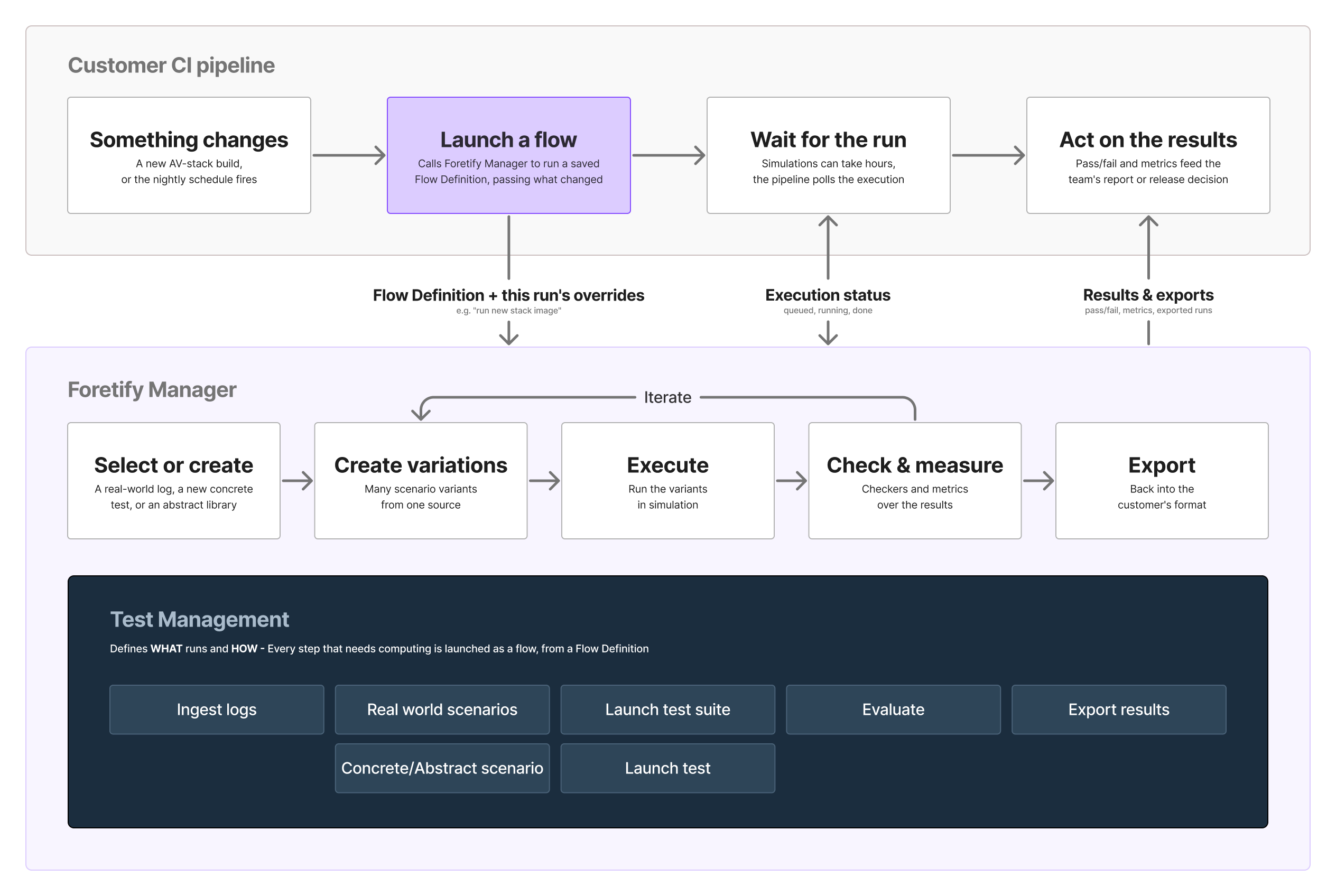
One challenge ran through four generations of the product: a launch is built from a predefined template, often one someone else created, yet every run needs something slightly different.
The problem
A template that every run needs to bend
Before the GUI, a test run was a spreadsheet, with every parameter typed by hand.

The first GUI, in 2023, moved it into one modal: pick a runner file, paste the environment settings as raw JSON, run.
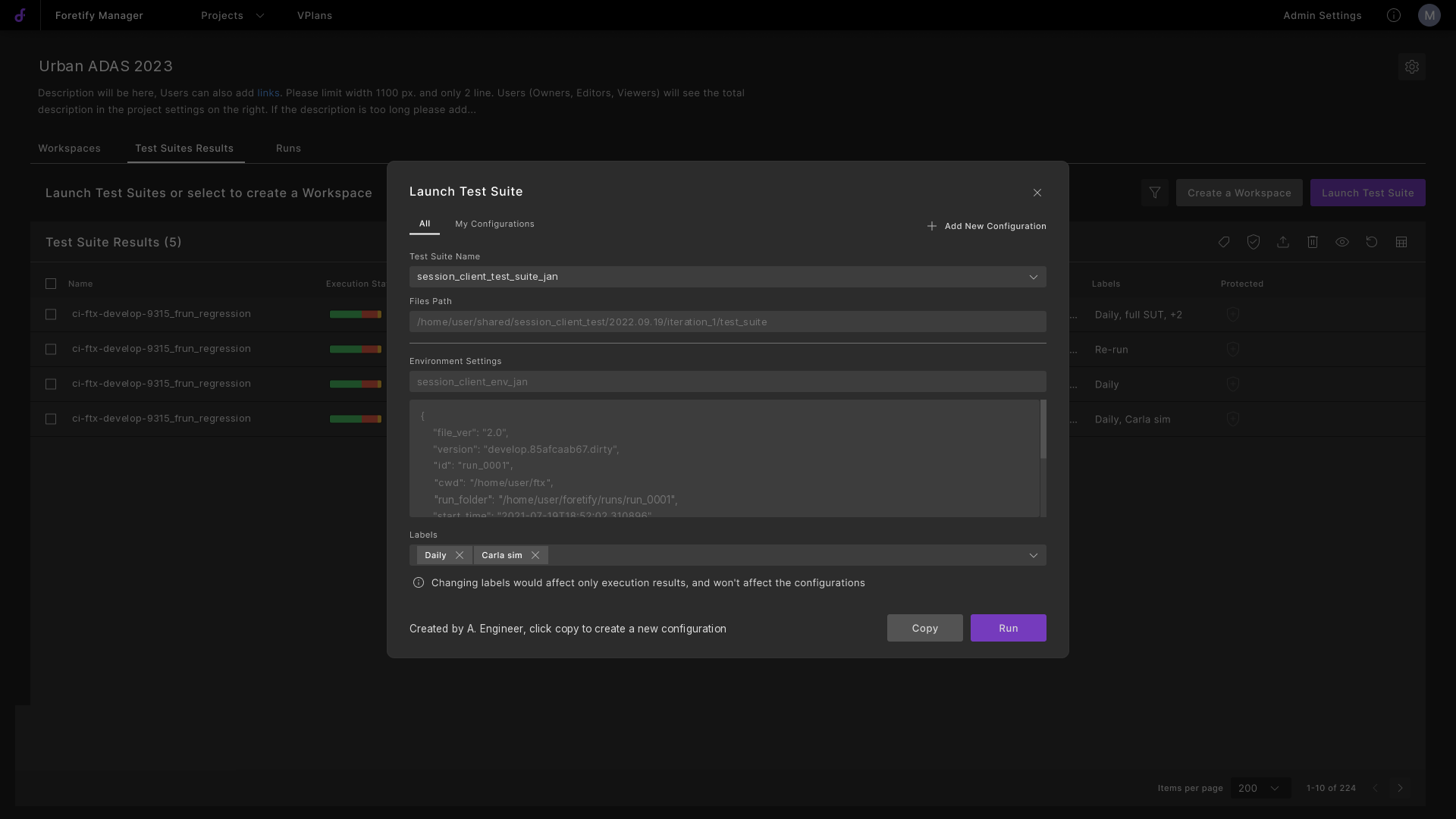
"It is too hard for user to setup a test using raw json file... New engineers have a hard time learning how to use the tool."
A customer's V&V organisation
Underneath the JSON sat a harder problem: no launch is quite the same twice. A new simulator image, another map, one changed parameter: without per-run overrides, changing one image tag meant cloning a whole settings record.
How I worked
Working from every signal available
Access to customers was limited, but I could still build the picture from every source available, and ran my own validation where none existed:
- 2023: Mapped the terminal workflow and the launch flows in FigJam.
- 2023-2024: Worked from field material: launch cases, an annotated customer configuration, site-visit notes.
- 2024: Ran my own prototype review: about twenty reviewers, roughly ninety logged items.
- 2025-2026: Reviewed the new flows with an application engineer, and benchmarked eight test and CI tools into design rules.
- Throughout: Kept a master Figma file as the team's single source of truth.
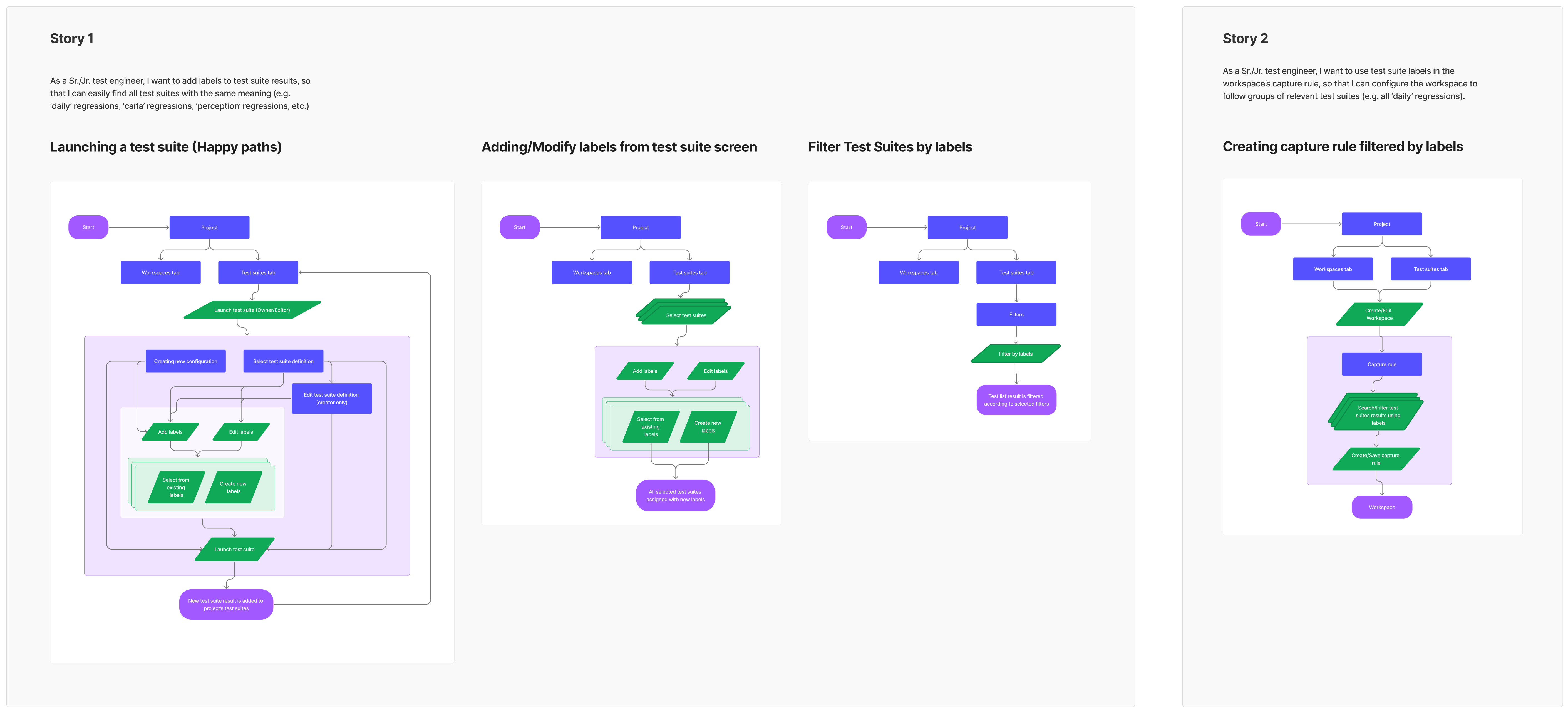
The 2024 concept was paused and never built. But one reviewer's request, to decide what a launch may override, returned two years later as the override model.
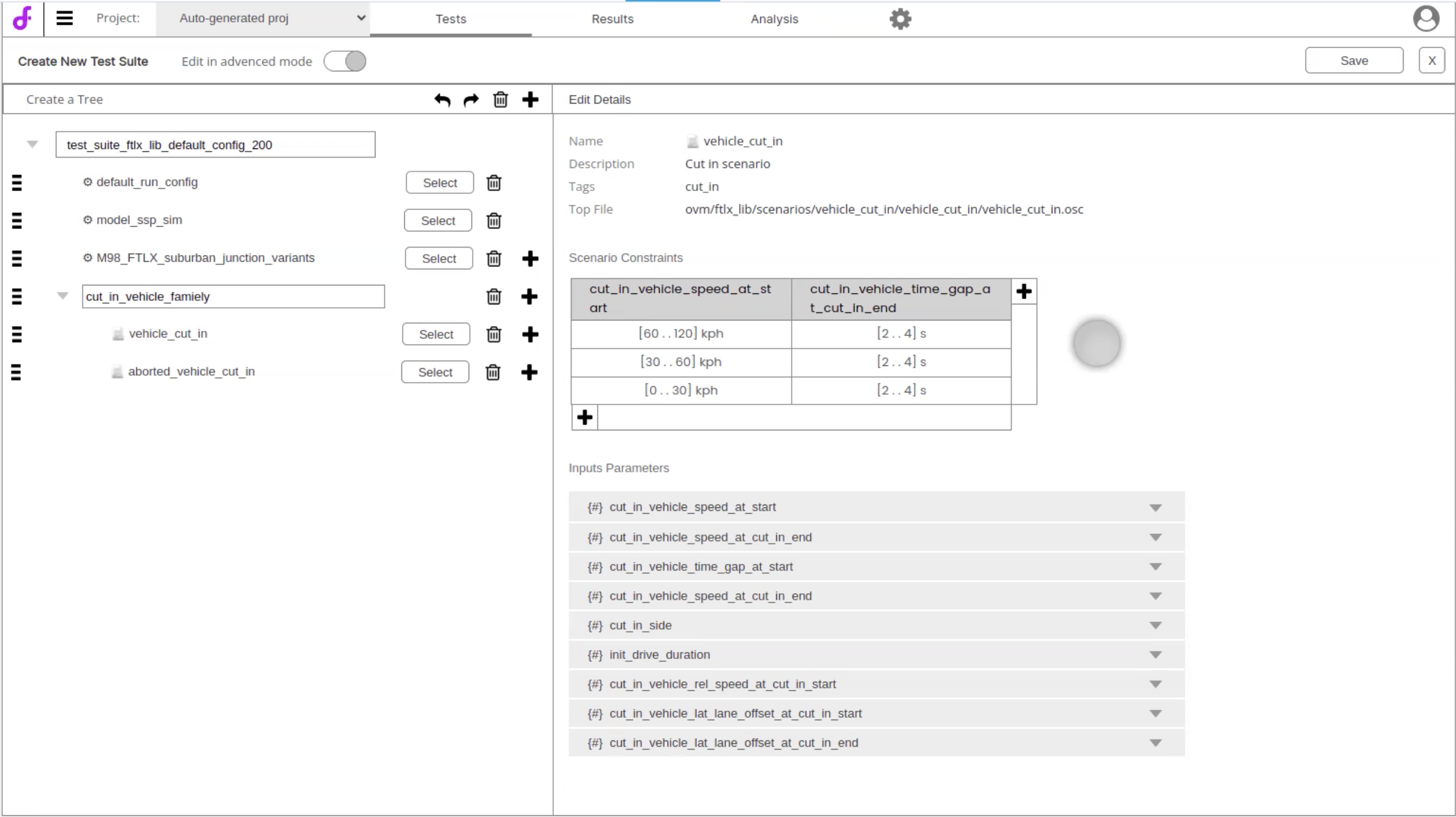
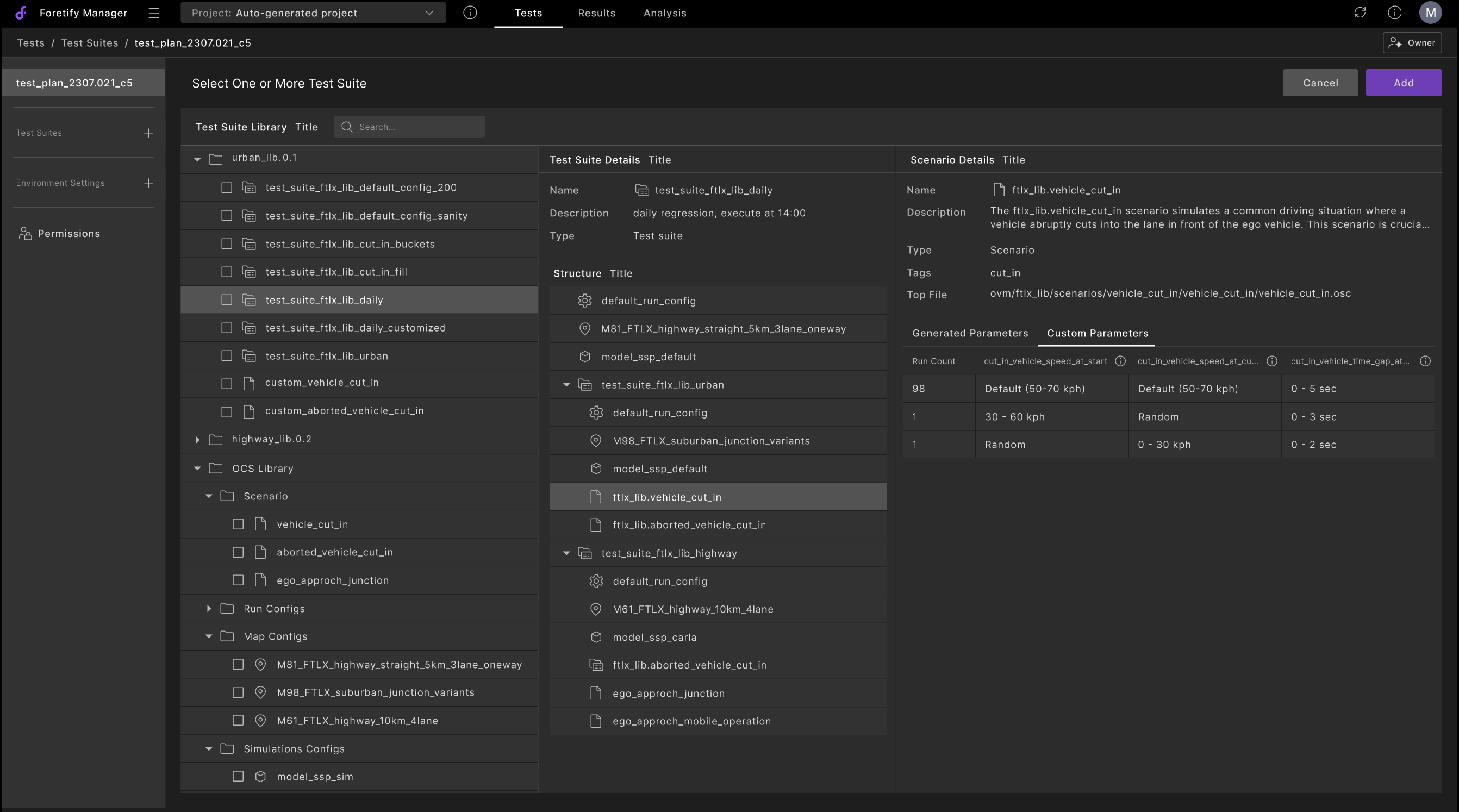
Two rounds of the composition concept: a suite as a tree, then a library where a suite overrides a scenario's parameters.
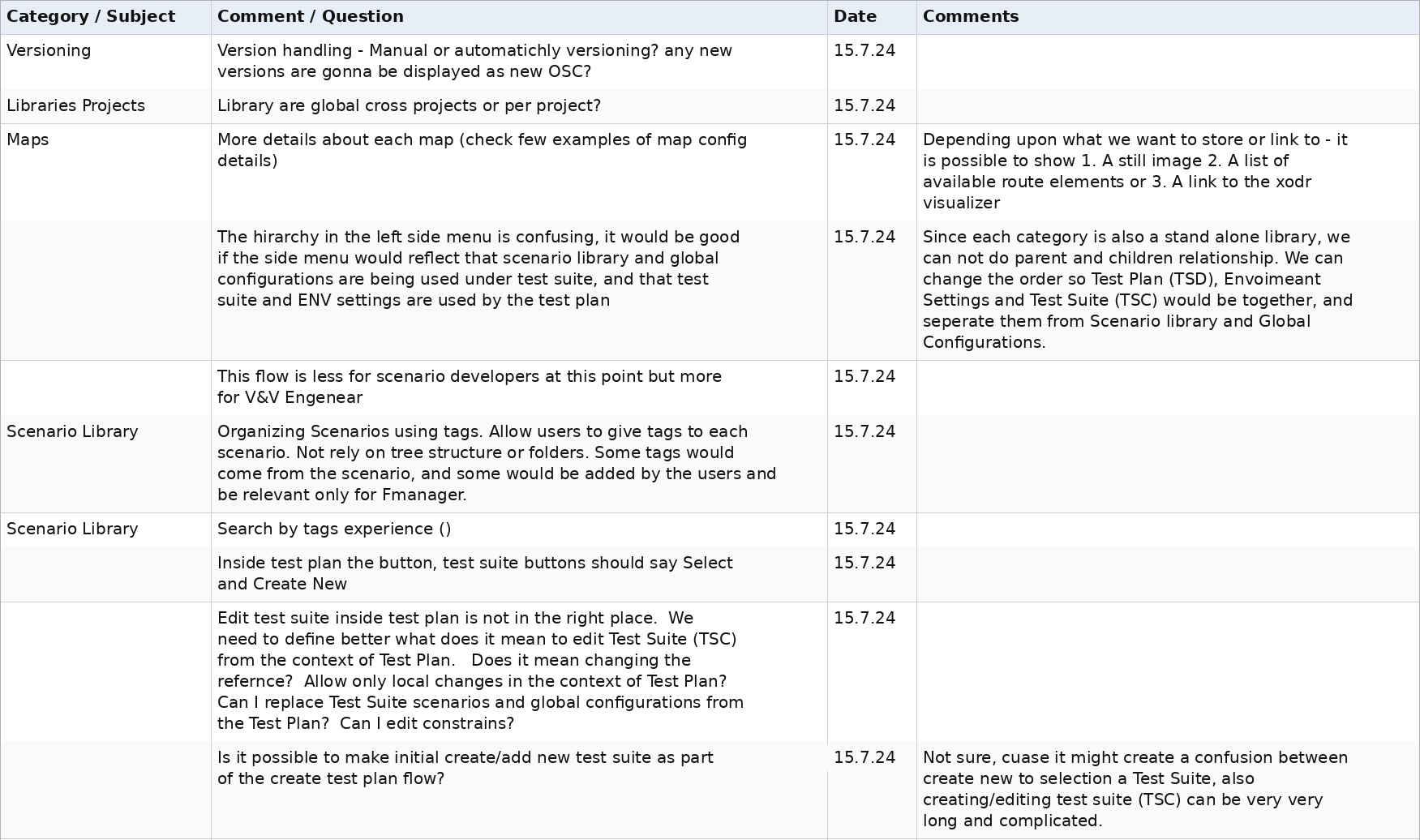
Research only outlives its project if it becomes someone's requirement. Findings belong on the shared backlog, so a paused project still leaves evidence for the next one.
Four generations followed, from a raw-JSON modal (2023) to the curated launch drawer (2026). Three design decisions carried across them.
Design decision 1
What to run, and how to run it
In the 2023 modal, the tests and their environment were one block of configuration: changing either meant editing both.
Split what to run from how to run it, as separate objects that only come together at launch.
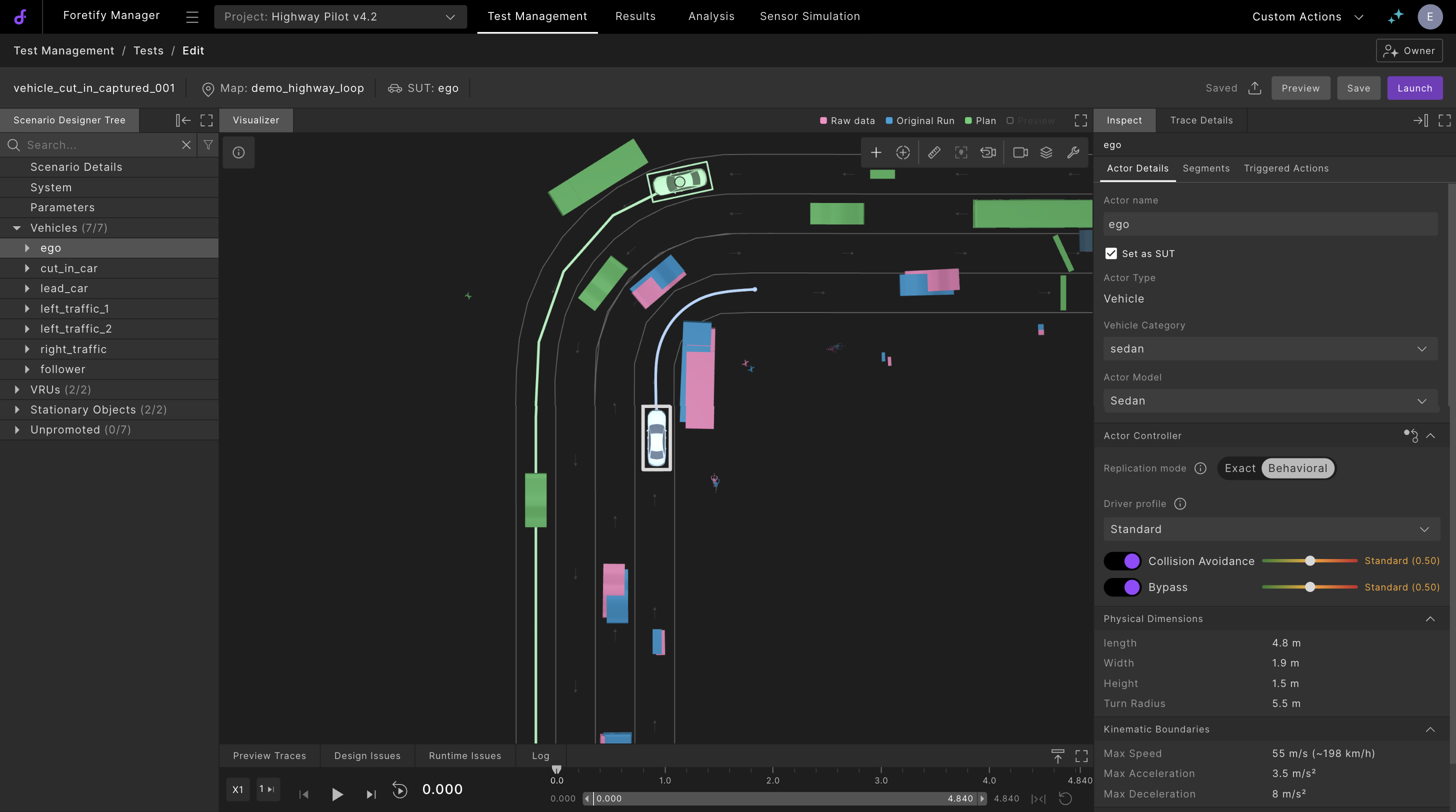
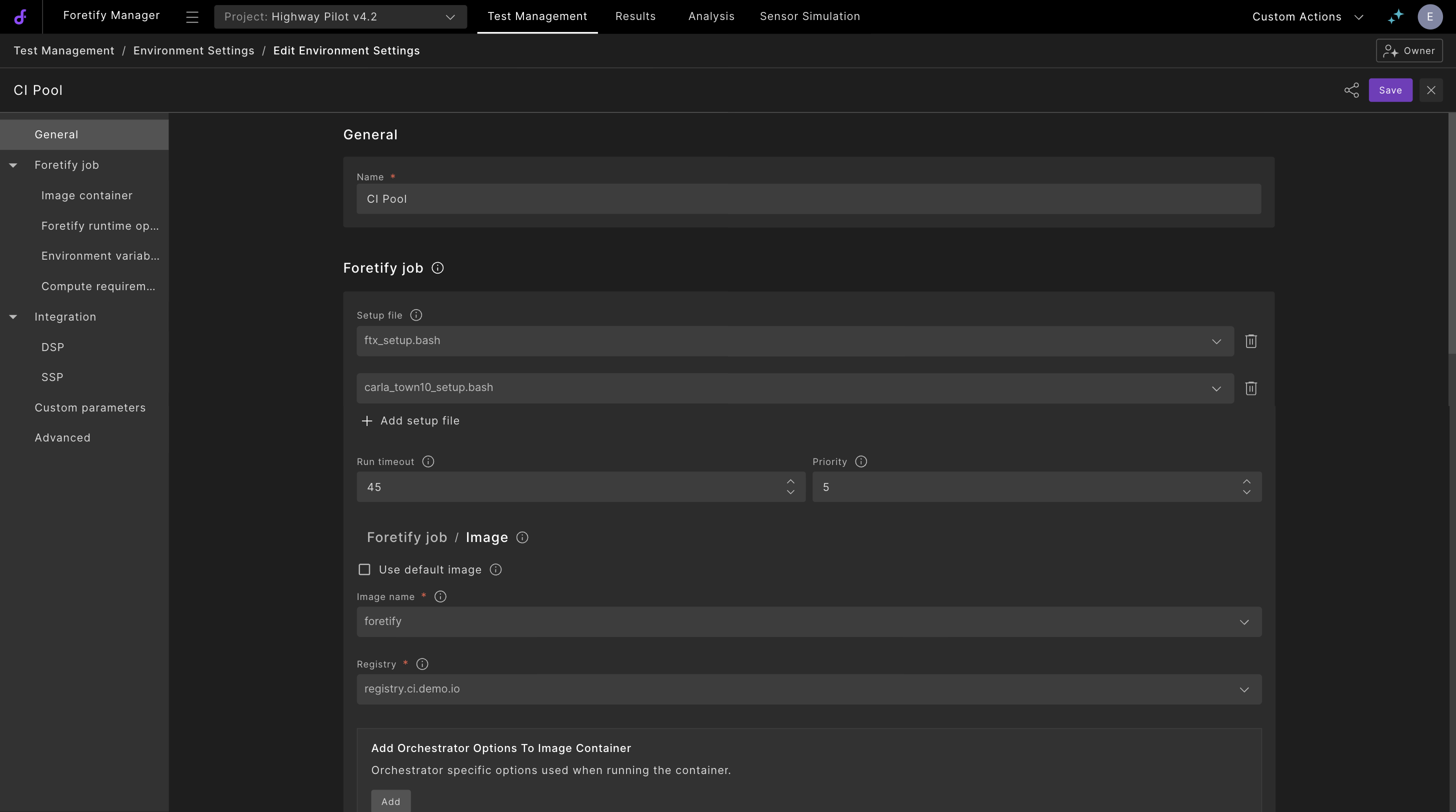
What to run is a scenario: actors, map and parameters. How to run it is a preset: setup files, simulator image, timeouts and variables.
Four objects carry the product:
- Tests: concrete or abstract scenarios.
- Test Suites: named groups of tests. What to run.
- Environment Settings: presets for the simulator, image and variables. How to run.
- Flow Definition (earlier, the Test Plan): a flow type, its suites and a preset in one launchable template. Set up once by an administrator, launched by V&V engineers and developers.
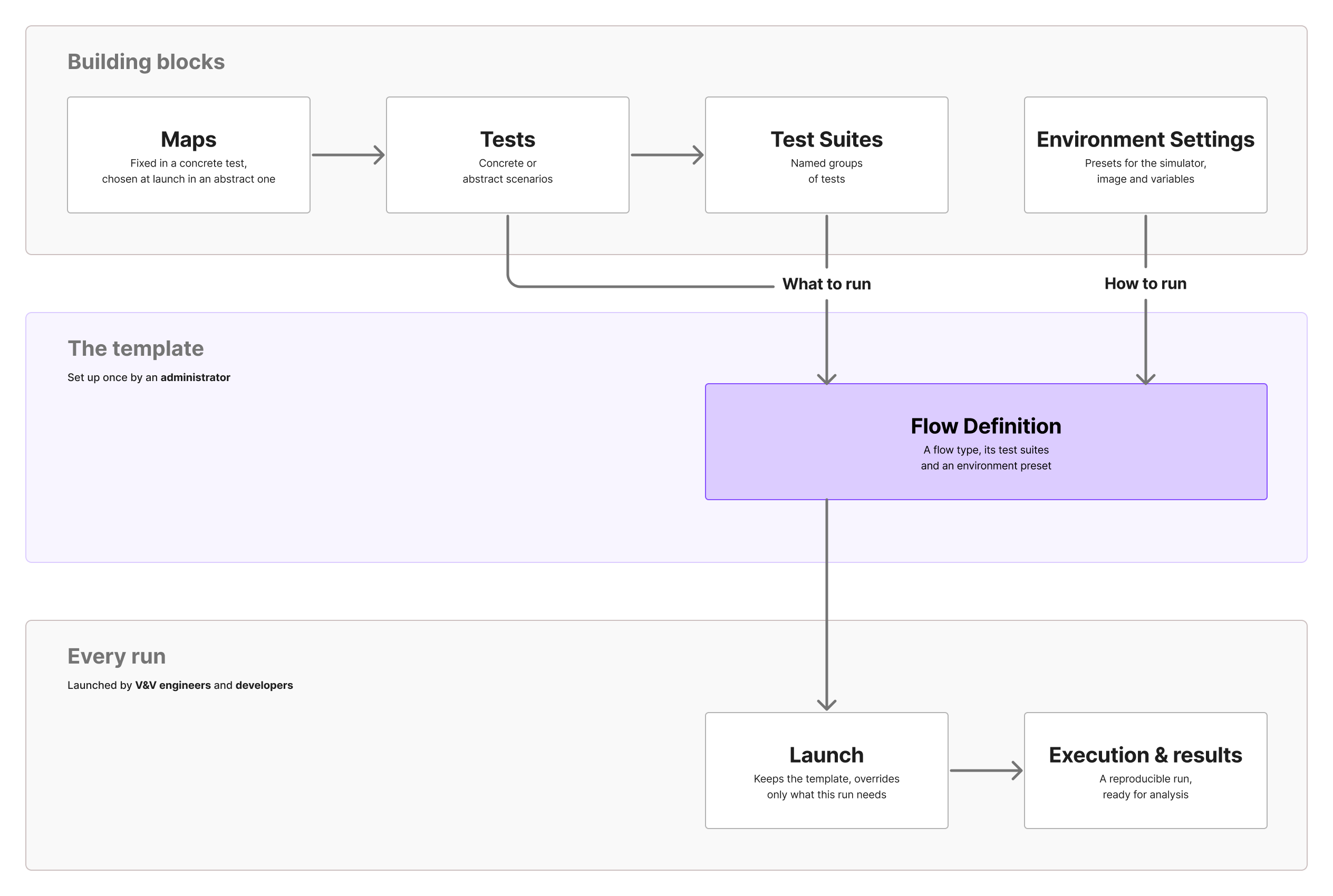
A clean split still needs explicit rules where the halves meet. Launching also saves the configuration, and that undocumented seam came back as a question a year later.
Design decision 2
One pattern to build, one drawer to launch
Executable assets got their own top-level tab, Test Management: a library of everything users can run, built on one repeating pattern:
- Entity manager: find, filter and share it.
- Template page: create and edit each master.
- Reusable drawer: launch the test.
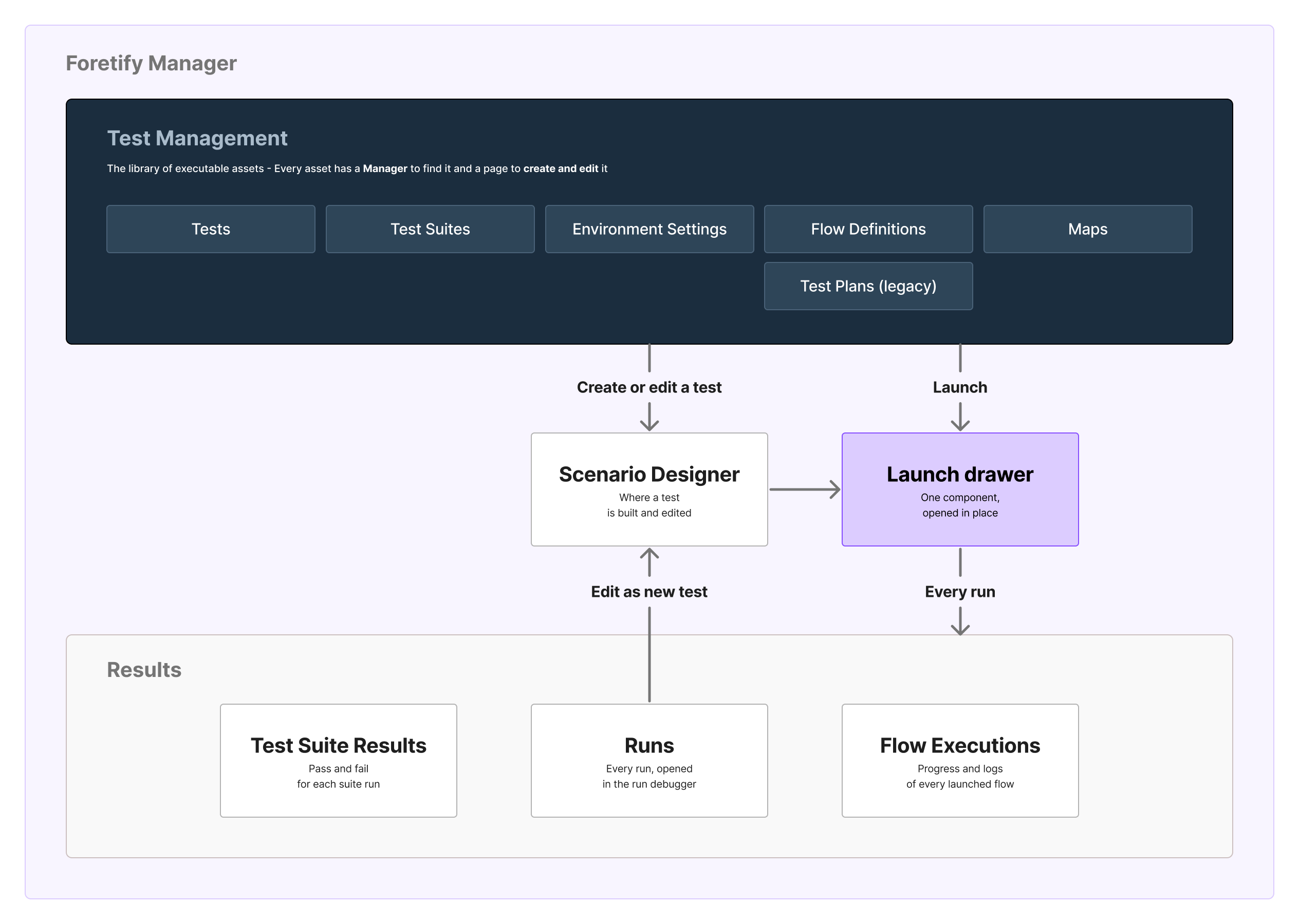
I first proposed a creation wizard inside the launch, then dropped it: creating objects mid-launch would leave orphaned plans and suites.
One repeating pattern for every master, and one temporary surface for every run: the launch drawer.
- Opened in place. It exposes only what this one execution can customise.
- One component, not a page. The same launch from Tests, Flow Definitions and the Scenario Designer.
- Learned once. Users launch from where they already are.
Keep creating and launching apart. A surface that only customises a run can be reused from anywhere.
Design decision 3
Show what matters, keep everything within reach
By 2026 a preset held far more than anyone needed: application engineers estimated that roughly 95% of environment settings were irrelevant to the person launching a test.
Administrators curate presets and declare which fields a user may override at launch. "Show all" keeps every setting within reach, because no one can predict what a specific run will need.
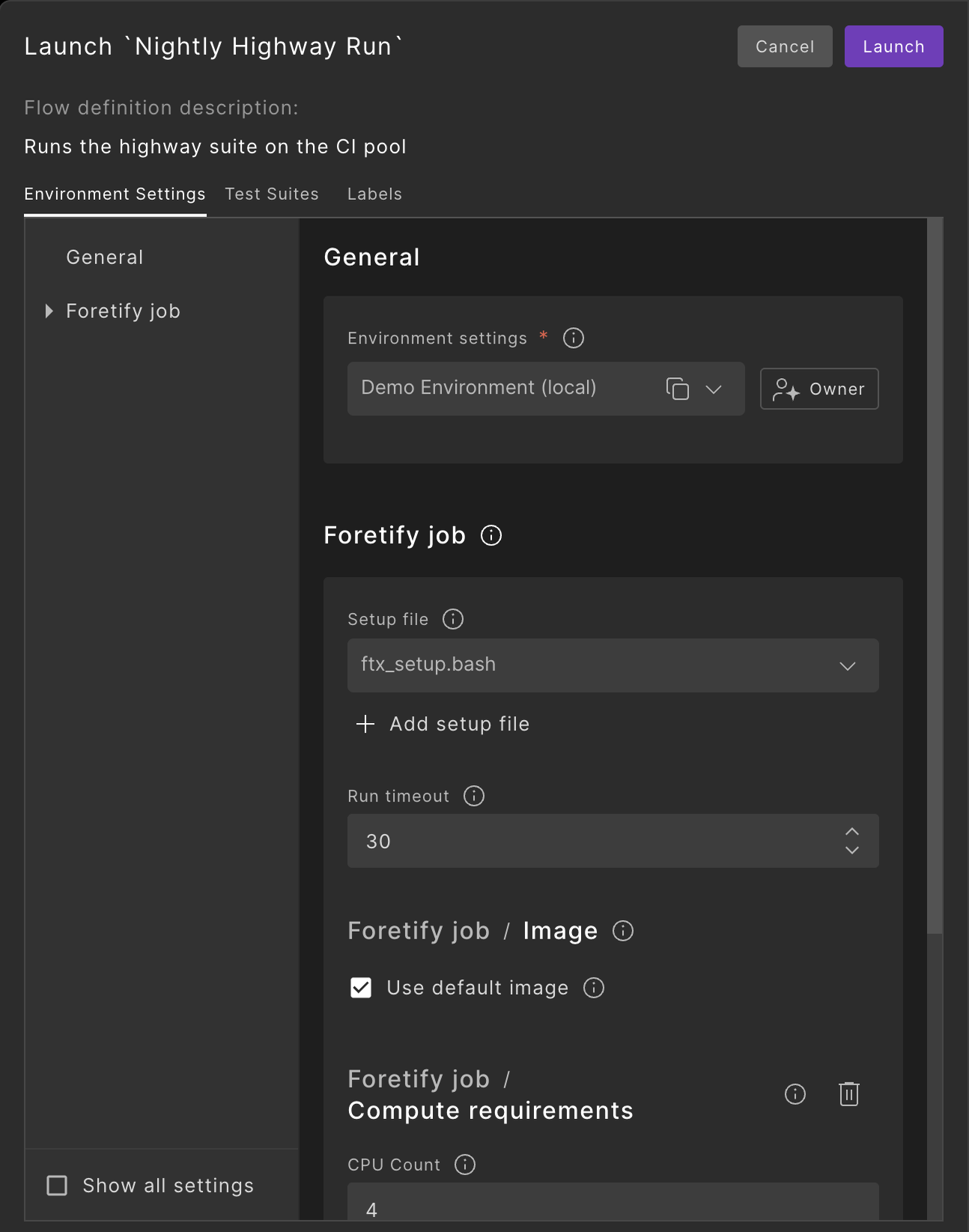
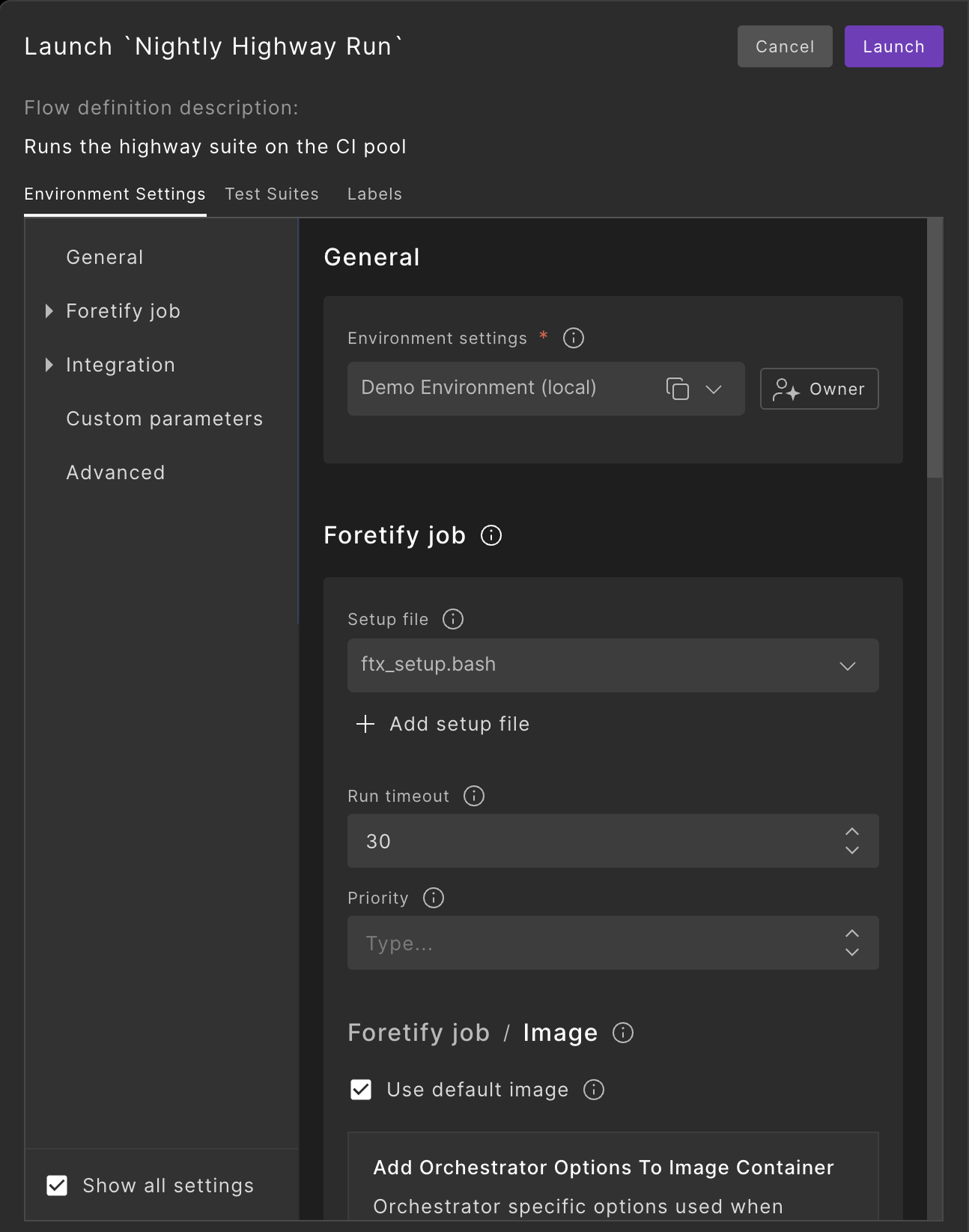
The same drawer twice: the curated default, and every setting one click away.
The template stays stable, and each execution changes only what it needs. Platform engineering calls this a golden path; I reached it from the field.
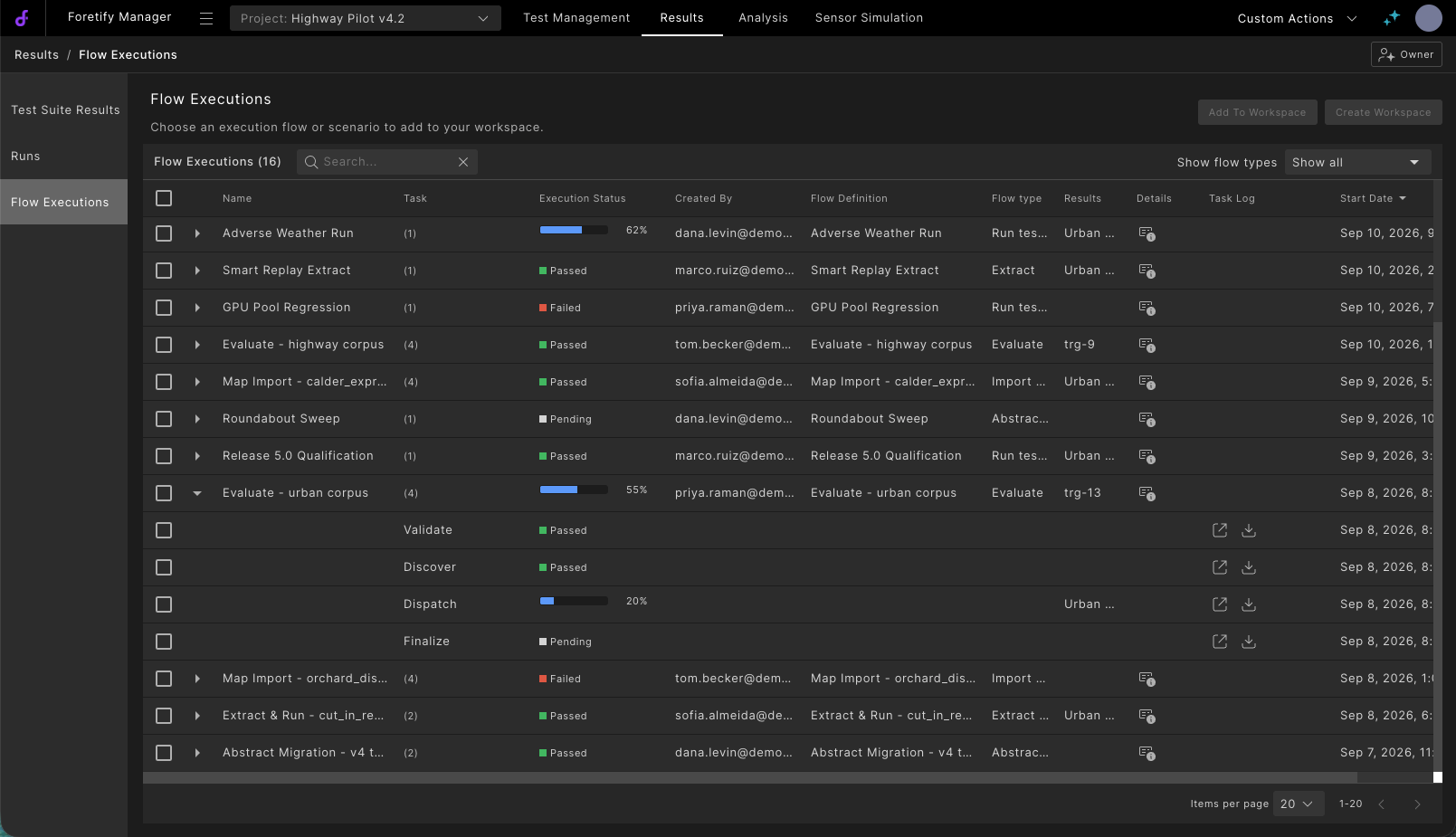
Simplify by hiding, never by removing. Experts only trust a curated default if the full set stays one click away.
Process change
Changing how design reaches engineering
In the last year my workflow changed too. I designed directly in a branch of the product: Figma for early exploration only, then the UX built in live code with mocked data, down to the shared components in Storybook.
That left one gap: development and QA still needed a source of truth, and redrawing finished code in Figma would double the work.
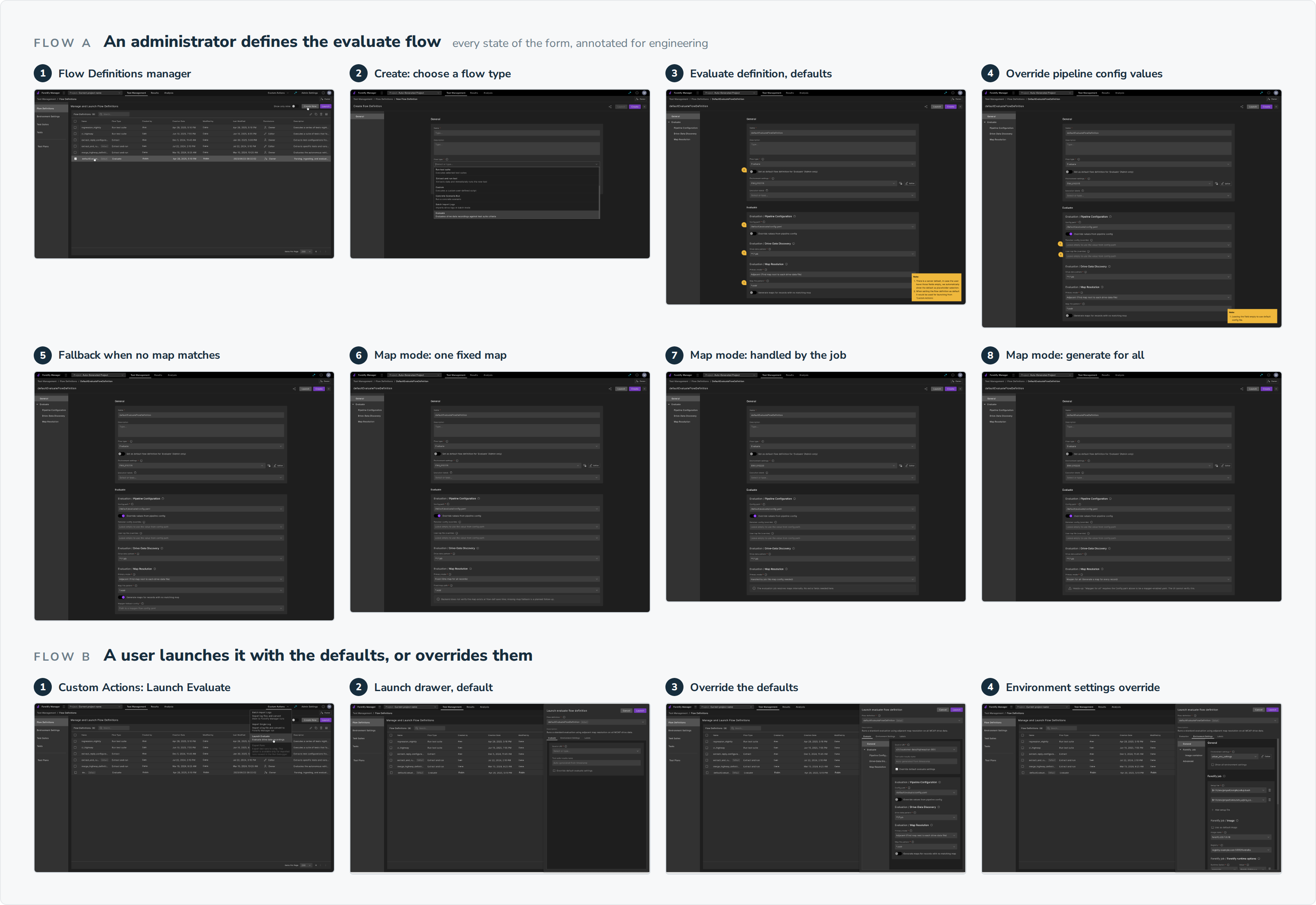
Replace the Figma and Zeplin handoff with QA reference pages pinned to a prototype commit: every state, how it was verified, and screenshots generated straight from the branch by a command I built.
Its first reader turned out to be me. Writing every state down as a test case worked as a second pass on my own design, and it surfaced edge cases I had missed. On the Manage Maps page alone, it exposed three states the design was asked for and never showed, such as a failed import that leaves no trace.
The front-end developer audited one against its commit and found four uncommitted files: the method doing exactly its job.
When the design lives in code, the reference has to come from the code too, or the designer maintains two versions of the truth.
Outcome
A structure the product could grow into
By the time I left, new work plugged into the model without reshaping it:
- One object, a dozen flow types. Each new flow, from ingesting logs to exporting results, rode the Flow Definition without a redesign.
- Overrides the field asked for. The four fields a customer said they change are the four the 2026 whitelist was built around.
- Enablement. Field engineers were trained on it in four sessions across time zones.
What I would do differently
Measure from day one. Nobody tracked usage, and I argued from that absence instead of fixing it. The first data I finally saw pointed the right way: people opened "Show all" again and again. Next time, the instrumentation ships with the design.
סקירה
השכבה שמתחת ל-pipeline
בכל פעם שצוות של רכב אוטונומי משנה את תוכנת הנהיגה, הוא צריך לדעת מה השינוי שבר. לנהוג ברכבים אמיתיים כדי לגלות זה איטי מדי ומסוכן מדי, ולכן התשובה מגיעה מסימולציה: אלפי תרחישי בדיקה, שמורצים אוטומטית בכל פעם שמופיע build חדש. לאוטומציה הזאת יש שני חצאים: ה-pipeline שמחליט מתי בדיקות רצות, והשכבה שמגדירה מה רץ ואיך. ב-Foretellix ה-pipeline היה של הלקוח. אני עיצבתי את החצי השני.
אתגר אחד ליווה ארבעה דורות של המוצר: כל הרצה נבנית מתבנית מוגדרת מראש, שלא פעם נוצרה על ידי מישהו אחר, ובכל זאת כל הרצה צריכה משהו קצת אחר.
הבעיה
תבנית שכל הרצה צריכה לכופף
לפני שהיה ממשק, הרצת בדיקות הייתה גיליון אלקטרוני, עם כל פרמטר מוקלד ידנית.
הממשק הראשון, ב-2023, העביר את זה למודאל אחד: בוחרים קובץ runner, מדביקים את הגדרות הסביבה כ-JSON גולמי, ומריצים.
"קשה מדי למשתמש להגדיר בדיקה באמצעות קובץ JSON גולמי... מהנדסים חדשים מתקשים ללמוד להשתמש בכלי."
ארגון ה-V&V של לקוח
מתחת ל-JSON הסתתרה בעיה קשה יותר: אין שתי הרצות זהות. image חדש לסימולטור, מפה אחרת, פרמטר אחד ששונה: בלי דריסות ברמת ההרצה, שינוי של tag יחיד ב-image חייב לשכפל רשומת הגדרות שלמה.
איך עבדתי
לעבוד מכל אות שהיה זמין
הגישה ללקוחות הייתה מוגבלת, ובכל זאת יכולתי לבנות את התמונה מכל מקור זמין, והרצתי ולידציה משלי איפה שלא הייתה:
- 2023: מיפיתי ב-FigJam את תהליך העבודה בטרמינל ואת ה-flows של ההרצה.
- 2023-2024: עבדתי מחומרי השטח: מקרי ההרצה, קונפיגורציה של לקוח עם הערות, סיכומי ביקורים אצל לקוח.
- 2024: הרצתי סקירה משלי על אב הטיפוס: כעשרים סוקרים, כתשעים פריטים מתועדים.
- 2025-2026: סקרתי את ה-flows החדשים עם מהנדס אפליקציה, ועשיתי בנצ'מרק לשמונה כלי בדיקות ו-CI שהפך לכללי עיצוב.
- לאורך כל הדרך: תחזקתי קובץ Figma מאסטר כמקור האמת היחיד של הצוות.
הקונספט של 2024 הוקפא ולא נבנה. אבל בקשה של אחד הסוקרים, להחליט מה הרצה רשאית לדרוס, חזרה שנתיים אחר כך כמודל הדריסות.
שני סבבים של קונספט הקומפוזיציה: suite כעץ, ואחר כך ספרייה שבה suite דורס פרמטרים של תרחיש.
מחקר שורד את הפרויקט שלו רק אם הוא הופך לדרישה של מישהו. ממצאים צריכים לשבת ב-backlog המשותף, כדי שגם פרויקט מוקפא ישאיר ראיות לפרויקט הבא.
אחר כך באו ארבעה דורות, ממודאל עם JSON גולמי (2023) ועד מגירת ההרצה המותאמת (2026). שלוש החלטות עיצוב ליוו את כולם.
החלטת עיצוב 1
מה להריץ, ואיך להריץ
במודאל של 2023, הבדיקות והסביבה שלהן היו גוש אחד של קונפיגורציה: כדי לשנות אחד מהם היה צריך לערוך את שניהם.
להפריד בין מה להריץ לבין איך להריץ, כאובייקטים נפרדים שמתחברים רק בהרצה.
מה להריץ הוא תרחיש: שחקנים, מפה ופרמטרים. איך להריץ הוא פריסט: קובצי setup, image של הסימולטור, timeouts ומשתנים.
ארבעה אובייקטים נושאים את המוצר:
- Tests: תרחישים קונקרטיים או אבסטרקטיים.
- Test Suites: קבוצות של בדיקות עם שם. מה להריץ.
- Environment Settings: פריסטים לסימולטור, ל-image ולמשתנים. איך להריץ.
- Flow Definition (קודם לכן Test Plan): סוג flow, ה-suites שלו ופריסט בתבנית אחת שאפשר להריץ. מוגדרת פעם אחת על ידי אדמין, ומורצת על ידי מהנדסי V&V ומפתחים.
גם הפרדה נקייה צריכה כללים מפורשים בנקודה שבה החצאים נפגשים. הרצה שומרת גם את הקונפיגורציה, והתפר הזה, שלא תועד, חזר כשאלה שנה אחר כך.
החלטת עיצוב 2
דפוס אחד לבנות, מגירה אחת להריץ
לנכסים שאפשר להריץ ניתן טאב משלהם ברמה העליונה, Test Management: ספרייה של כל מה שאפשר להריץ, שבנויה על דפוס אחד שחוזר:
- מנהל ישויות (manager): למצוא, לסנן ולשתף.
- עמוד תבנית: ליצור ולערוך כל master.
- מגירה לשימוש חוזר: להריץ את הבדיקה.
בהתחלה הצעתי wizard ליצירה בתוך ההרצה, ואז ויתרתי עליו: יצירת אובייקטים באמצע הרצה הייתה משאירה plans ו-suites יתומים.
תבנית אחת שחוזרת לכל master, ומשטח זמני אחד לכל הרצה: מגירת ההרצה.
- נפתחת במקום. מציגה רק את מה שההרצה הזו יכולה להתאים.
- קומפוננטה אחת, לא עמוד. אותה הרצה מ-Tests, מ-Flow Definitions ומה-Scenario Designer.
- לומדים פעם אחת. משתמשים מריצים מהמקום שבו הם כבר נמצאים.
להפריד בין יצירה להרצה. משטח שרק מתאים הרצה אפשר להשתמש בו שוב מכל מקום.
החלטת עיצוב 3
להראות את מה שחשוב, ולהשאיר הכול בהישג יד
עד 2026 פריסט הכיל הרבה יותר ממה שמישהו צריך: מהנדסי האפליקציה העריכו שכ-95% מהגדרות הסביבה לא רלוונטיות למי שמריץ בדיקה.
אדמינים מגדירים פריסטים וקובעים אילו שדות משתמש רשאי לדרוס בהרצה. "Show all" משאיר כל הגדרה בהישג יד, כי אף אחד לא יכול לחזות מה הרצה ספציפית תצטרך.
אותה מגירה פעמיים: ברירת המחדל המותאמת, וכל ההגדרות במרחק קליק.
התבנית נשארת יציבה, וכל הרצה משנה רק את מה שהיא צריכה. ב-platform engineering קוראים לזה golden path; אני הגעתי אליו מהשטח.
לפשט על ידי הסתרה, אף פעם לא על ידי הסרה. מומחים סומכים על ברירת מחדל מותאמת רק אם הסט המלא נשאר במרחק קליק.
שינוי תהליך
לשנות את הדרך שבה העיצוב מגיע להנדסה
בשנה האחרונה השתנתה גם שיטת העבודה שלי. עיצבתי ישירות ב-branch של המוצר: Figma רק לחקירה מוקדמת, ואז ה-UX נבנה בקוד חי עם דאטה מדומה, עד לקומפוננטות המשותפות ב-Storybook.
נשאר פער אחד: פיתוח ו-QA עדיין היו צריכים מקור אמת, ולצייר מחדש ב-Figma קוד גמור היה מכפיל את העבודה.
להחליף את ה-handoff ב-Figma וב-Zeplin בעמודי QA reference שמוצמדים ל-commit של אב הטיפוס: כל מצב, איך הוא אומת, וצילומי מסך שנוצרים ישירות מה-branch באמצעות פקודה שבניתי.
הקורא הראשון של העמוד הזה היה אני. לכתוב כל מצב כמקרה בדיקה עבד כמעבר שני על העיצוב שלי, וחשף מקרי קצה שפספסתי. בעמוד Manage Maps לבדו הוא חשף שלושה מצבים שהעיצוב התבקש להראות ולא הראה, למשל ייבוא שנכשל ולא משאיר שום עקבות.
מפתח ה-front-end בדק אחד מהם מול ה-commit שלו ומצא ארבעה קבצים שלא נכנסו ל-commit: השיטה עושה בדיוק את מה שהיא אמורה לעשות.
כשהעיצוב חי בקוד, גם הרפרנס צריך לבוא מהקוד, אחרת המעצב מתחזק שתי גרסאות של האמת.
התוצאה
מבנה שהמוצר יכול היה לגדול לתוכו
כשעזבתי, עבודה חדשה התחברה למודל בלי לעצב אותו מחדש:
- אובייקט אחד, תריסר סוגי flow. כל flow חדש, מקליטת לוגים ועד ייצוא תוצאות, נשען על ה-Flow Definition בלי עיצוב מחדש.
- הדריסות שהשטח ביקש. ארבעת השדות שלקוח אמר שהוא משנה הם בדיוק הארבעה שסביבם נבנה ה-whitelist של 2026.
- הטמעה. מהנדסי השטח הוכשרו עליו בארבעה סשנים, באזורי זמן שונים.
מה הייתי עושה אחרת
למדוד מהיום הראשון. אף אחד לא עקב אחרי השימוש, ואני טענתי מתוך ההיעדר הזה במקום לתקן אותו. הדאטה הראשון שבסוף ראיתי הצביע לכיוון הנכון: אנשים פתחו את "Show all" שוב ושוב. בפעם הבאה, המדידה יוצאת יחד עם העיצוב.