
Alert Rule Creationיצירת כללי התראה
Data Pipeline & Dataset Monitoringניטור pipelines ו-datasets
Key Outcomes
What the Project Delivered
Self-serve alert creation
The redesigned flow enabled data engineers to set up alerts independently - removing the reliance on customer success support that had been a consistent blocker in the original experience.
Multi-asset support
Introduced the ability to set alerts across multiple datasets and pipelines in a single action - a workflow that previously required creating alerts one by one.
Duplicate alert prevention
Added proactive duplicate detection to the creation flow, reducing alert spam and the CS tickets it generated. Users could now see if a similar alert already existed before creating a new one.
Research-led sprint cycle
Introduced competitor analysis and iterative user feedback into a sprint cycle that had neither before. The process continued after I joined - a systemic change, not a one-off project.
Databand Alert System
Overview
Databand (acquired by IBM) is a proactive data observability tool for data engineers that helps detect and resolve data issues. The main value Databand gives to its customers is catching bad data before it impacts the business.
Databand's alert system is the core engine that customers use to keep track of their moving data. This is why the alert definition editor is a very strategic and important part of the Databand system. By setting alert rules, customers can choose which metric and what data or pipelines processes they want to monitor.
When I joined Databand, creating an alert was one of the most painful experiences in the product for users, and one of the hardest parts of it to design.
Goals
High Level Goals
Product Goals:
- Supporting more alert types.
- More users would create more alerts without the help of Databand's customer success department.
- Creating alerts for multiple assets - Pipelines, tasks, or datasets.
- Setting alerts on data.
- Setting alerts on column level.
UX Roadmap:
- Creating an alert should be easy, and users should be able to do it alone.
- Simplify as much as possible the complexity of setting alerts on different assets and processes.
My Role
Full Ownership, Start to Finish
I was the lead designer for the alert creation experience throughout my time at Databand, owning the full design process across 7 iterative releases. This wasn't a single sprint handoff - it was a sustained design effort that evolved as user needs, technical capabilities, and business priorities changed over time.
I ran multi-channel user research (customer support analysis, user interviews, Smartlook session recordings, and demo observations), defined the UX strategy and requirements with the PM, created concepts from lo-fi wireframes through pixel-perfect specs, ran usability tests with real customers, and collaborated closely with the engineering team throughout development and QA. I also introduced the competitor research and iterative feedback practice into the team's sprint cycle - a process that didn't exist before I joined.
Research
Users' Research
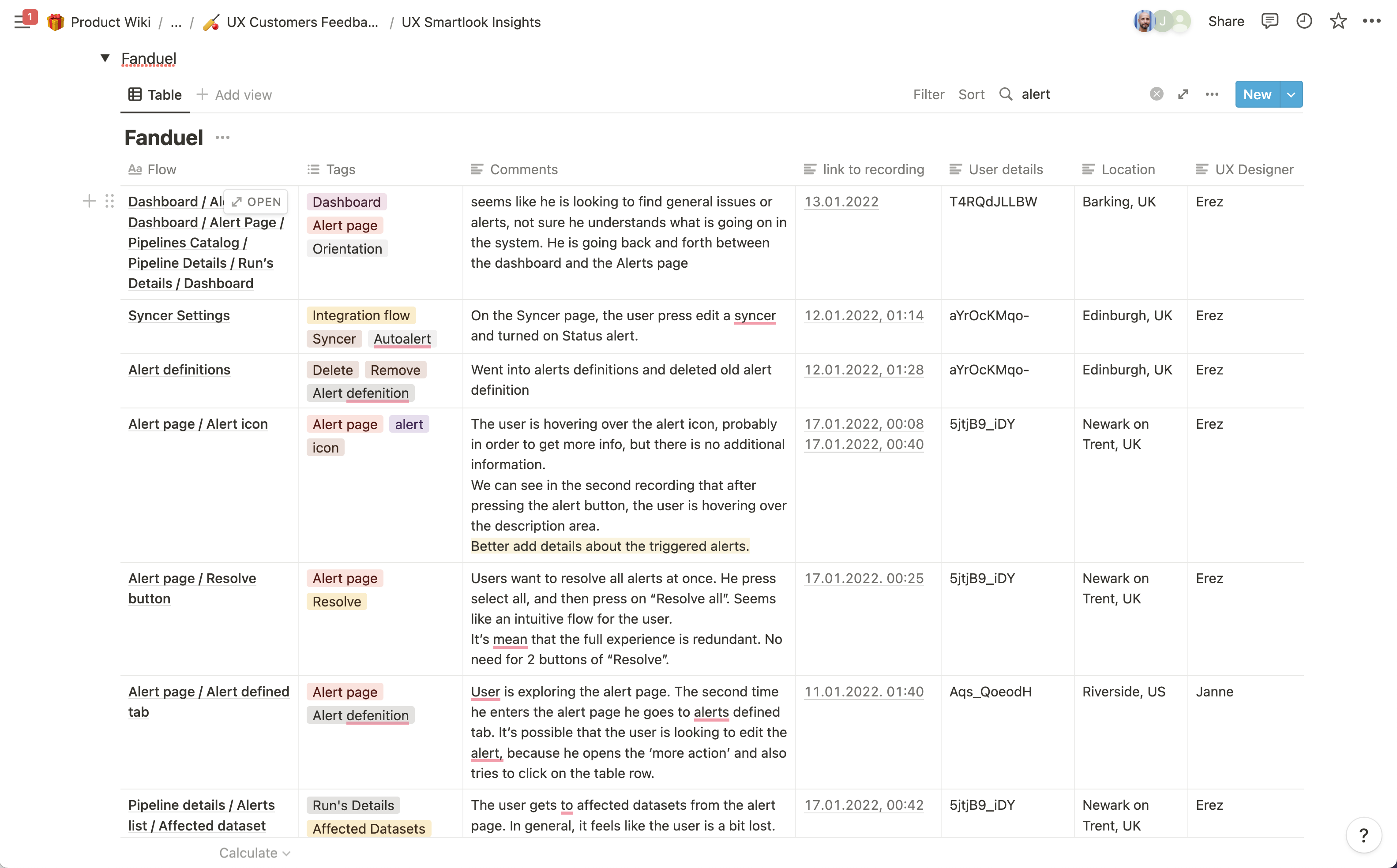
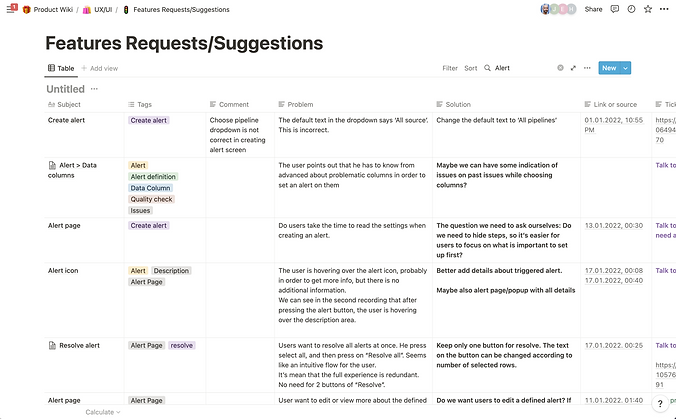
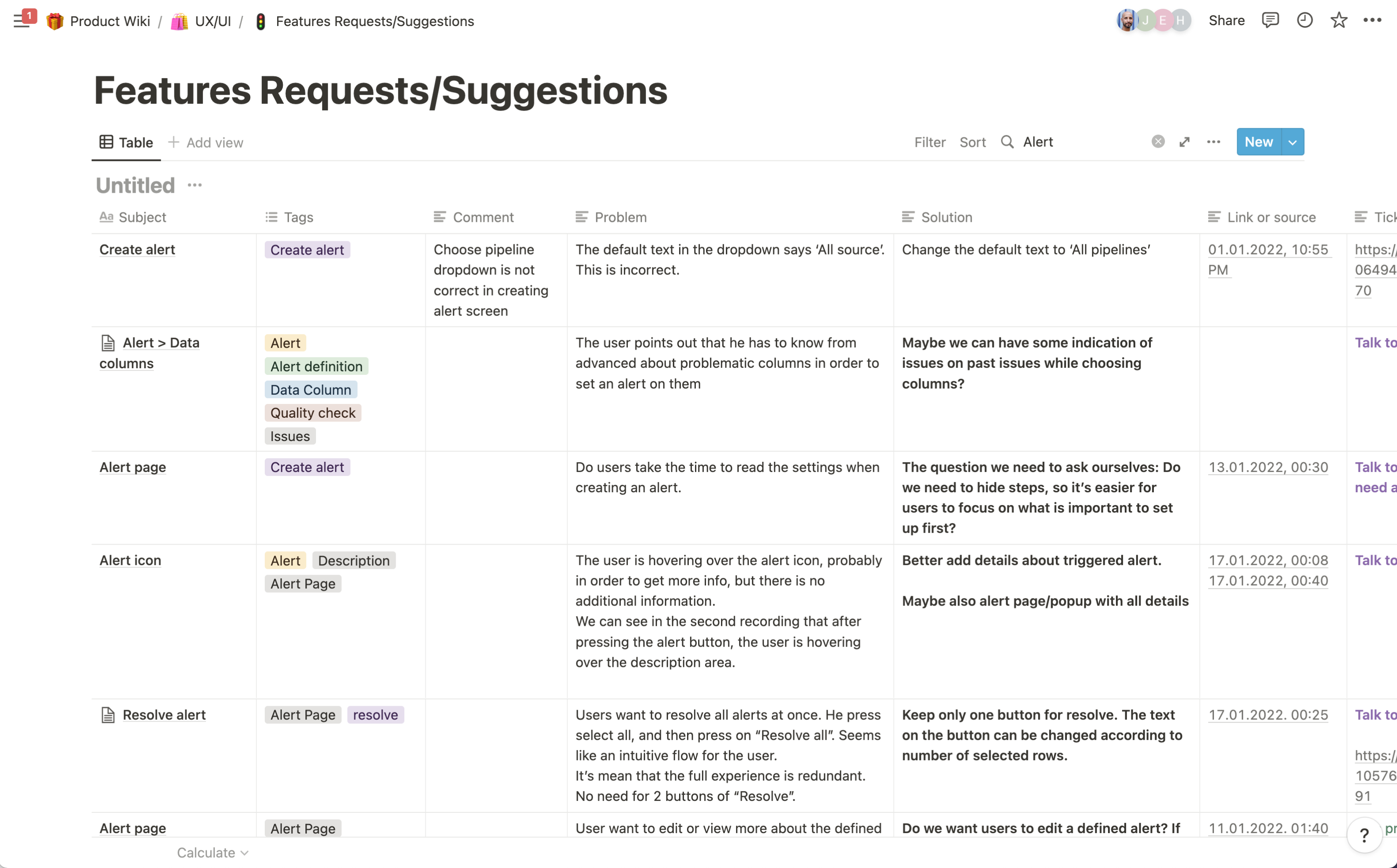
Learning how our users were experiencing the old alert creation editor was through 4 main channels: customer support, user interviews, watching recordings of demos for potential users, and watching user recordings on Smartlook.
Main Findings:
- Users don't know where to start from.
- The old experience is hard to understand.
- Lack of confidence in the UI.
- Setting up an alert is too complex for users to do themselves - they eventually ask for help from customer success.
- There is no clear hierarchy in the UI.
Research
Competitors Research
In order to understand how to design the best and optimal experience for setting an alert on data and pipelines, I was researching direct and indirect competitors, trying to understand how others are answering similar challenges that Databand's users are facing, what kind of possible features we can use, and looking for UX/UI solutions and patterns that can be used as reference or inspiration.
Main Findings:
- It is common to start creating alerts from a preset.
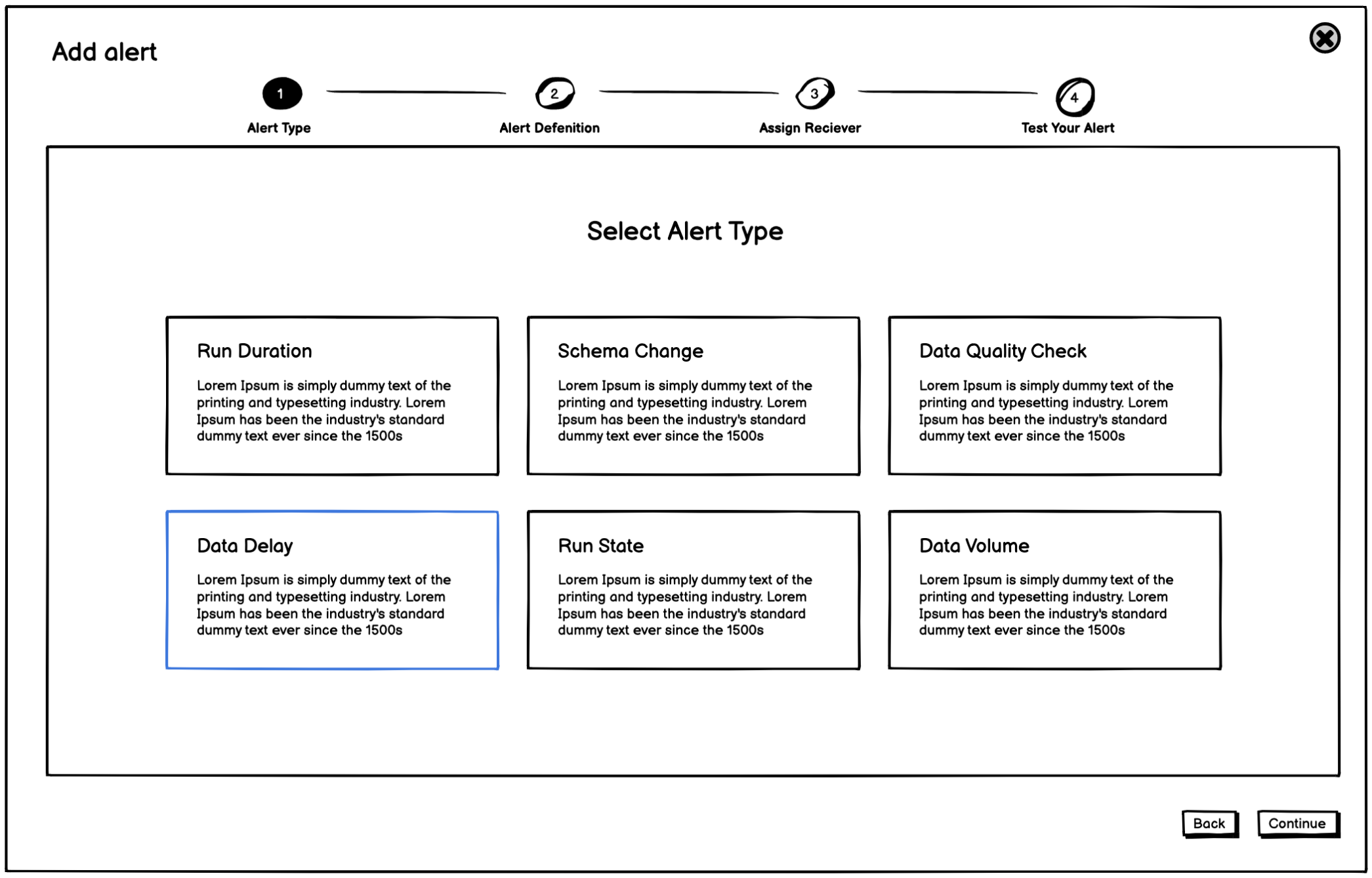
- The process of defining an alert is split into several steps.
- Conversational UX for setting the alert rule.
- It is common to display a preview of past data (if available), to help users choose correct trigger values.
- Choosing stakeholder receiver and platform, to be notified in case of a rule breach.
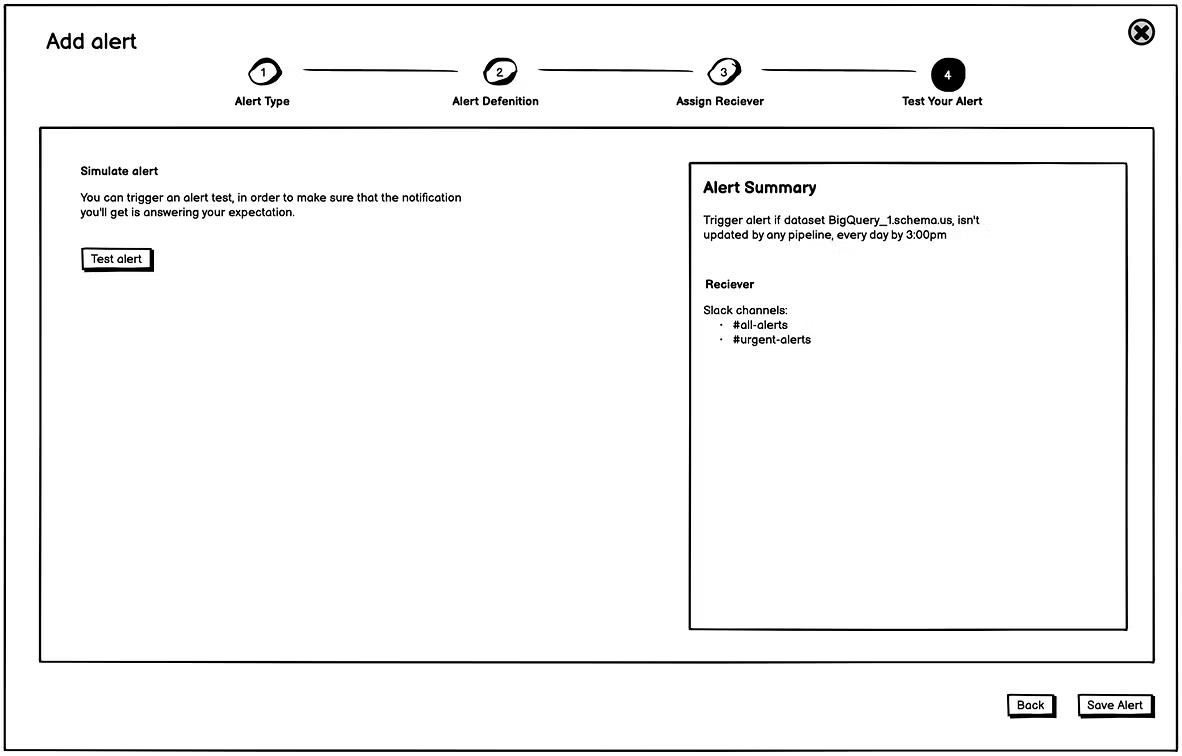
- It would be nice to have some testing action.
- There is a popular UX pattern where setting the alert is done as part of a conversational experience.
- Another pattern: an "If condition" structure.
Ideation
The Vision for Creating Alert Experience
The goal was to design an agile experience that can grow according to the complexity and additional alerts over time.
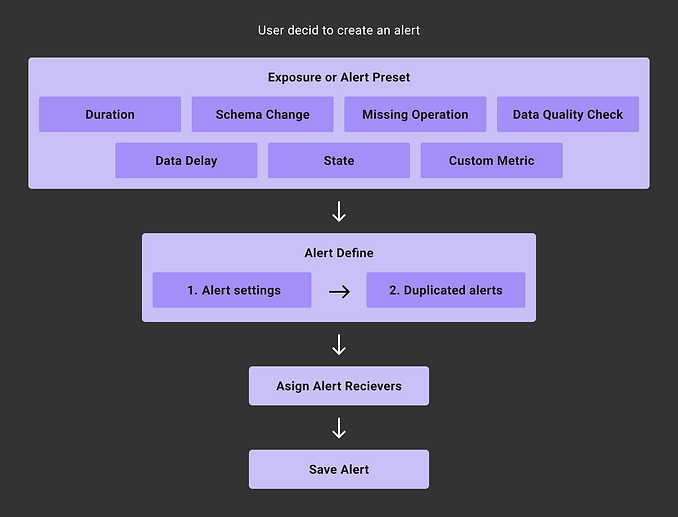
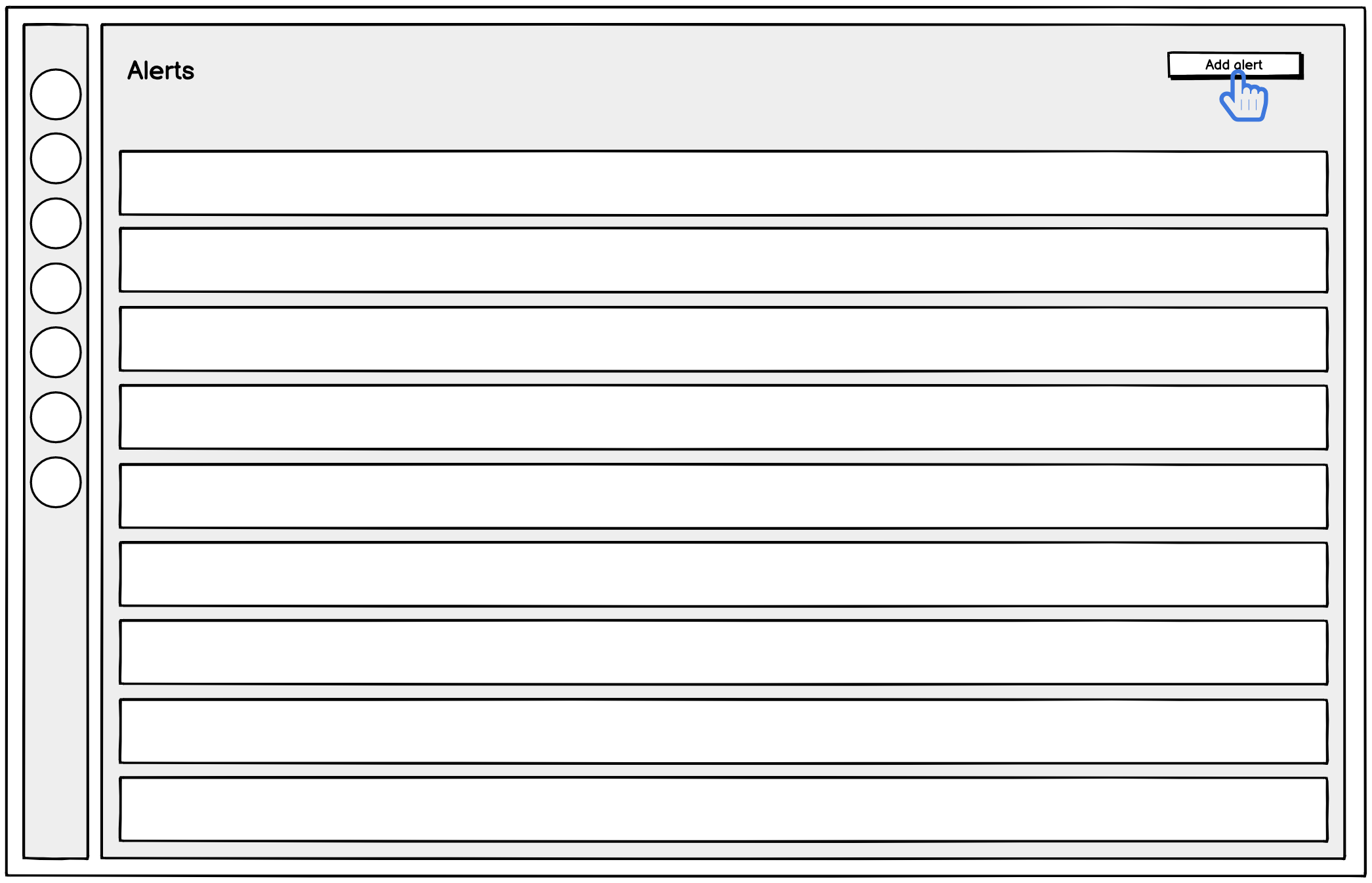
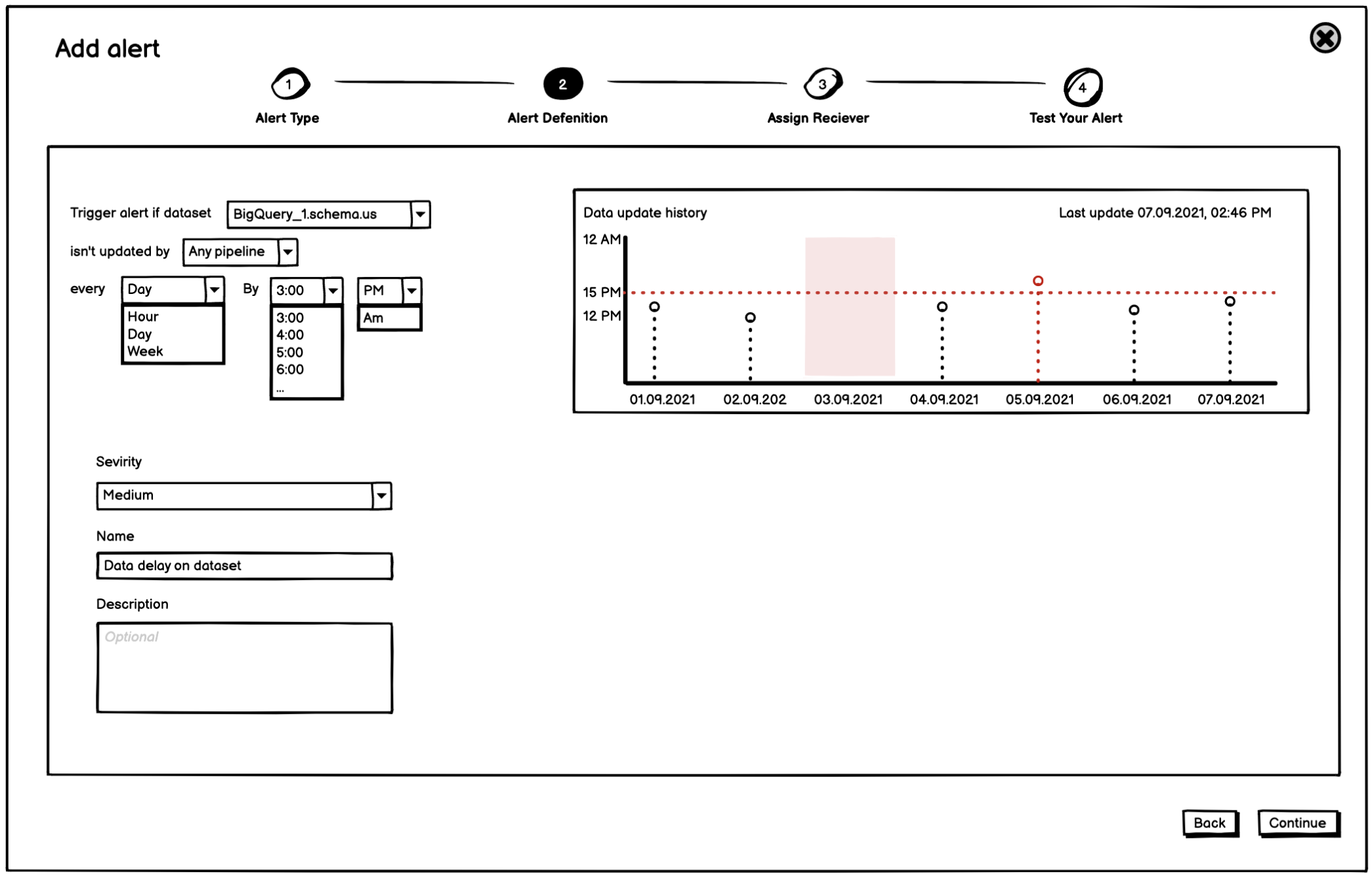
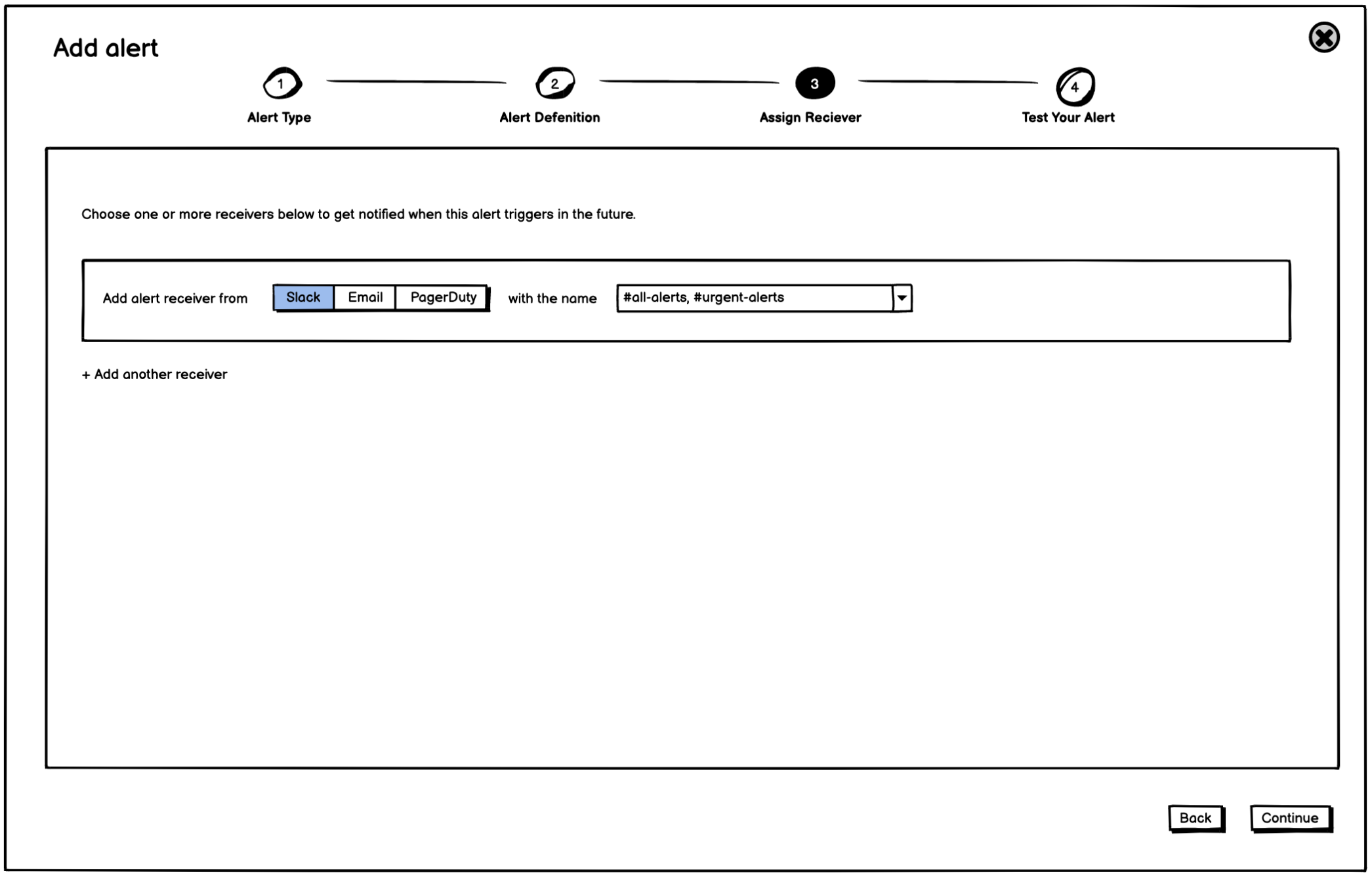
We knew that for the first iteration we would add a Data Delay alert, so I used this scenario to create a low-fidelity wireframe flow to brainstorm and share ideas inside the product team and get feedback from customer success.
Iteration No.1
Learn about Data Quality Issues
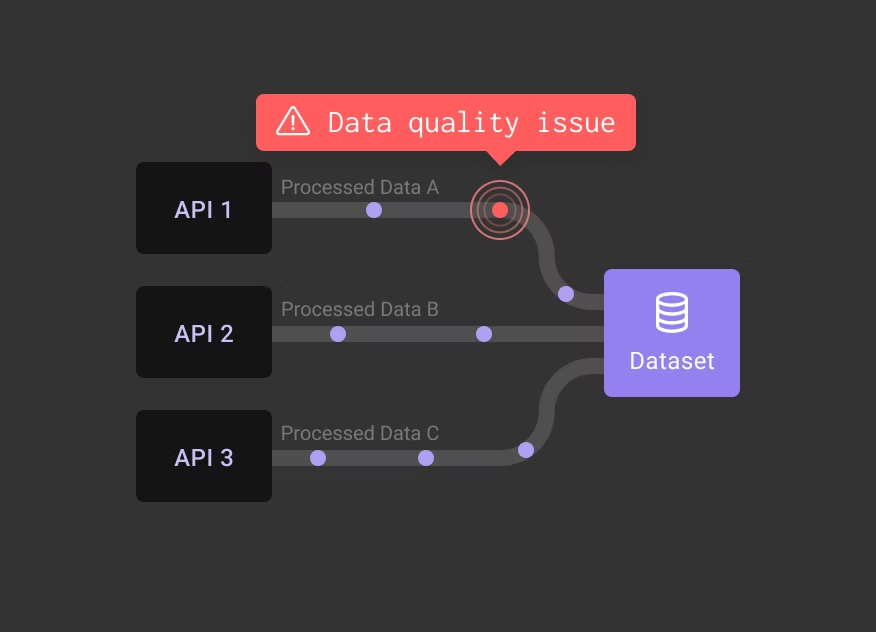
The new alert creation started with a request that kept returning from users at that time. They wanted to know when something is wrong with their data quality. Users wanted to be notified whenever there is an issue with data inside a specific dataset. For that, we needed to add an advanced alert monitor, checking the data source or pipeline process which is relevant.
What does a Data Quality Issue mean?
A possible indication of problematic data is when there is an issue with any of the metadata metrics like data freshness, null count, anomalies, and data statistics. A problematic data might be ingested into the target dataset undetected, and in turn affect downstream data products.
Starting with Data Delay Alert
Talking to users, we realized that knowing when data is late to be updated gives them a lot of value in indicating that something is wrong. For that we decided to allow users to set a Data Delay alert across multiple datasets, including the option to target datasets related to a specific pipeline.
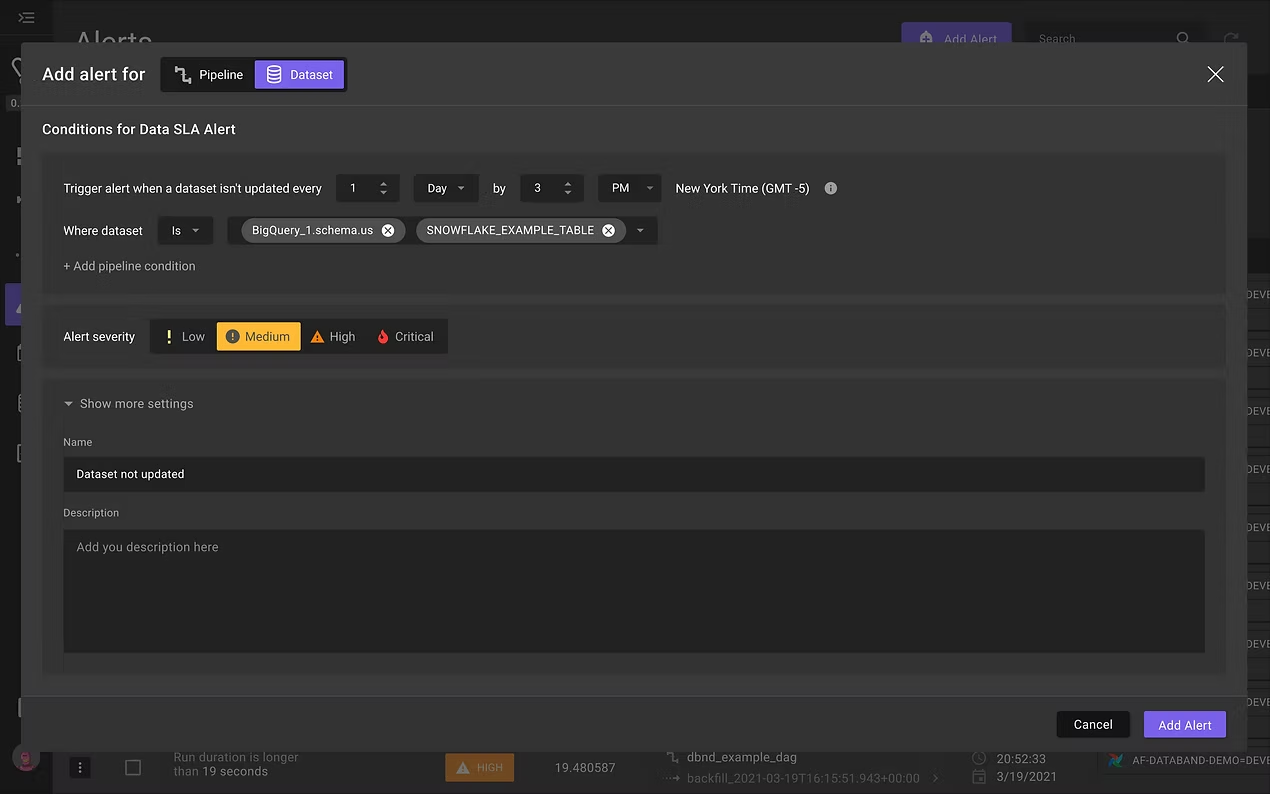
To begin with, we started by creating only the alert define experience without a receiver and no alerts gallery. We also temporarily left the old experience under pipeline alert. I created a prototype that would allow us to test the new alert experience with a few customers. It was pretty clear that the new design is easier to consume and much more clear than the old one.
Preparing Design Spec for Development
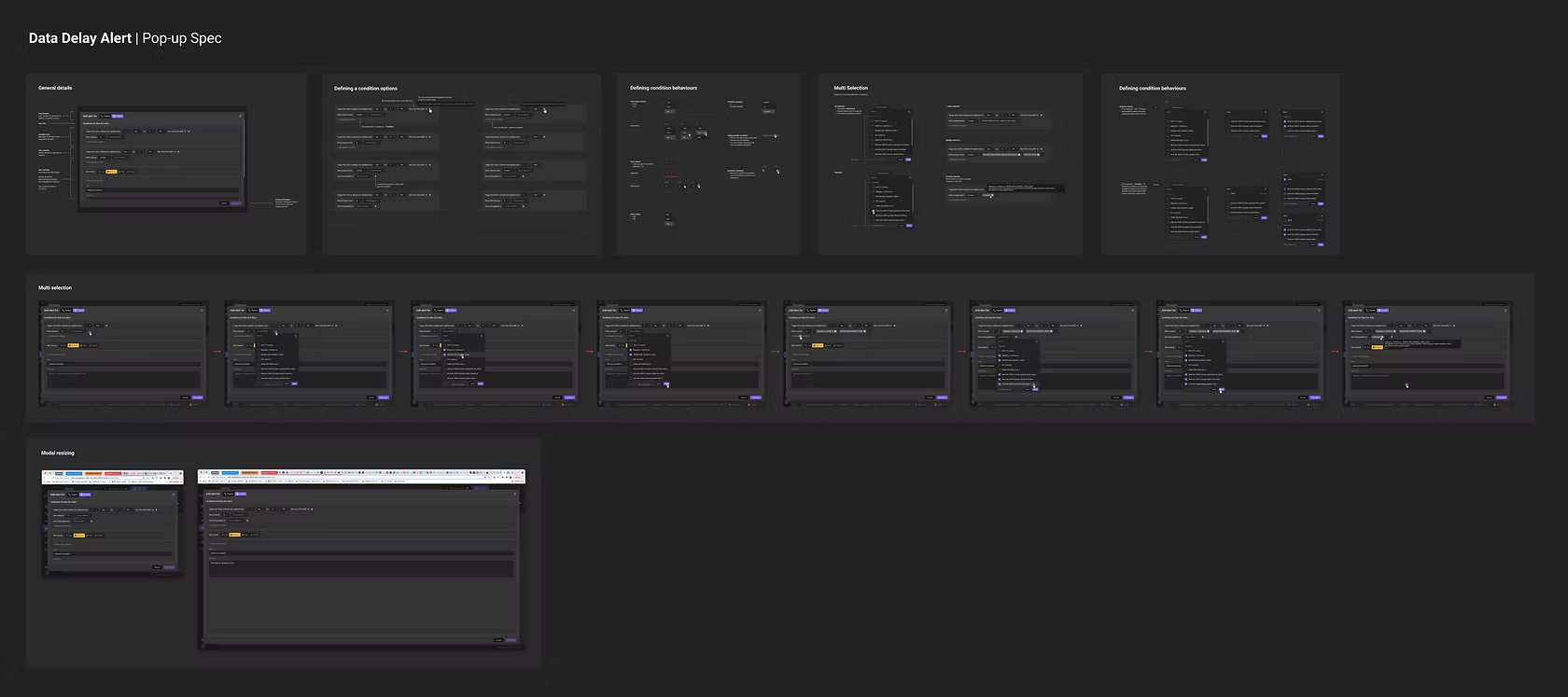
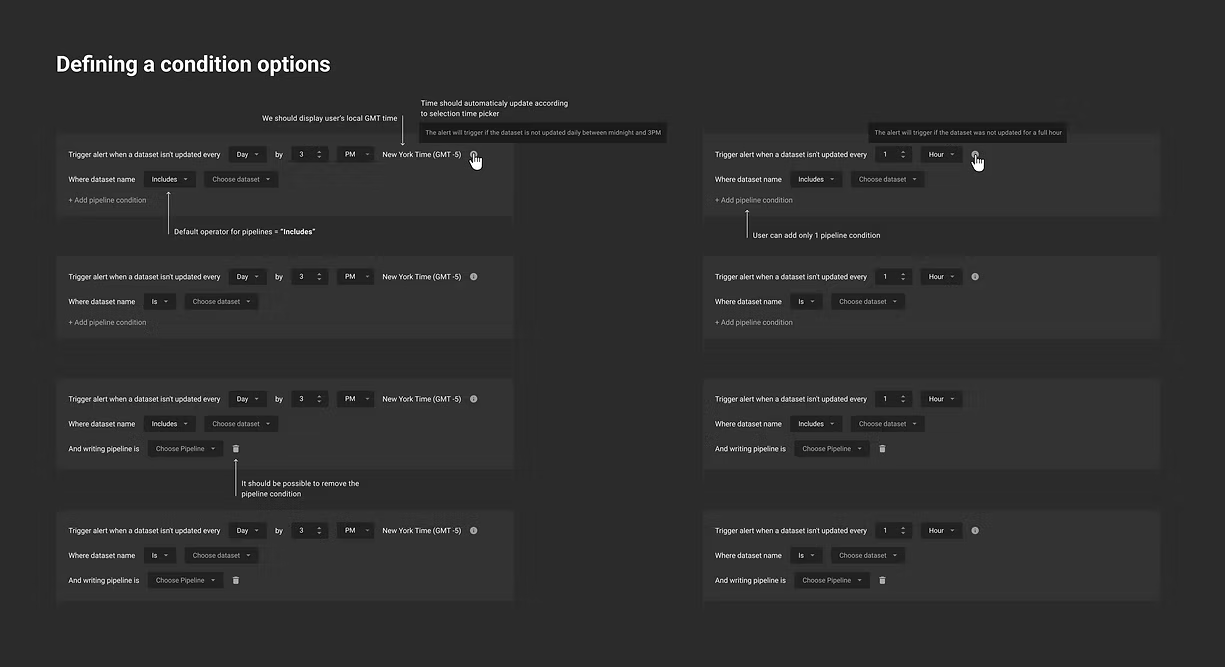
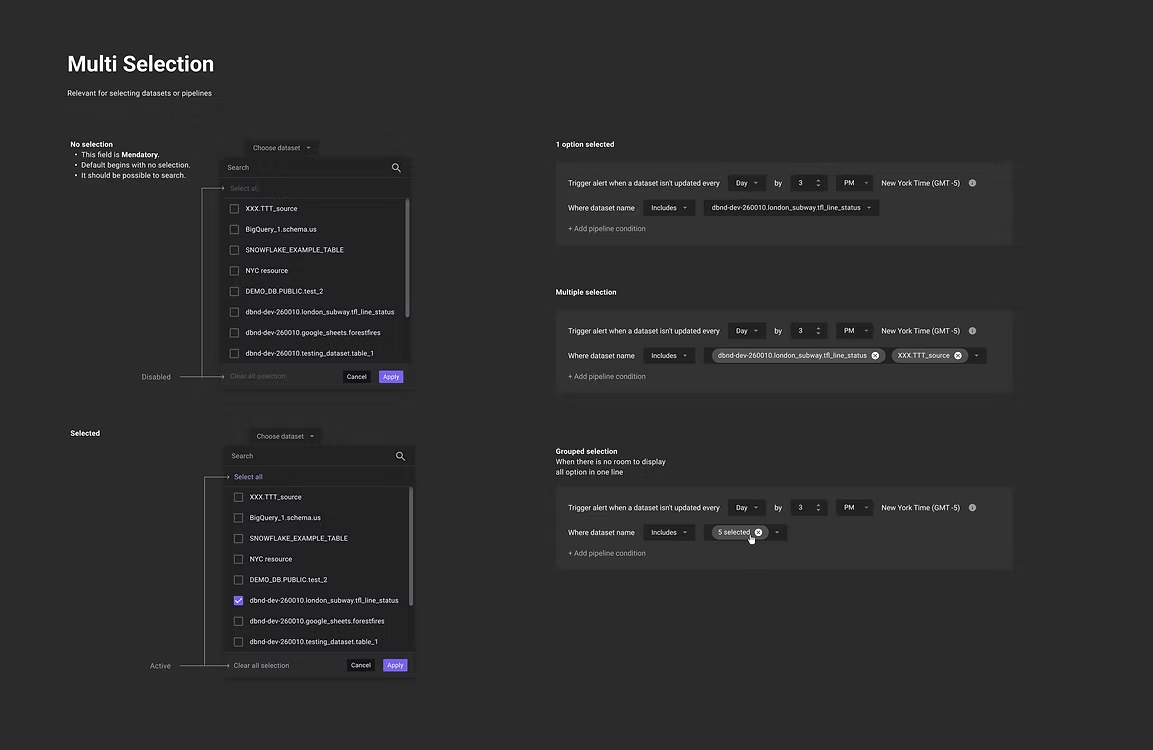
I created detailed specs, presenting different use cases and flows, with high-fidelity design. Together with the front-end team, we defined different interactions and validation behaviors.
First Released Learning
Eventually, when the first iteration was on the air, we started collecting feedback from users.
Main good feedback:
- A conversational and direct new experience is more clear.
- The user's attention is focused on one alert.
- Setting an alert on multiple targets is super valuable for data engineers' workflow.
Need improvement:
- Multi-selection dropdown interaction was confusing. Users couldn't understand the difference between them.
- Users wanted more details about how the alert is working.
I decided to address the feedback during the following iterations.
Iteration No.2
Data Quality Check
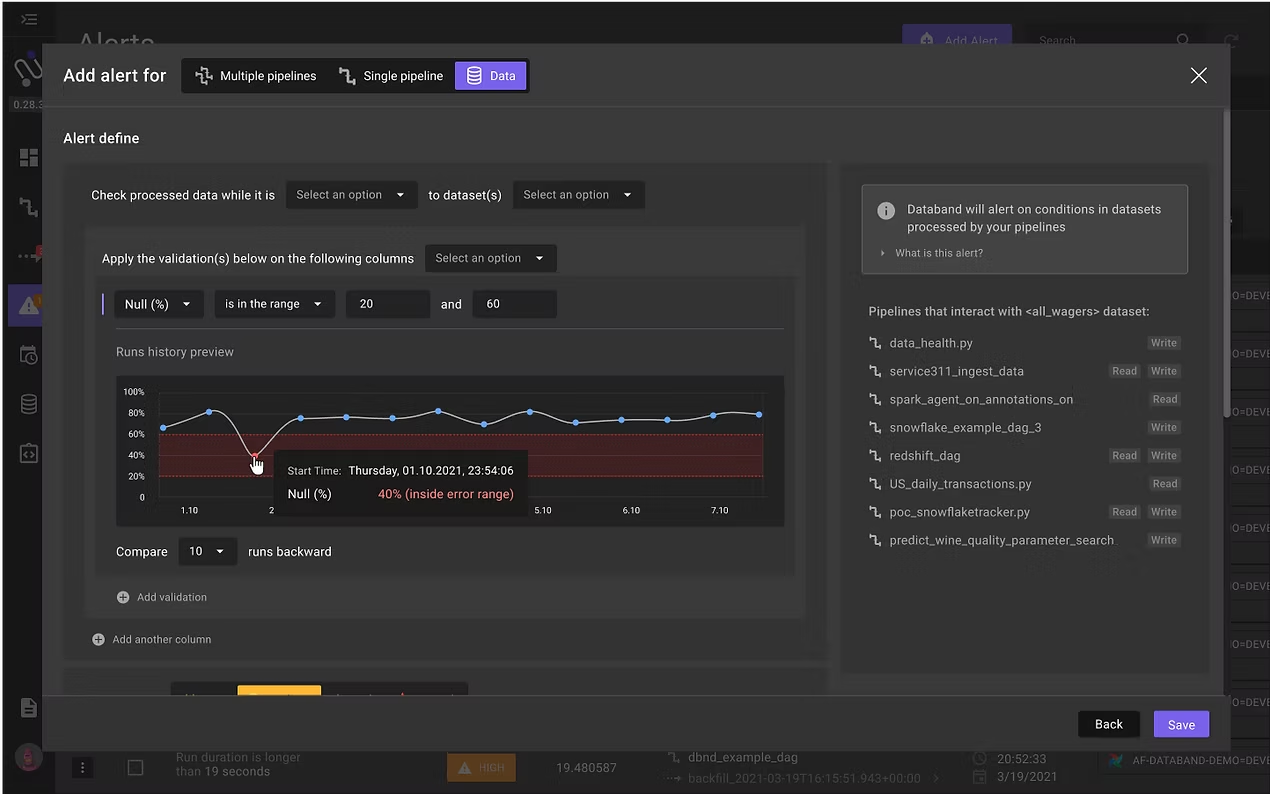
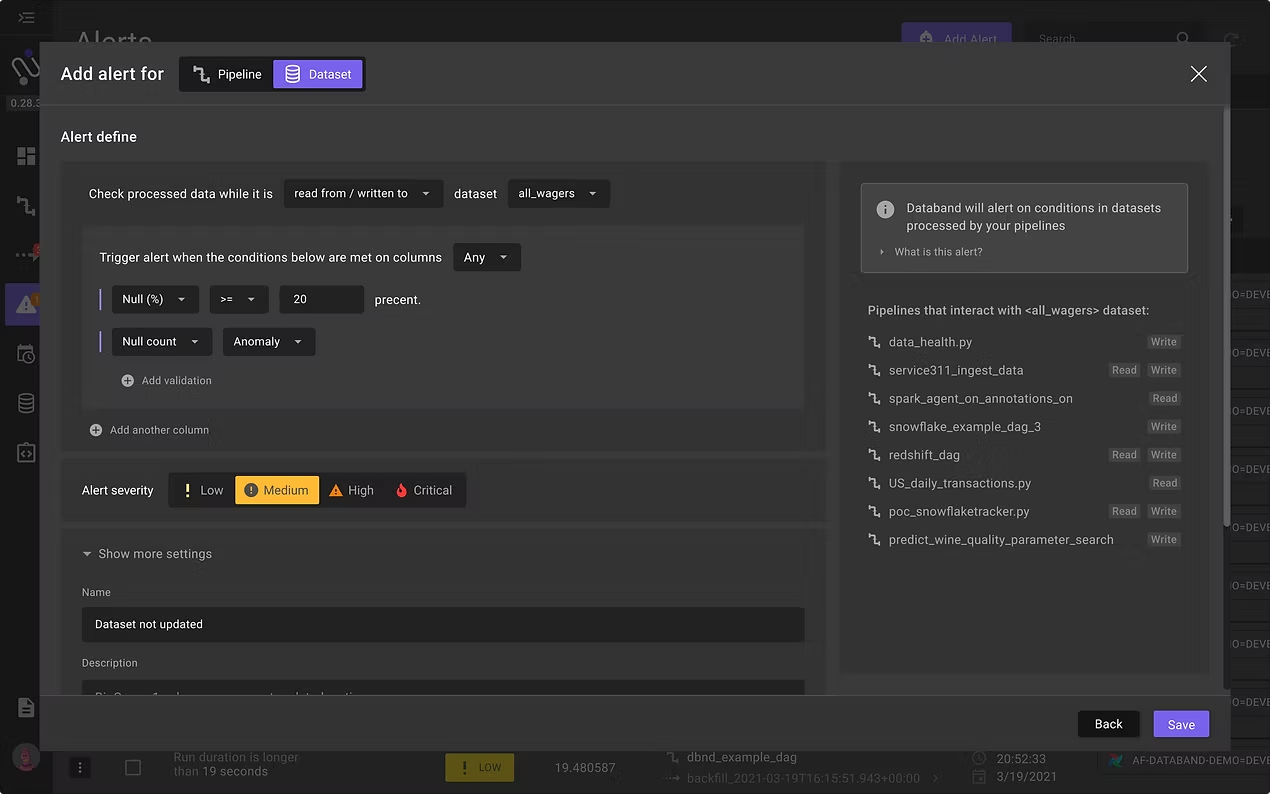
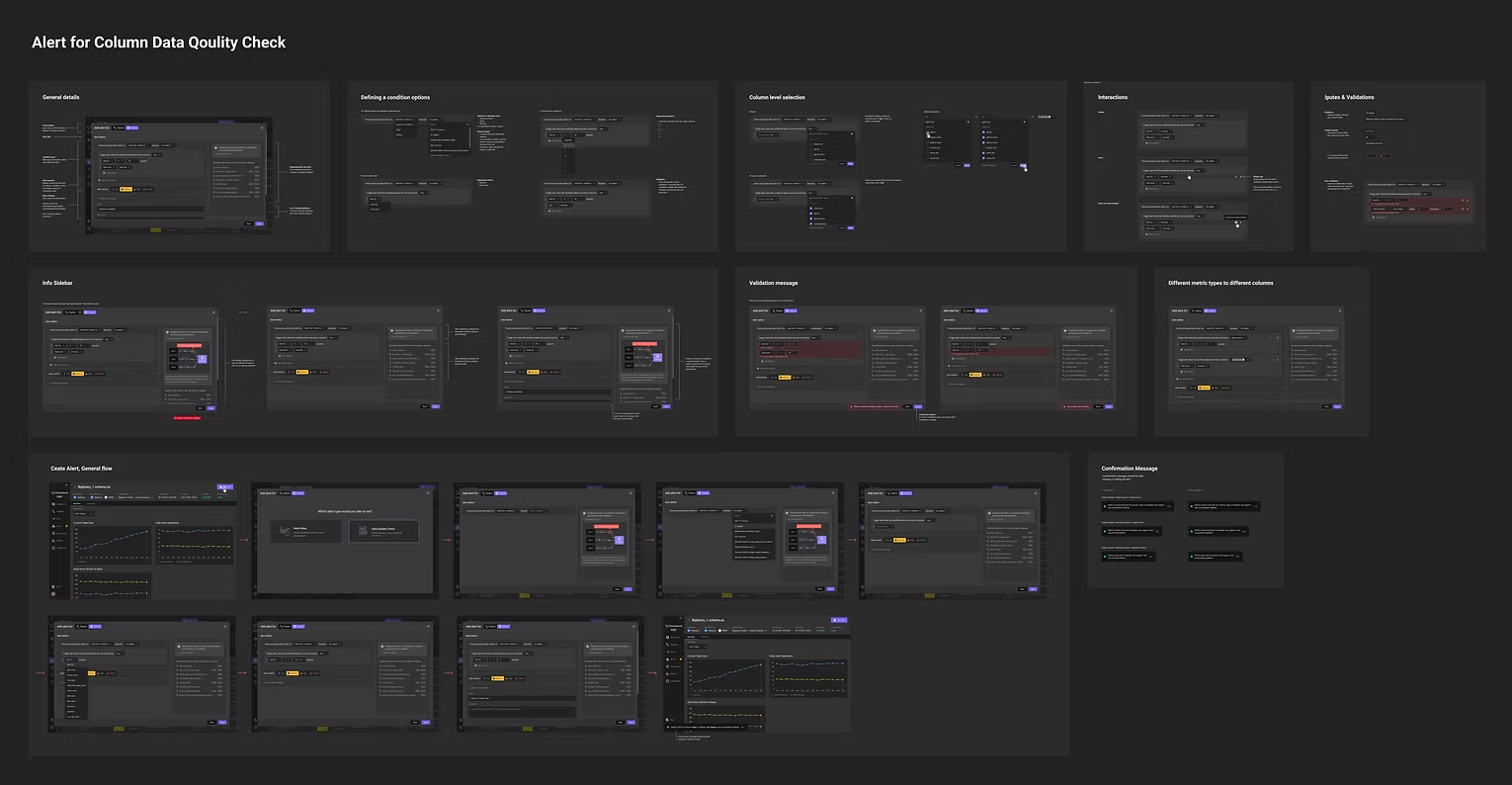
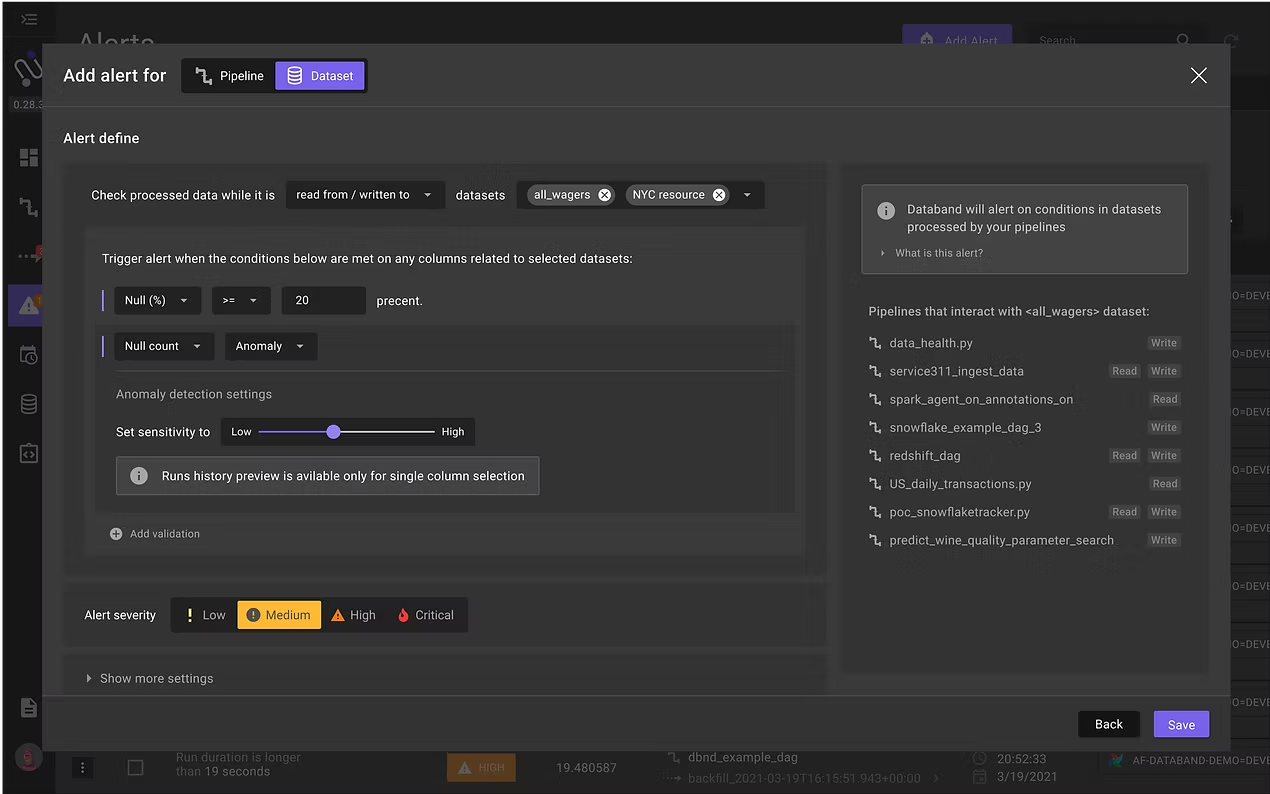
According to users' requests, the next iteration included the capability to set alerts on different metrics for column-level data. The new alert included setting alerts to one or more columns of a dataset, on different metrics like anomaly, nulls, and metadata statistics.
Users' Feedback
When users started working with the new data quality alert, we learned that users are missing 2 important things, that were scoped out because of technical priority:
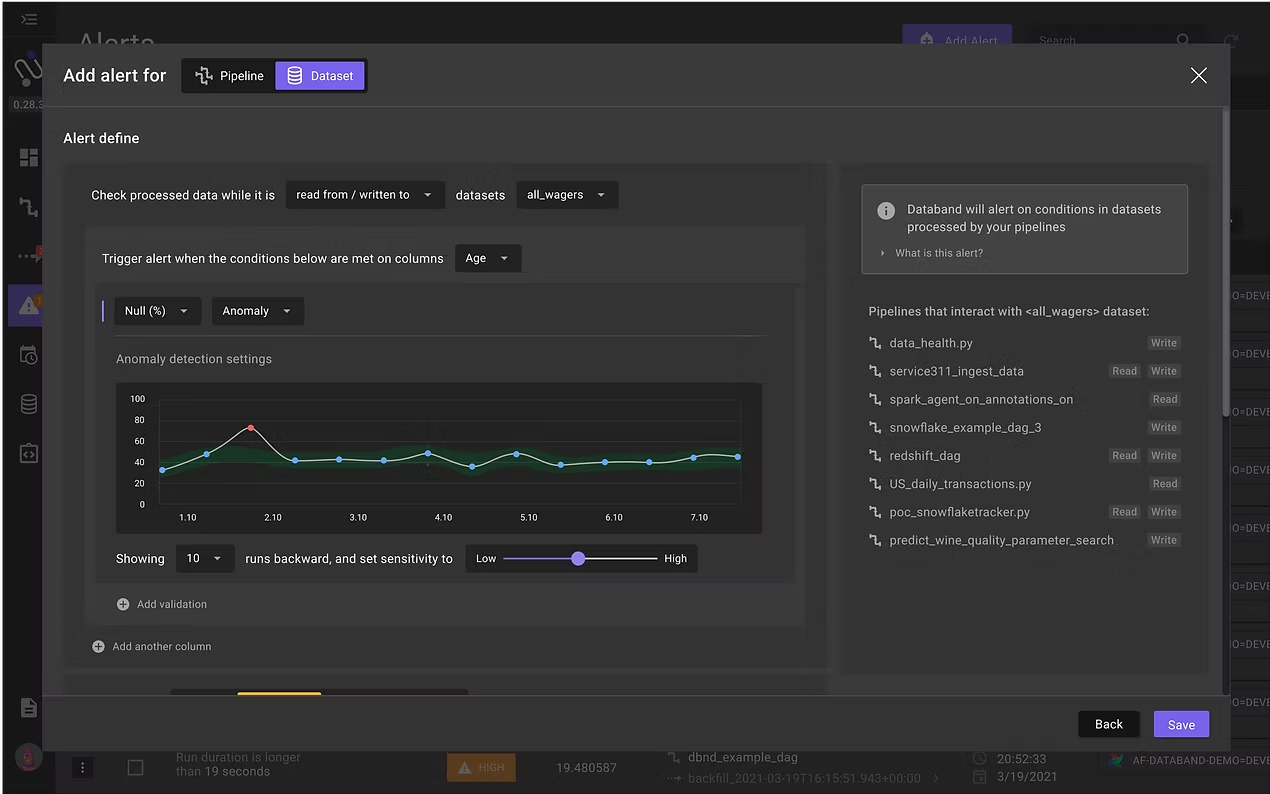
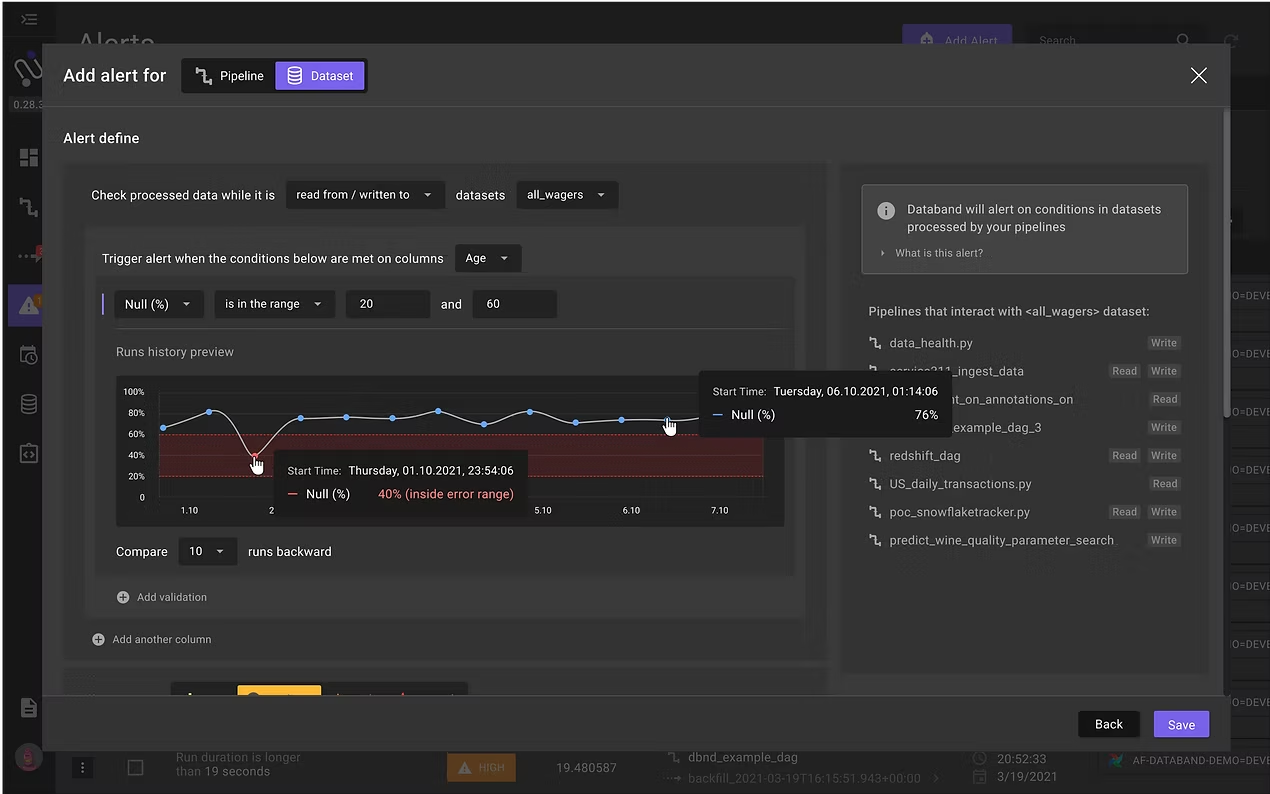
- Anomaly/Range detection - Users were looking for visual anomaly detection range, otherwise they can't really know what to expect from when an alert would be triggered. So we added a graph with anomaly detection, based on previous data that was collected.
- Alert on multiple datasets - Users were missing the ability to set an alert on multiple datasets at once.
Those requests were quite critical for users, so we invested the following sprint in adding those requests.
Iteration No.3
Choose an Owner / Receiver to be Notified
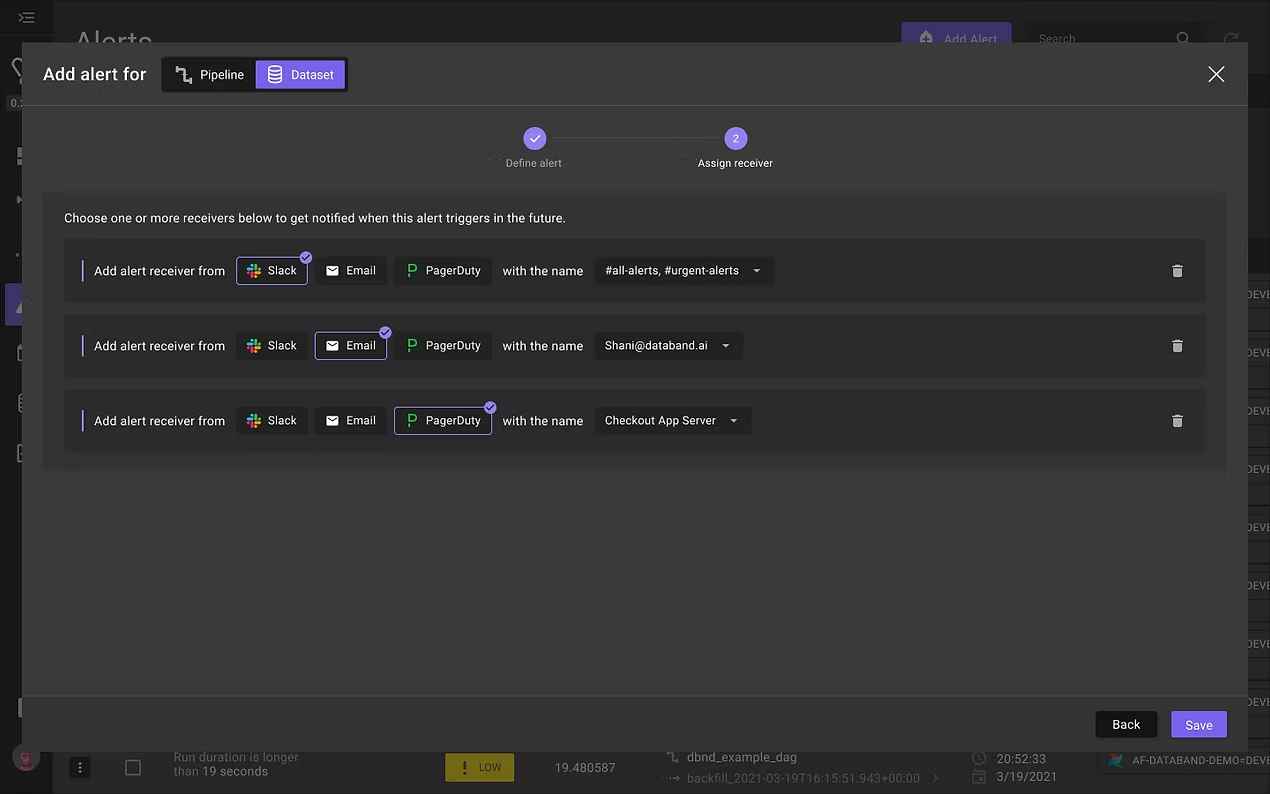
Now was the time to approach another step from the original concept - assigning different receivers for different alerts. Until this point, it was possible to set only one receiver for triggered alerts. The ability to choose different receivers per alert rule was a deal-breaker. Different people inside the same team or company were responsible for different pipelines, and they wanted to get only the triggered alerts relevant to them.
We took advantage to build this feature upon a request that came from an important client; adding integration for the PagerDuty receiver.
The experience was supposed to be very short and simple:
- Select one of the receivers that are integrated with the system - Slack, Email, or PagerDuty.
- Choose email, slack channel, or contact person, who would be notified.
Iteration No.4
Simplify the Experience for Assigning a Receiver
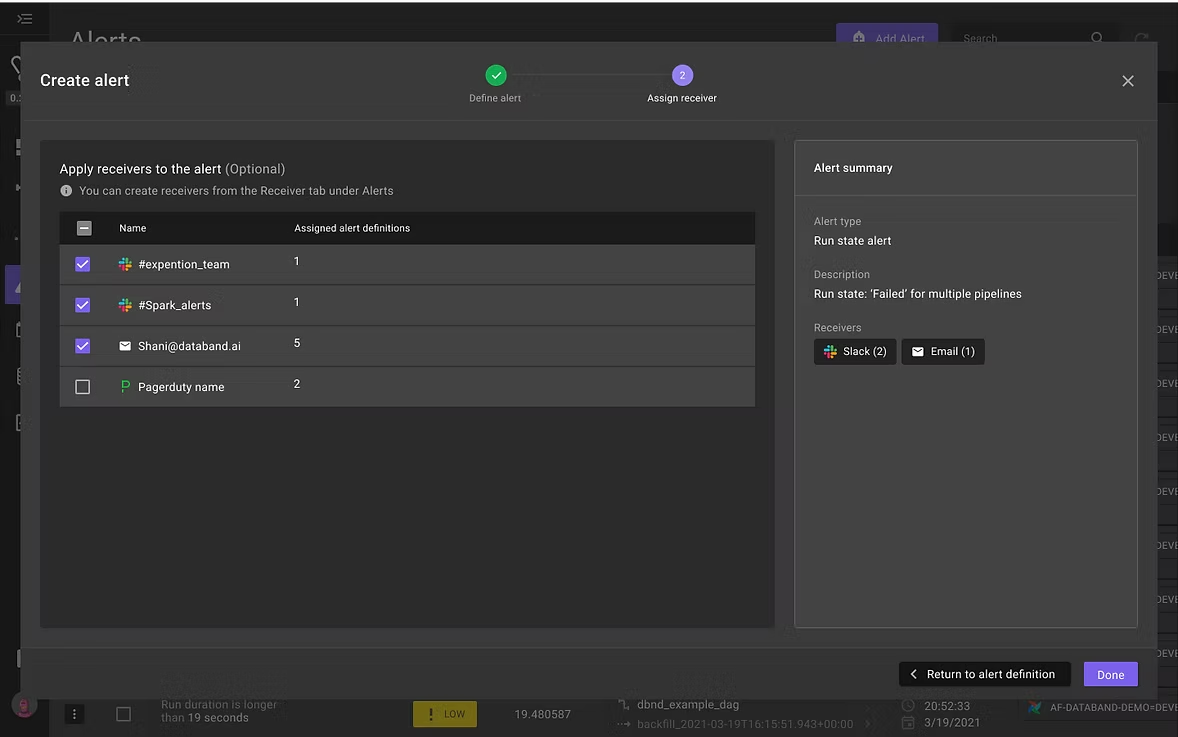
We quickly learned that the UI for selecting a receiver was really hard to understand, which ended up with customers not using it. We updated the experience into a list that exposes all possible receivers from the start, so the user only needs to choose which receiver they want notified.
Iteration No.5
Creating an Alert on Multiple Assets
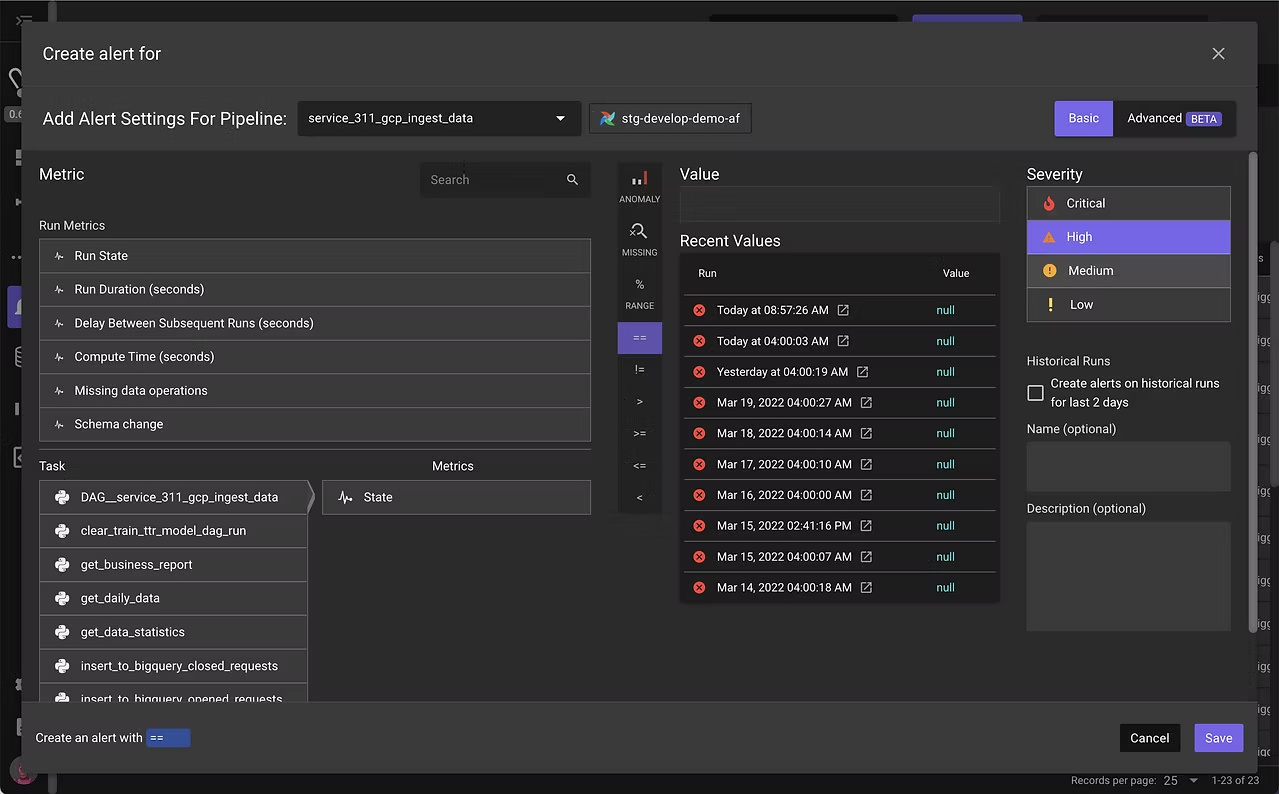
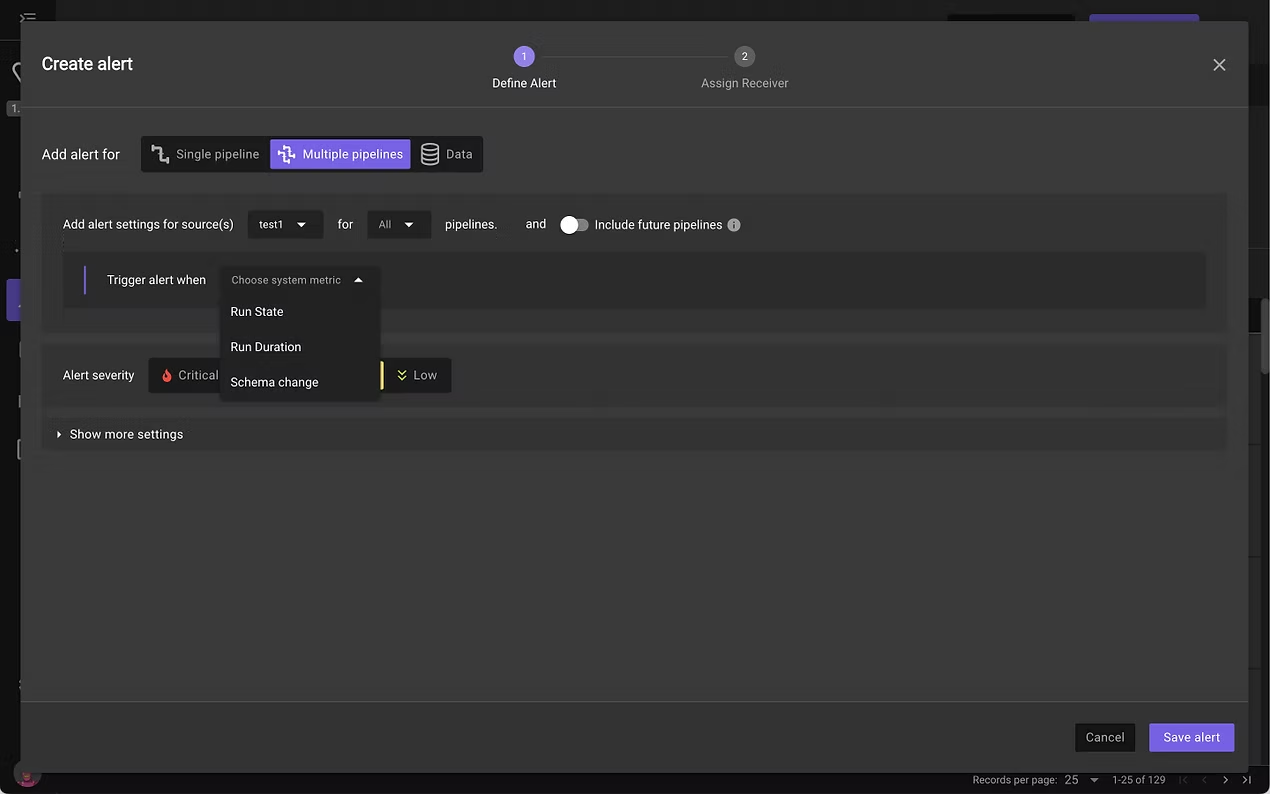
After introducing the ability to set a data quality alert on multiple datasets, customers asked for the same capability for the 3 most popular pipeline alerts: Run State, Run Duration & Schema Change.
We were looking for a quick way to validate and were wondering if to add multiple selections to the old alert editor, but we faced huge product and UX challenges that solving, would at least double our scope; the old editor supported setting an alert on specific tasks inside pipelines.
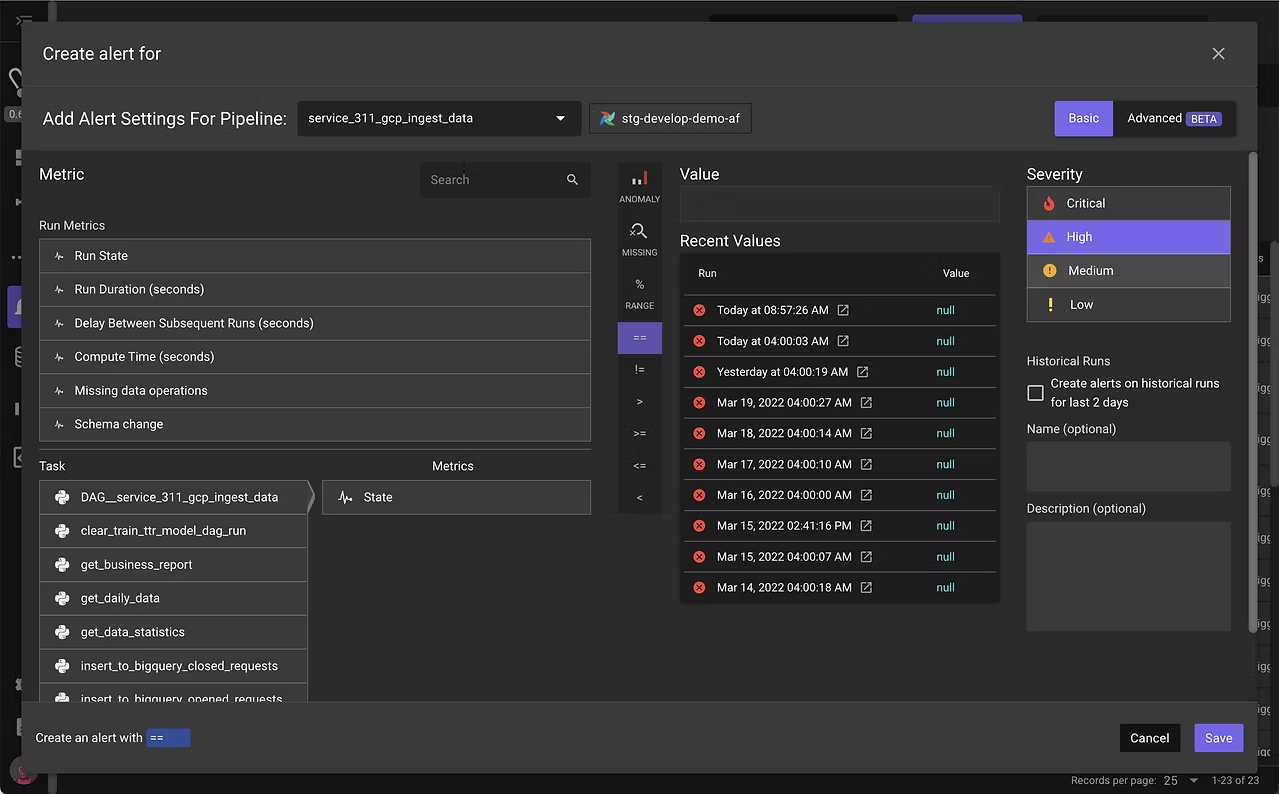
We knew that on our future road map we plan to solve the complexity of setting alerts on entire pipelines vs inner tasks. So for this iteration, we decided to add multi selections for those 3 alerts, using the new experience pattern. This would give us a quick solution that we can validate with users.
Iteration No.6
Users are Creating Duplicated Alerts
Our customer success team started to notice that for some reason customers are creating duplicated alerts. talking to them raised a few problems:
- They were receiving a lot of spam alerts, which ended up with ignoring some of the alerts or turning them off.
- The user didn't know if they or someone else has already set up an alert on a specific asset.
We realized that the problem was in our experience, which allowed creating similar alerts without warning the users that they are about to do so.
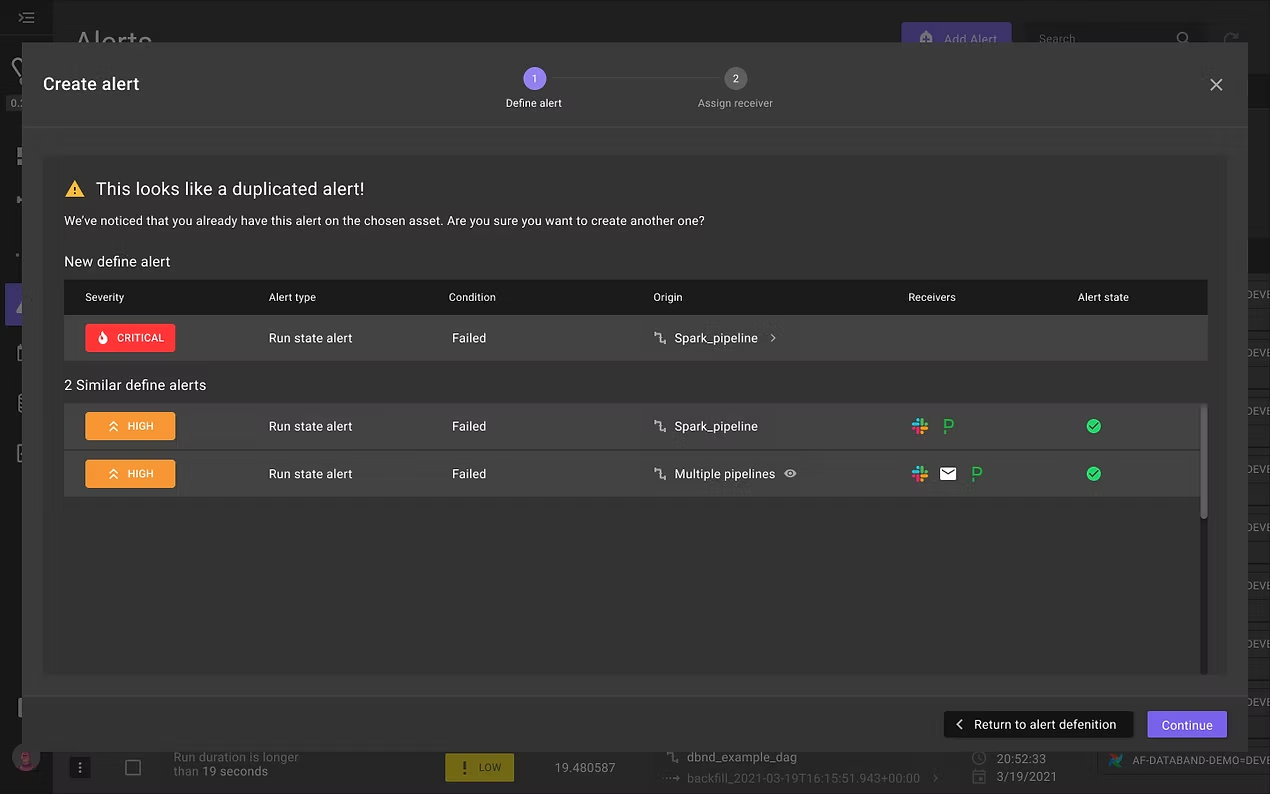
An alert considers duplicated if there is a similarity in 3 parameters:
- Alert type
- Condition
- Origin of assets
The solution
In case we recognize that the user setting an alert that is similar to existing, we show him as part of the create alert flow, a validation screen which warn him that he is about to create a duplicated alert, and present him details about those alerts.
Iteration No.7 (WIP)
Creating an Alert for Multiple Assets
Lately, we working on unifying the entire alert experience, and tackling more of the major problems in alert creation products.
Product requirements:
- All alerts on pipelines should support the complexity of setting alerts on the entire pipeline vs alerts on inner tasks.
- All alerts should be applied to single or multiple assets.
UX requirements:
- Users should understand what the alerts suppose to test, and giving 1 or more examples.
- 1 coherent experience for all alerts - Today it includes 3 different experiences with different capabilities.
- Old experience is confusing, not clear, and not friendly to use.
- The conversation UX pattern is not optimized for the localization of different languages.
Assumptions we had:
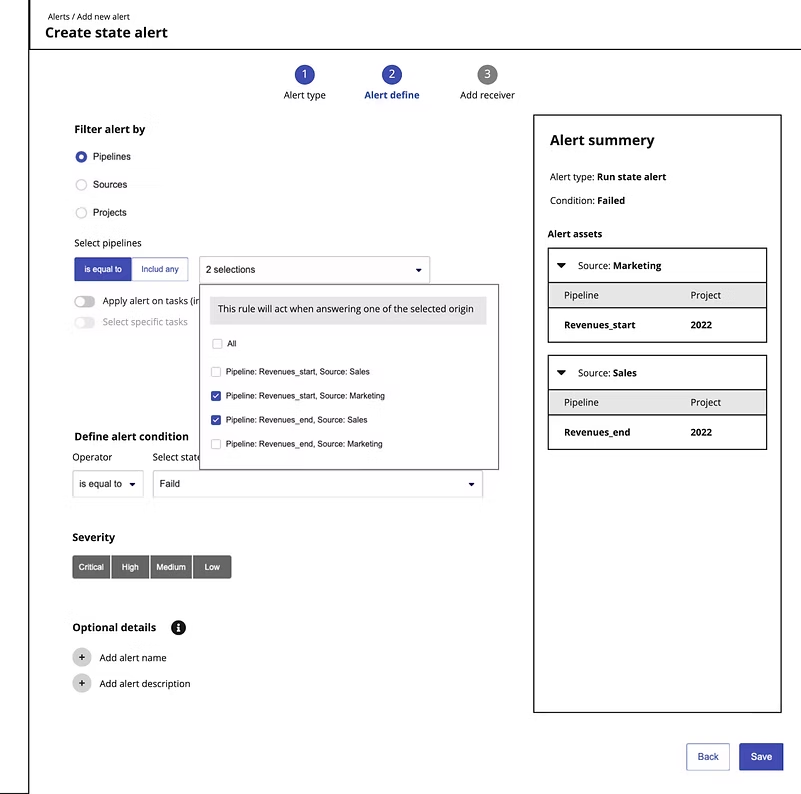
- User wishes to filter according to source or project, might be both of them together.
- It is important the user would know from the start if he sets an alert on the entire pipeline or on tasks level.
I create a low-fidelity mockups in order for the product manager and I are could explore and refine different ideas, and use cases, and collect feedback from customers. Each version starts with assumptions that we validate with customers.
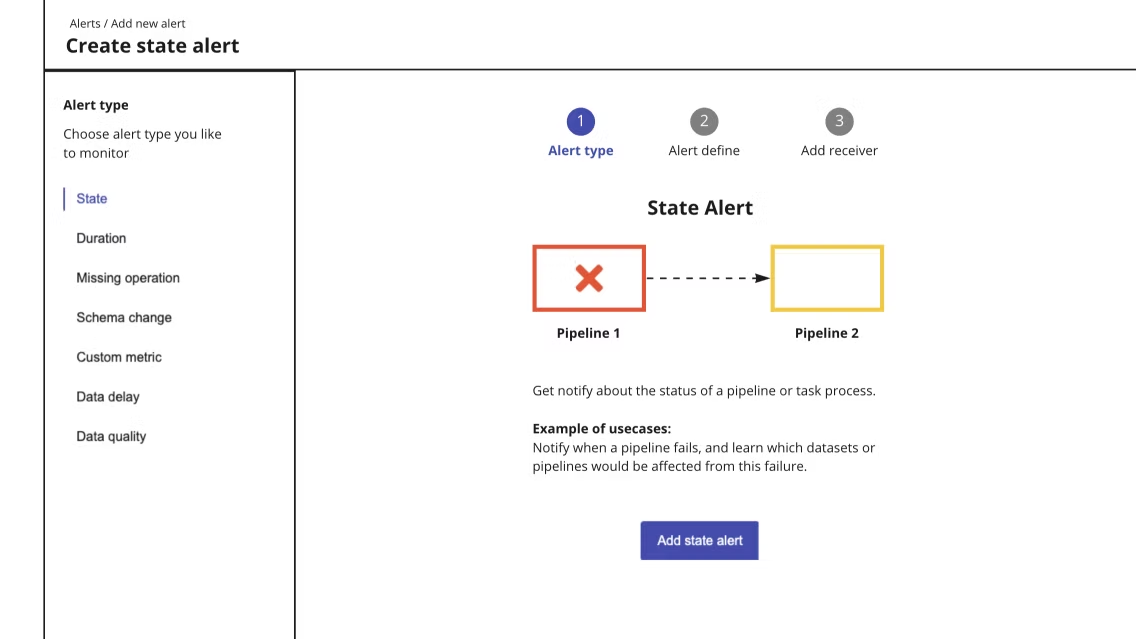
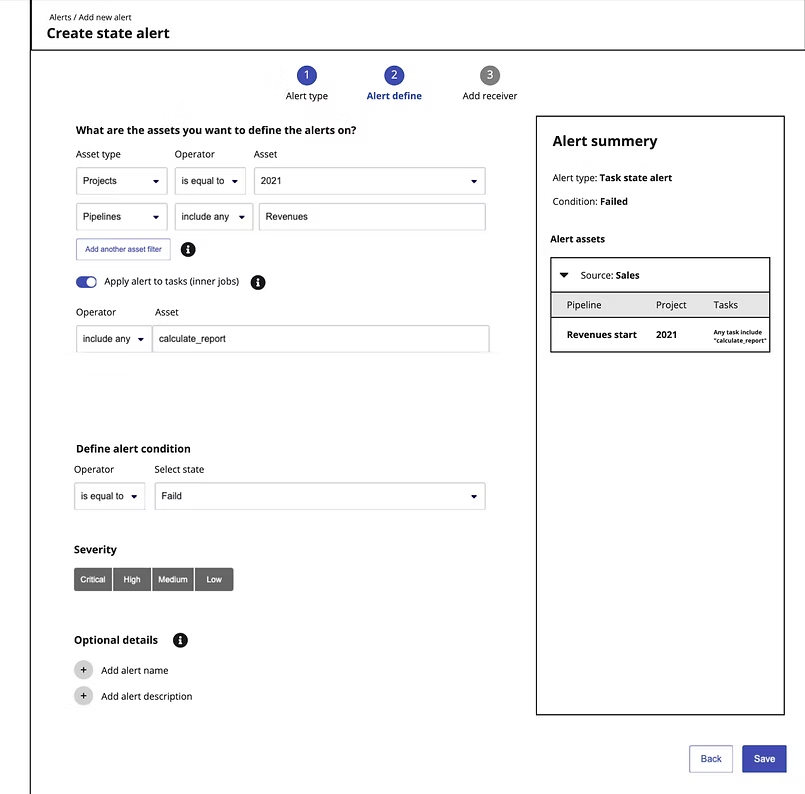
You can see a prototype example for one of the latest concepts.
Note: This version is still in the ideation phase.
Usability feedback
We tested this version with our customers, and we learned some good & bad insights.
The good feedback:
- People loves the Summary part, "Setting an alert can be complicated and it is good I can see it all the time"
- The gallery which explain the alert and it is good there are some use cases examples.
Less good insights:
- Sometimes people missing that they need to choose if setting alert to the entire pipeline or to inner tasks.
- Even when users are not missing this option, they are not always understand what the different.
- Filter pipelines assets according to source and projects together is confusing. Seems that this is not useful scenario.
Adopting the feedback
After the testing we did, we understood the we need to update a little our assumptions:
- If the user wishes to filter according to source or project, he probably wishes to create alerts on the level of pipelines or any tasks of one or more pipelines.
- The user would probably filter according to projects or sources, but not both of them.
- Setting task alerts is derived from the context of specific pipeline.
UX changes:
- A user is asked to filter from the start according to source, project, or pipeline.
- Then we asked him about asset selection.
- Applying an alert to a specific task is optional only when selecting a specific pipeline. The user needs to toggle on the options related to the tasks.
- It is not possible to cross-filtering according to source & project together.
Outcomes
What Changed
Over 7 releases, the alert creation experience went from one of Databand's most painful interactions to a self-serve workflow that data engineers could complete without customer success involvement. Key outcomes:
- Alert types grew from a single pipeline alert to a full suite covering data delay, column-level quality, anomaly detection, multi-asset selection, and per-alert receiver configuration.
- The conversational, step-by-step pattern significantly reduced cognitive load - usability testing showed users understood the new flow immediately, compared to needing guided support with the original.
- The duplicate alert detection (Iteration 6) directly reduced alert spam and the CS tickets that came with it - customers were turning off alerts because they were getting too much noise.
- Multi-asset selection, introduced in Iterations 2 and 5, unlocked a workflow that was previously only possible by creating alerts one at a time.
Reflection
What I Would Do Differently
The conversational UX pattern was the right call for simple, single-asset alerts - users responded to it immediately and it tested well. But as the product grew to support multi-asset scenarios, pipeline-vs-task hierarchy, and per-alert receivers, the pattern started showing its limits. We ended up with three different experiences that each solved a piece of the problem but didn't feel like a coherent system.
If I were starting from scratch, I would have invested more time upfront in designing the mental model rather than the interface. The core question - "is this alert about a pipeline, a task inside a pipeline, or a dataset?" - was something users consistently struggled with across every iteration. Getting a cleaner answer to that question early would have shaped a more extensible foundation and saved several rounds of rework.
תוצאות עיקריות
מה הפרויקט השיג
יצירת התראות עצמאית
התהליך המחודש אפשר למהנדסי דאטה להגדיר התראות בעצמם, בלי להישען על צוות ה-customer success, תלות שהייתה חסם קבוע בחוויה המקורית.
תמיכה בכמה נכסים
נוספה האפשרות להגדיר התראה על כמה datasets ו-pipelines בפעולה אחת, תהליך שקודם דרש ליצור התראות אחת אחת.
מניעת התראות כפולות
נוסף לתהליך היצירה זיהוי מוקדם של כפילויות, שהפחית את הצפת ההתראות ואת פניות התמיכה שנבעו ממנה. משתמשים יכלו לראות אם כבר קיימת התראה דומה לפני שיצרו חדשה.
מחזור ספרינט מבוסס מחקר
הכנסתי ניתוח מתחרים ומשוב משתמשים איטרטיבי למחזור ספרינט שלא כלל אף אחד מהם. התהליך נמשך מאז כחלק קבוע מעבודת הצוות: שינוי מערכתי, לא פרויקט חד-פעמי.
מערכת ההתראות של Databand
סקירה
Databand (שנרכשה על ידי IBM) היא כלי data observability פרואקטיבי למהנדסי דאטה, שעוזר לזהות ולפתור בעיות בנתונים. הערך המרכזי ש-Databand נותנת ללקוחות שלה הוא לתפוס נתונים פגומים לפני שהם פוגעים בעסק.
מערכת ההתראות של Databand היא המנוע המרכזי שבעזרתו לקוחות עוקבים אחרי הנתונים שלהם בתנועה. לכן עורך הגדרת ההתראות הוא חלק אסטרטגי וחשוב מאוד במערכת. בעזרת כללי התראה, לקוחות בוחרים איזה מדד ואילו נתונים או תהליכי pipeline הם רוצים לנטר.
כשהגעתי ל-Databand, יצירת התראה הייתה אחת החוויות הכואבות במוצר עבור המשתמשים, ואחד החלקים הקשים ביותר לעיצוב.
מטרות
מטרות על
מטרות מוצר:
- תמיכה בסוגי התראות נוספים.
- יותר משתמשים ייצרו יותר התראות בלי עזרה של צוות ה-customer success של Databand.
- יצירת התראות על כמה נכסים: pipelines, tasks או datasets.
- הגדרת התראות על נתונים.
- הגדרת התראות ברמת העמודה.
מפת הדרכים של ה-UX:
- יצירת התראה צריכה להיות קלה, ומשתמשים צריכים להצליח לעשות אותה לבד.
- לפשט ככל האפשר את המורכבות של הגדרת התראות על נכסים ותהליכים שונים.
התפקיד שלי
אחריות מלאה, מההתחלה ועד הסוף
הייתי המעצב המוביל של חוויית יצירת ההתראות לאורך כל התקופה שלי ב-Databand, ואחראי על תהליך העיצוב המלא לאורך 7 גרסאות איטרטיביות. זה לא היה handoff של ספרינט בודד, אלא מאמץ עיצובי מתמשך שהתפתח יחד עם צורכי המשתמשים, היכולות הטכניות והעדיפויות העסקיות.
ניהלתי מחקר משתמשים בכמה ערוצים (ניתוח פניות תמיכה, ראיונות משתמשים, הקלטות סשנים ב-Smartlook וצפייה בדמואים), הגדרתי עם ה-PM את אסטרטגיית ה-UX ואת הדרישות, יצרתי קונספטים מ-wireframes ב-lo-fi ועד מפרטים pixel-perfect, הרצתי בדיקות שמישות עם לקוחות אמיתיים, ועבדתי צמוד עם צוות הפיתוח לאורך הפיתוח וה-QA. הכנסתי גם את מחקר המתחרים ואת המשוב האיטרטיבי למחזור הספרינט של הצוות, תהליך שלא היה קיים לפני שהצטרפתי.
מחקר
מחקר משתמשים
למדנו איך משתמשים חווים את עורך ההתראות הישן דרך 4 ערוצים עיקריים: פניות לתמיכה, ראיונות משתמשים, צפייה בהקלטות של דמואים ללקוחות פוטנציאליים, וצפייה בהקלטות משתמשים ב-Smartlook.
ממצאים עיקריים:
- משתמשים לא יודעים מאיפה להתחיל.
- קשה להבין את החוויה הישנה.
- חוסר ביטחון בממשק.
- הגדרת התראה מורכבת מדי בשביל שמשתמשים יעשו אותה לבד, ובסוף הם מבקשים עזרה מה-customer success.
- אין היררכיה ברורה בממשק.
מחקר
מחקר מתחרים
כדי להבין איך לעצב את החוויה הטובה ביותר להגדרת התראה על נתונים ועל pipelines, חקרתי מתחרים ישירים ועקיפים. ניסיתי להבין איך אחרים עונים על אתגרים דומים לאלה של משתמשי Databand, אילו פיצ'רים אפשר לאמץ, וחיפשתי פתרונות ודפוסי UX/UI שיכולים לשמש כרפרנס או כהשראה.
ממצאים עיקריים:
- נהוג להתחיל יצירת התראה מ-preset.
- תהליך הגדרת ההתראה מחולק לכמה שלבים.
- UX שיחתי להגדרת כלל ההתראה.
- נהוג להציג תצוגה מקדימה של נתוני עבר (אם יש), כדי לעזור למשתמשים לבחור ערכי סף נכונים.
- בחירת הנמען והפלטפורמה שיקבלו הודעה במקרה של הפרת כלל.
- רצוי שתהיה פעולת בדיקה כלשהי.
- דפוס UX נפוץ: הגדרת ההתראה נעשית כחלק מחוויה שיחתית.
- דפוס נוסף: מבנה של "If condition".
אידיאציה
החזון לחוויית יצירת ההתראה
המטרה הייתה לעצב חוויה גמישה, שיכולה לגדול עם המורכבות ועם התראות שיתווספו לאורך זמן.
ידענו שבאיטרציה הראשונה נוסיף התראת Data Delay, אז השתמשתי בתרחיש הזה כדי ליצור flow של wireframes ב-low fidelity, לסיעור מוחות ולשיתוף רעיונות בתוך צוות המוצר, ולקבלת משוב מה-customer success.
איטרציה 1
ללמוד על בעיות באיכות הנתונים
יצירת ההתראה החדשה התחילה מבקשה שחזרה אז שוב ושוב ממשתמשים: הם רצו לדעת כשמשהו לא בסדר באיכות הנתונים שלהם, ולקבל הודעה בכל פעם שיש בעיה בנתונים בתוך dataset מסוים. בשביל זה היינו צריכים להוסיף ניטור מתקדם, שבודק את מקור הנתונים או את תהליך ה-pipeline הרלוונטי.
מה זו בעיה באיכות הנתונים?
סימן אפשרי לנתונים בעייתיים הוא בעיה באחד ממדדי המטא-דאטה, כמו טריות הנתונים, כמות ערכי null, אנומליות וסטטיסטיקות של הנתונים. נתונים בעייתיים עלולים להיכנס ל-dataset היעד בלי שיתגלו, ולהשפיע בהמשך על מוצרי דאטה שנשענים עליו.
מתחילים בהתראת Data Delay
בשיחות עם משתמשים הבנו שלדעת מתי נתונים מתעדכנים באיחור נותן להם הרבה ערך, כסימן לכך שמשהו לא בסדר. לכן החלטנו לאפשר הגדרת התראת Data Delay על כמה datasets, כולל האפשרות לבחור datasets שקשורים ל-pipeline מסוים.
בהתחלה יצרנו רק את חוויית הגדרת ההתראה, בלי נמען ובלי גלריית התראות. השארנו זמנית גם את החוויה הישנה תחת התראות pipeline. בניתי אב-טיפוס שאפשר לנו לבדוק את החוויה החדשה עם כמה לקוחות. היה די ברור שהעיצוב החדש קל יותר לקריאה וברור הרבה יותר מהישן.
הכנת מפרט עיצוב לפיתוח
יצרתי מפרטים מפורטים שמציגים מקרי שימוש ו-flows שונים, בעיצוב high fidelity. יחד עם צוות ה-front-end הגדרנו את האינטראקציות ואת התנהגויות הוולידציה.
מה למדנו מהגרסה הראשונה
כשהאיטרציה הראשונה עלתה לאוויר, התחלנו לאסוף משוב ממשתמשים.
המשוב הטוב:
- חוויה שיחתית וישירה ברורה יותר.
- תשומת הלב של המשתמש ממוקדת בהתראה אחת.
- הגדרת התראה על כמה יעדים בבת אחת נותנת המון ערך ל-workflow של מהנדסי דאטה.
דורש שיפור:
- האינטראקציה של ה-dropdown עם הבחירה המרובה בלבלה. משתמשים לא הבינו את ההבדל בין האפשרויות.
- משתמשים רצו יותר פרטים על איך ההתראה עובדת.
החלטתי לטפל במשוב באיטרציות הבאות.
איטרציה 2
בדיקת איכות נתונים
בעקבות בקשות משתמשים, האיטרציה הבאה כללה את היכולת להגדיר התראות על מדדים שונים לנתונים ברמת העמודה. ההתראה החדשה אפשרה להגדיר התראה על עמודה אחת או יותר ב-dataset, על מדדים כמו אנומליות, ערכי null וסטטיסטיקות מטא-דאטה.
משוב משתמשים
כשמשתמשים התחילו לעבוד עם התראת איכות הנתונים החדשה, למדנו שחסרים להם שני דברים חשובים, שנשארו מחוץ ל-scope בגלל סדרי עדיפויות טכניים:
- זיהוי אנומליה / טווח - משתמשים חיפשו ייצוג ויזואלי של טווח זיהוי האנומליה, אחרת קשה לדעת מתי ההתראה תופעל. הוספנו גרף עם זיהוי אנומליות, על בסיס נתונים שנאספו בעבר.
- התראה על כמה datasets - למשתמשים הייתה חסרה היכולת להגדיר התראה על כמה datasets בבת אחת.
הבקשות האלה היו קריטיות למשתמשים, אז השקענו את הספרינט הבא בהוספה שלהן.
איטרציה 3
בחירת בעלים / נמען שיקבל את ההתראה
הגיע הזמן לגשת לשלב נוסף מהקונספט המקורי: שיוך נמענים שונים להתראות שונות. עד אז אפשר היה להגדיר רק נמען אחד להתראות שהופעלו. היכולת לבחור נמען שונה לכל כלל התראה הייתה deal-breaker: אנשים שונים באותו צוות או באותה חברה היו אחראים על pipelines שונים, ורצו לקבל רק את ההתראות שרלוונטיות להם.
כדי לבנות את הפיצ'ר, ניצלנו בקשה של לקוח חשוב: להוסיף אינטגרציה עם PagerDuty כנמען.
החוויה הייתה אמורה להיות קצרה ופשוטה מאוד:
- בוחרים אחד מהנמענים שמחוברים למערכת: Slack, Email או PagerDuty.
- בוחרים כתובת מייל, ערוץ Slack או איש קשר שיקבל את ההודעה.
איטרציה 4
פישוט החוויה של שיוך נמען
מהר מאוד למדנו שהממשק לבחירת נמען היה קשה מאוד להבנה, ובסוף לקוחות לא השתמשו בו. עדכנו את החוויה לרשימה שחושפת את כל הנמענים האפשריים מההתחלה, כך שהמשתמש רק צריך לבחור מי יקבל את ההודעה.
איטרציה 5
יצירת התראה על כמה נכסים
אחרי שהוספנו את היכולת להגדיר התראת איכות נתונים על כמה datasets, לקוחות ביקשו את אותה יכולת ל-3 התראות ה-pipeline הפופולריות ביותר: Run State, Run Duration ו-Schema Change.
חיפשנו דרך מהירה לבדוק את הכיוון ושקלנו להוסיף בחירה מרובה לעורך ההתראות הישן, אבל נתקלנו באתגרי מוצר ו-UX גדולים, שפתרונם היה לפחות מכפיל את ה-scope: העורך הישן תמך בהגדרת התראה על tasks מסוימים בתוך pipelines.
ידענו שבהמשך ה-roadmap אנחנו מתכננים לפתור את המורכבות של הגדרת התראות על pipelines שלמים לעומת tasks פנימיים. לכן באיטרציה הזאת החלטנו להוסיף בחירה מרובה ל-3 ההתראות האלה, בדפוס של החוויה החדשה. כך קיבלנו פתרון מהיר שאפשר לבדוק מול משתמשים.
איטרציה 6
משתמשים יוצרים התראות כפולות
צוות ה-customer success שלנו התחיל לשים לב שמשום מה לקוחות יוצרים התראות כפולות. בשיחות איתם עלו כמה בעיות:
- הם קיבלו הרבה התראות ספאם, ובסוף התעלמו מחלק מההתראות או כיבו אותן.
- המשתמש לא ידע אם הוא או מישהו אחר כבר הגדיר התראה על נכס מסוים.
הבנו שהבעיה הייתה בחוויה שלנו, שאפשרה ליצור התראות דומות בלי להזהיר את המשתמשים שהם עומדים לעשות את זה.
התראה נחשבת כפולה אם יש דמיון ב-3 פרמטרים:
- סוג ההתראה
- התנאי
- מקור הנכסים
הפתרון
כשאנחנו מזהים שהמשתמש מגדיר התראה שדומה להתראה קיימת, אנחנו מציגים לו, כחלק מתהליך יצירת ההתראה, מסך ולידציה שמזהיר שהוא עומד ליצור התראה כפולה ומציג את הפרטים של ההתראות הדומות.
איטרציה 7 (בתהליך)
יצירת התראה על כמה נכסים
לאחרונה אנחנו עובדים על איחוד של כל חוויית ההתראות, ועל טיפול בעוד כמה מהבעיות המרכזיות ביצירת התראות.
דרישות מוצר:
- כל ההתראות על pipelines צריכות לתמוך במורכבות של הגדרת התראה על pipeline שלם לעומת התראה על tasks פנימיים.
- כל התראה צריכה לחול על נכס אחד או על כמה נכסים.
דרישות UX:
- משתמשים צריכים להבין מה ההתראה אמורה לבדוק, עם דוגמה אחת או יותר.
- חוויה אחת עקבית לכל ההתראות. היום יש 3 חוויות שונות עם יכולות שונות.
- החוויה הישנה מבלבלת, לא ברורה ולא ידידותית לשימוש.
- דפוס ה-UX השיחתי לא מותאם ללוקליזציה לשפות שונות.
ההנחות שלנו:
- המשתמש רוצה לסנן לפי source או project, ואולי לפי שניהם יחד.
- חשוב שהמשתמש ידע מההתחלה אם הוא מגדיר התראה על pipeline שלם או ברמת ה-tasks.
יצרתי mockups ב-low fidelity כדי שה-PM ואני נוכל לבחון ולחדד רעיונות ומקרי שימוש שונים, ולאסוף משוב מלקוחות. כל גרסה מתחילה מהנחות שאנחנו מאמתים מול לקוחות.
אפשר לראות אב-טיפוס לדוגמה של אחד הקונספטים האחרונים.
הערה: הגרסה הזאת עדיין בשלב האידיאציה.
משוב מבדיקות שמישות
בדקנו את הגרסה הזאת עם לקוחות שלנו, ולמדנו כמה תובנות טובות ופחות טובות.
המשוב הטוב:
- אנשים אוהבים את חלק הסיכום: "הגדרת התראה יכולה להיות מסובכת, וטוב שאני רואה את זה כל הזמן"
- הגלריה שמסבירה כל התראה, וטוב שיש בה דוגמאות למקרי שימוש.
תובנות פחות טובות:
- לפעמים אנשים מפספסים שהם צריכים לבחור אם להגדיר התראה על pipeline שלם או על tasks פנימיים.
- גם כשמשתמשים לא מפספסים את האפשרות, הם לא תמיד מבינים מה ההבדל.
- סינון נכסי pipelines לפי source ו-project יחד מבלבל. נראה שזה לא תרחיש שימושי.
אימוץ המשוב
אחרי הבדיקות הבנו שצריך לעדכן מעט את ההנחות שלנו:
- אם המשתמש רוצה לסנן לפי source או project, כנראה שהוא רוצה ליצור התראות ברמת ה-pipelines, או על tasks כלשהם של pipeline אחד או יותר.
- המשתמש כנראה יסנן לפי projects או לפי sources, אבל לא לפי שניהם.
- הגדרת התראות על tasks נגזרת מההקשר של pipeline מסוים.
שינויי UX:
- המשתמש מתבקש לסנן כבר מההתחלה לפי source, project או pipeline.
- אחר כך שואלים אותו על בחירת הנכסים.
- החלת התראה על task מסוים אפשרית רק כשבוחרים pipeline מסוים. המשתמש צריך להפעיל את האפשרויות שקשורות ל-tasks.
- אי אפשר לסנן לפי source ו-project יחד.
תוצאות
מה השתנה
לאורך 7 גרסאות, חוויית יצירת ההתראות הפכה מאחת האינטראקציות הכואבות ביותר ב-Databand ל-workflow עצמאי שמהנדסי דאטה משלימים בלי מעורבות של customer success. התוצאות העיקריות:
- סוגי ההתראות גדלו מהתראת pipeline אחת לסט מלא שמכסה data delay, איכות ברמת העמודה, זיהוי אנומליות, בחירה של כמה נכסים והגדרת נמען לכל התראה.
- הדפוס השיחתי, שלב אחרי שלב, הפחית משמעותית את העומס הקוגניטיבי: בבדיקות שמישות משתמשים הבינו את ה-flow החדש מיד, לעומת הצורך בליווי בחוויה המקורית.
- זיהוי ההתראות הכפולות (איטרציה 6) הפחית ישירות את הצפת ההתראות ואת פניות התמיכה שבאו איתה. לקוחות כיבו התראות כי קיבלו יותר מדי רעש.
- בחירה של כמה נכסים, שנוספה באיטרציות 2 ו-5, פתחה workflow שקודם היה אפשרי רק ביצירת התראות אחת אחת.
מבט לאחור
מה הייתי עושה אחרת
דפוס ה-UX השיחתי היה ההחלטה הנכונה להתראות פשוטות על נכס בודד: משתמשים הגיבו אליו מיד והוא עבר טוב בבדיקות. אבל כשהמוצר גדל ותמך בתרחישים של כמה נכסים, בהיררכיה של pipeline מול task ובנמענים לכל התראה, הדפוס התחיל להראות את הגבולות שלו. בסוף היו לנו שלוש חוויות שונות, שכל אחת פתרה חלק מהבעיה, אבל יחד הן לא הרגישו כמו מערכת אחת.
אם הייתי מתחיל מאפס, הייתי משקיע יותר זמן מראש בעיצוב המודל המנטלי ולא בממשק. שאלת הליבה, "האם ההתראה הזאת היא על pipeline, על task בתוך pipeline או על dataset?", הייתה משהו שמשתמשים התקשו בו בעקביות בכל איטרציה. תשובה נקייה יותר לשאלה הזאת בשלב מוקדם הייתה יוצרת בסיס שקל יותר להרחיב, וחוסכת כמה סבבים של עבודה מחדש.