Will the run match the plan?האם ההרצה תתאים לתכנית?
An editor for building driving scenarios, designed so the author can see the gap between the plan and the run.עורך לבניית תרחישי נהיגה, שמראה ליוצר את הפער בין התכנון להרצה.
Overview
Someone has to build the near-miss
A self-driving team can't wait for the road to produce a dangerous moment, so someone builds one: take a recorded drive, add a car that cuts in, run it in simulation. That person plans what should happen. The simulation decides what does, because the vehicle under test drives itself.
The Scenario Designer is where they do it, from scratch or from a recording: the first two steps of Foretellix's flow. I designed it so the author can see the gap between plan and run: what is wrong before a preview, what happened in it, and what changed from the recording.
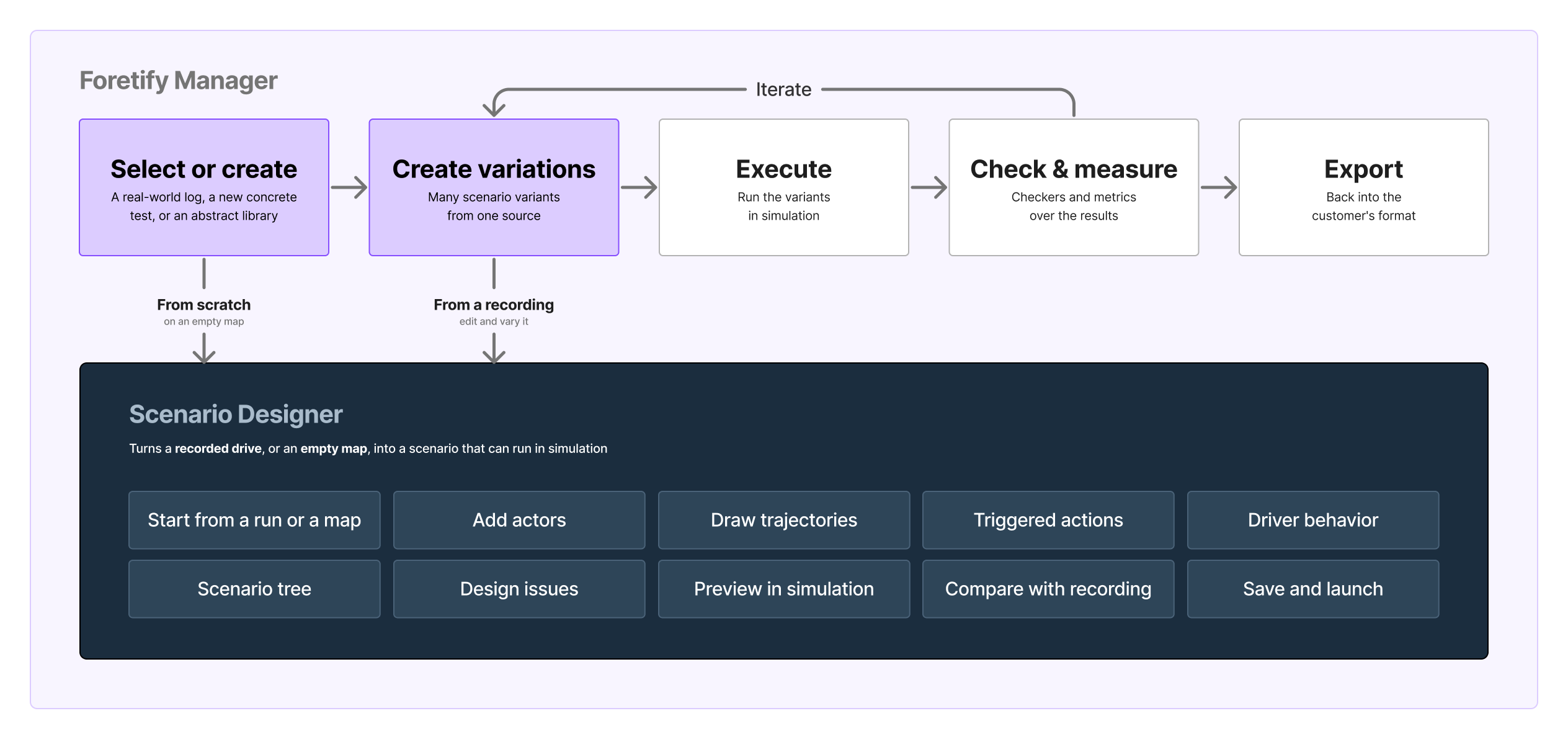
One question ran under every screen, and four design decisions came out of it: will the run match the plan?
The problem
A plan nobody can check until it runs
At first, users could only review and debug simulation results, not edit or create them. It took four steps:
- 1An export panel. The leanest start: Smart Replay, inside the run debugger. Keep recorded actors, change their speed or position, export a new test.
- 2New actors. They called for a complete editor. I started designing it while extending Smart Replay.
- 3A separate editor. A temporary step: Smart Replay left the debugger. It could vary a recording, not start from scratch.
- 4One editor. The Scenario Designer: new scenarios from scratch, and edits to existing results.
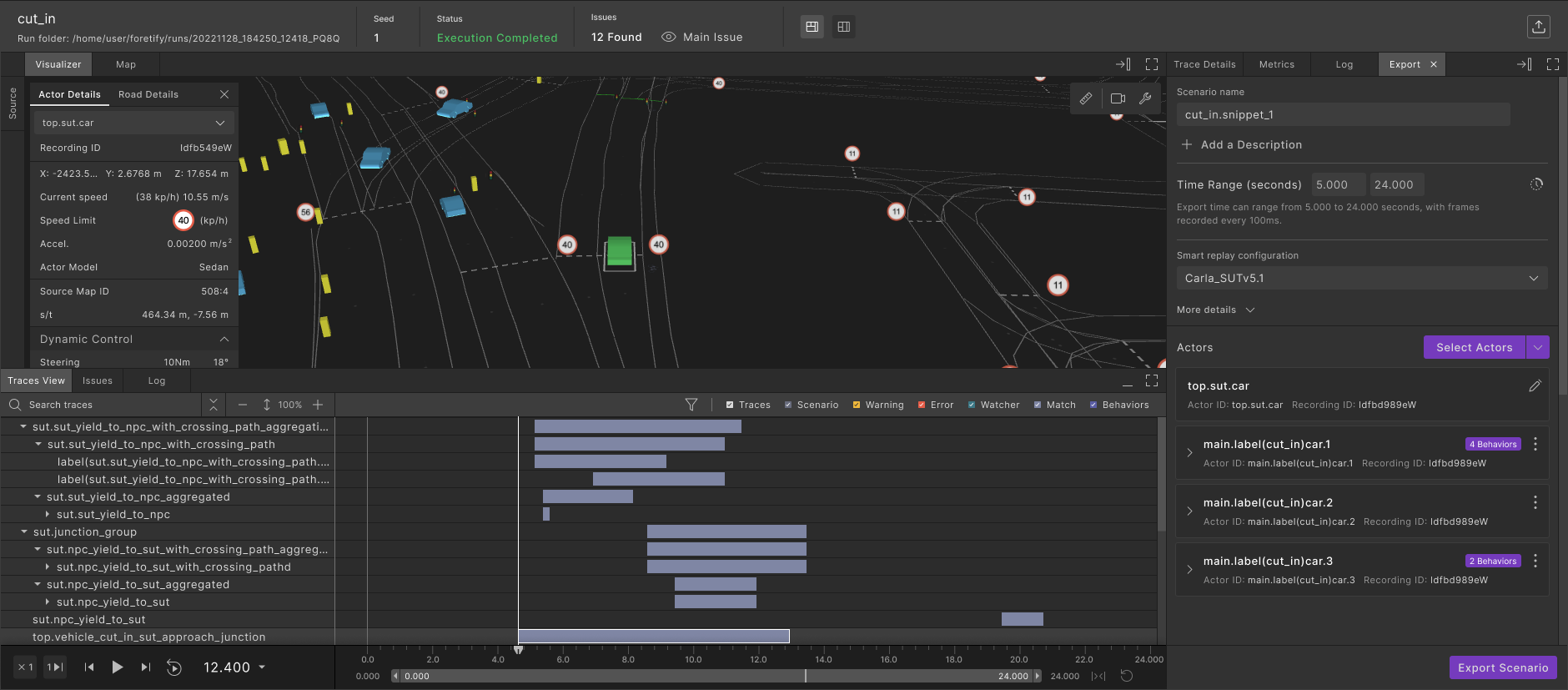
New actors also brought the harder problem, the one this case study is about. In a cut-in, the author adds a car that changes lane just in front of the vehicle under test. That vehicle drives itself: a little faster or slower than assumed, and the cut-in comes too early, too late, or not at all.
How I worked
Stand-ins and questions in writing
For its first months the editor had no product manager. So alongside the design I defined the features, wrote the user stories and acceptance criteria, and set the priorities.
I had no direct contact with the people who would use it, but I wasn't working blind. A contact at the main customer worked closely with us on requirements, and a second customer sent a clear written list of needs. The rest came from:
- Stand-ins for users. Internal usability sessions with colleagues in the author's seat, dogfooding, bug-bash findings, and a persona. The session planned with a customer's user never took place.
- Open questions, in public. I wrote down what nobody had decided, from error severity to auto-save, and the answers became the specification.
- Prototypes to vote on. Where a choice was open, I built the options for the team to try.
- Two designers. They kept the Smart Replay side moving under my written direction while I designed the editor.
The questions became the specification. With no product manager to turn needs into one, asking well, in writing, was the deliverable.
Market research
What eleven other editors do
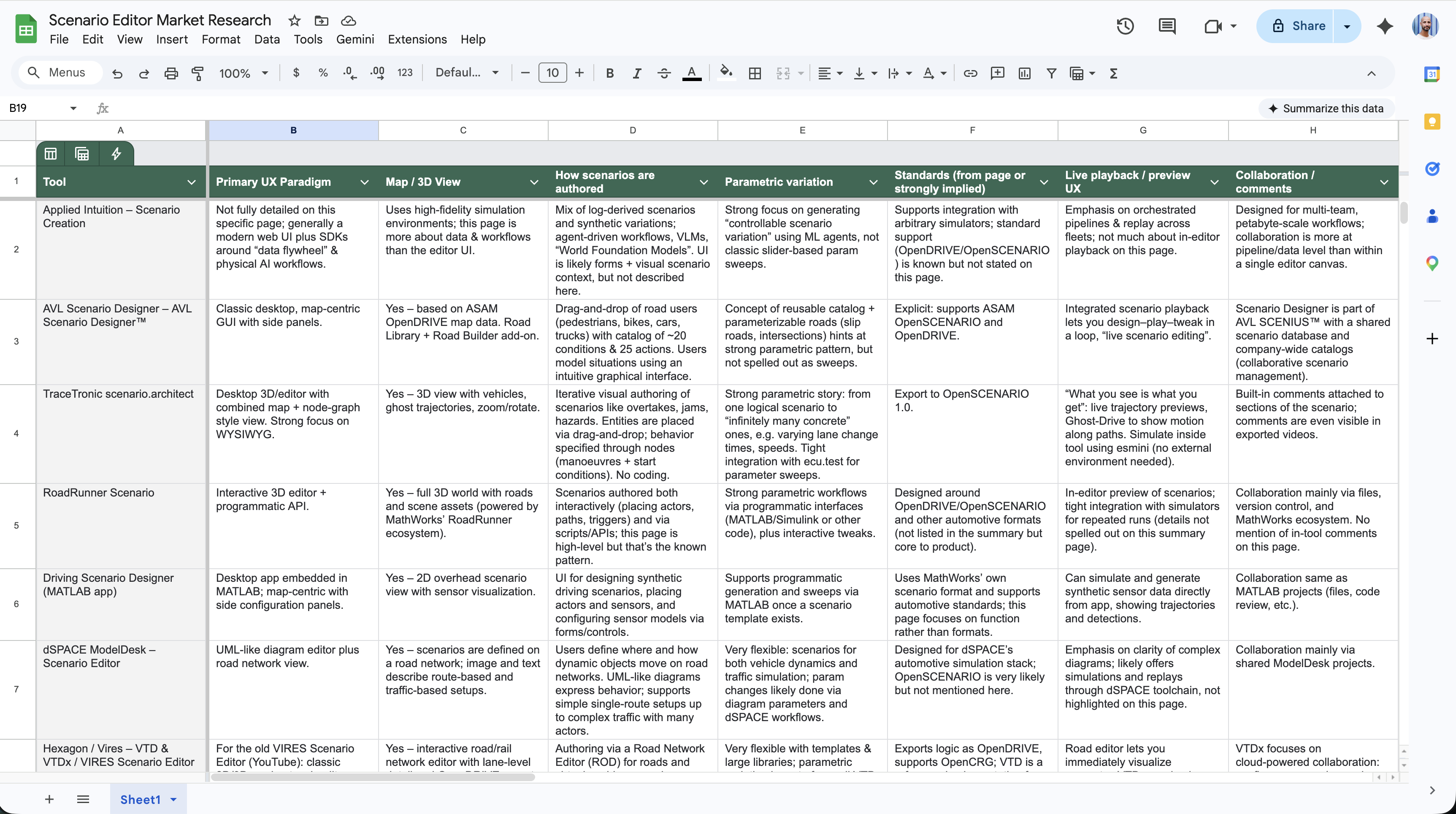
I compared eleven scenario-authoring tools on nine aspects. They split on how to describe a path, and most kept a structured view of the scene beside the map: the questions behind decisions 1 and 2.
Design decision 1
A path made of waypoints
A new actor needs a path. The benchmark showed two ways to describe one. Some tools use waypoints: points on the map that the car passes in order. Others use segments: one stretch of driving after another, each with its own behaviour.
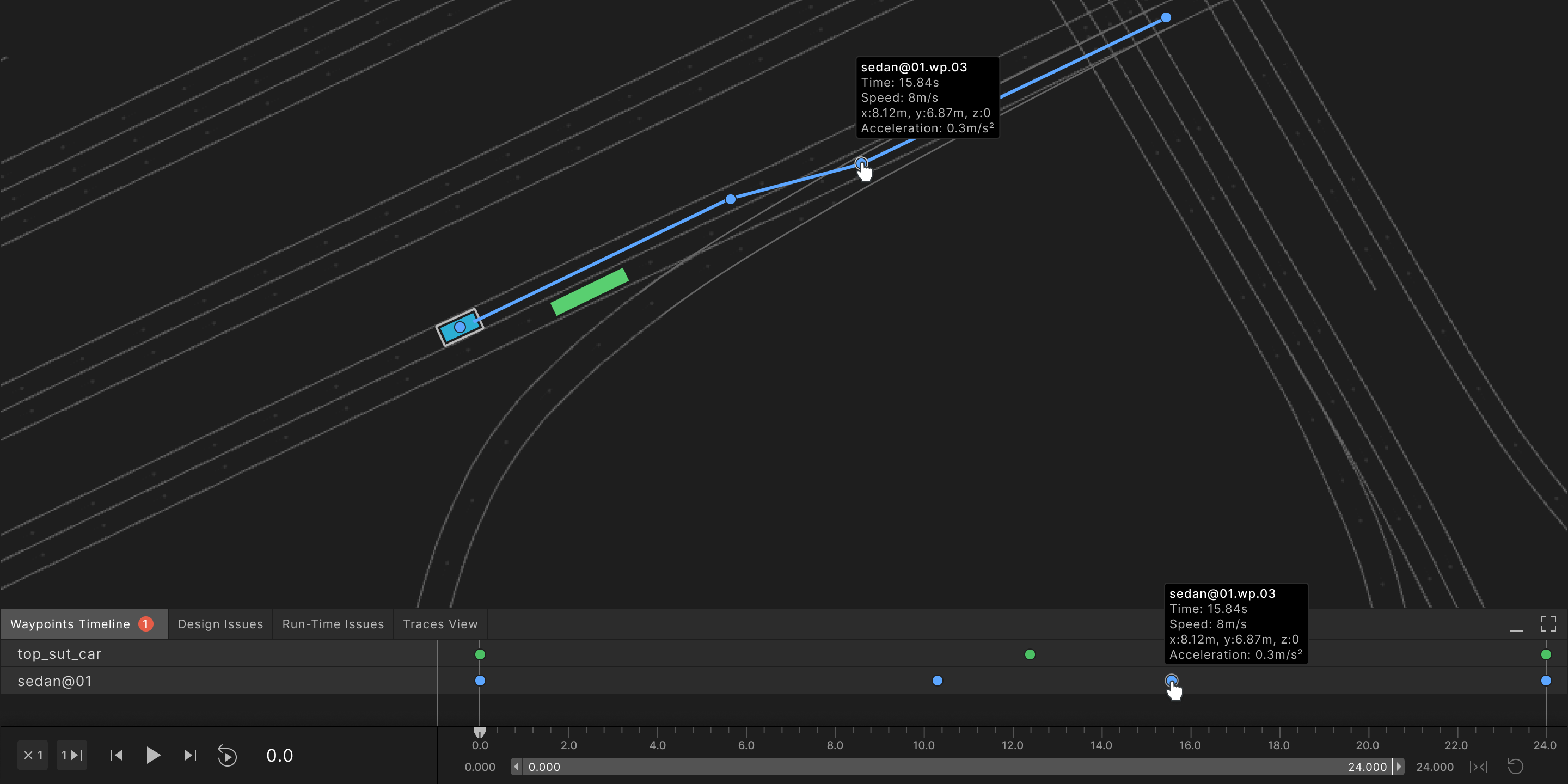
Build the path from waypoints. The author clicks point A, then B, then C on the map, the editor connects them along the road, and each waypoint carries a time or a speed.
- A pattern people know. Animation and 3D tools move an object the same way: along a path, through points.
- It matches how a manoeuvre is described. From here, to here, to here.
- Distance and time read together. Two points far apart with little time between them: the car is driving fast, before any number is read.
What was cut
One of the application engineers I interviewed before making this choice asked to see the waypoints on the timeline as well as on the map. I designed it: one row for each actor, one dot for each waypoint. It was cut before production and never built, because customers didn't seem to need it.
What came back
Segments returned later. An actor may have to follow one stretch of its path exactly and adapt to traffic on the next, and that setting belongs to the stretch between two waypoints. So the author still places waypoints, and the segment between them carries the behaviour.
Start from the concept people can already picture. The model underneath can grow later, as the segment did.
Design decision 2
One tree for the whole scene
By early 2026 a scene held the vehicle under test, recorded actors, added actors, segments, triggered actions and parameters. In a flat list, people lost their place.
Make the scene's structure a permanent surface: a tree beside the map that lists everything in the scenario and drives what the map and the inspector show.
Six of the eleven benchmarked tools put a structured scene list beside the map. The PM and the tech lead weren't convinced it was a must, so I built a working prototype in the product's own code. The PM came round as the feature details got deeper, and I believe the prototype helped.
The tree also carries an idea that was the PM's: set a behaviour on a group and every actor in it follows. My part was the rule for exceptions. An actor you changed by hand keeps its value until you reset it.
When an argument can't be held in a static file, build it in the real material. It changes who is able to judge it.
Design decision 3
Two kinds of issues, shown where they happen
Some problems can be known from the plan itself. Others only a run can reveal. An author who can't tell them apart doesn't know whether to fix the plan or run it again.
Sort issues by when they can be known.
- Design issues come from the plan. They appear while you edit, errors block the preview, and each one clears itself when fixed.
- Runtime issues come from a run and stay until the next one.
- A log keeps the history of every preview.
An issue also shows up where the author is looking: on the waypoint that causes it, with the reason. In the table, each row names every actor involved.
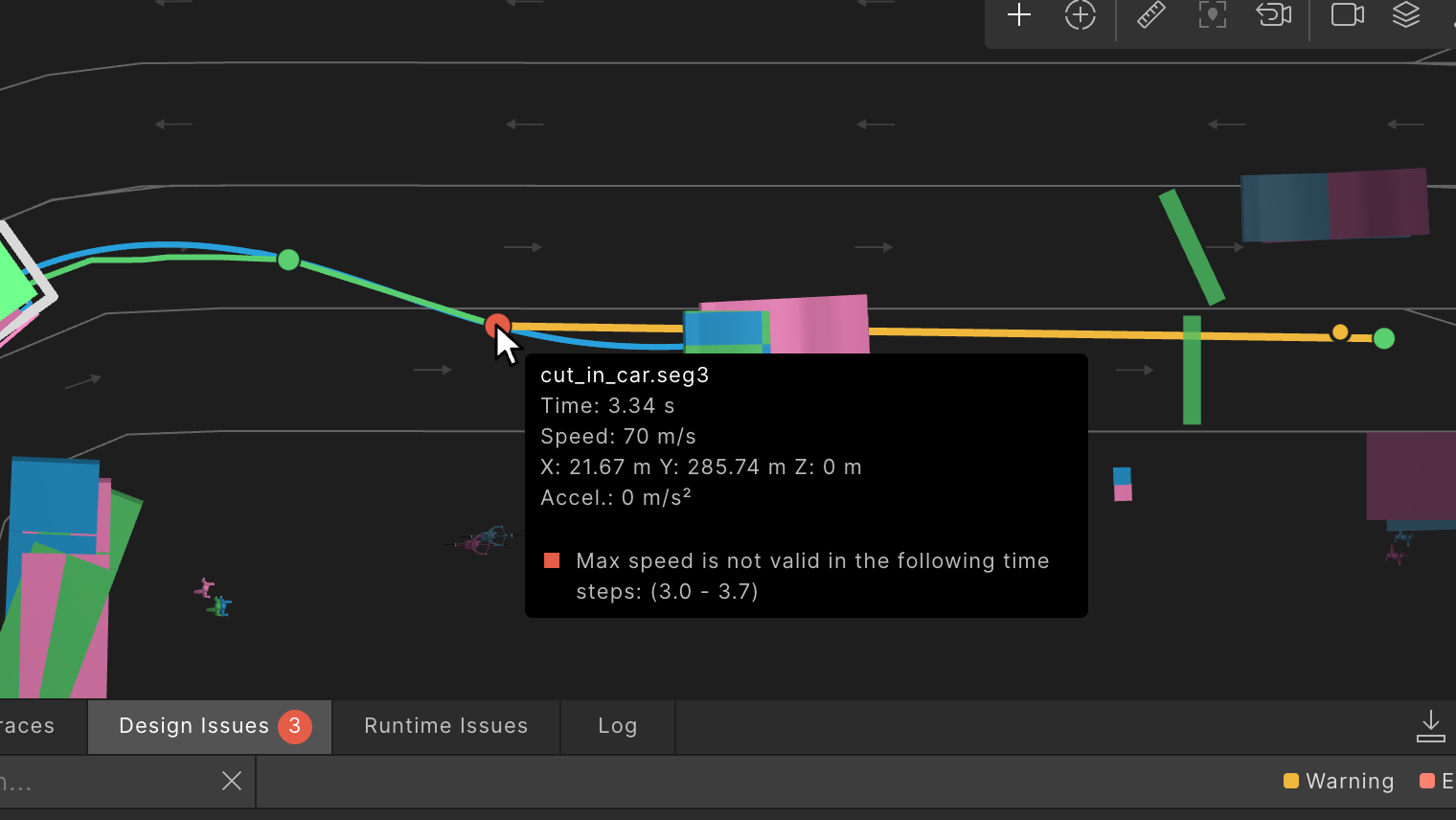
A problem gets fixed where it happens, not in a list of problems. The table is for the overview; the waypoint is where the work is.
Design decision 4
Preview: the run beside the plan
Comparing started in the run debugger: a result is checked against the original noisy log, and against other versions and variations of the same test.
In Smart Replay, comparing meant a long loop: change, extract, execute, then open the result elsewhere.
Preview runs the scenario inside the editor and shows the result as its own layer beside the plan.
The check is gradual, cheapest first:
- Play. The exact planned path. No behaviour, no alerts.
- Preview. A real run on Foretify's default simulator, not the customer's. Representative, and much faster.
- Launch. The customer's full configuration, variations included. Much slower.
The PM and I wanted two levels, with Preview on the customer's full configuration. That was too slow and cost the customer more. The middle level was the tech lead's solution.
I first carried the debugger's compare into the editor as it was. But in the editor, one side is being edited: my first model turned a recorded actor into an editable one, destroying the recording it had to be compared with. My team caught it before it was built.
The fix: promoting an actor duplicates it. The original stays as a reference layer, and the edit sits on top.
A run only means something next to what it came from, so an edit must never replace it.
Process change
One component, in Figma and in code
Each panel of the editor started as a master component in Figma: the inspector, the tree, the actor controller. Every ticket's delivery screens were built from them, with each state numbered and annotated.
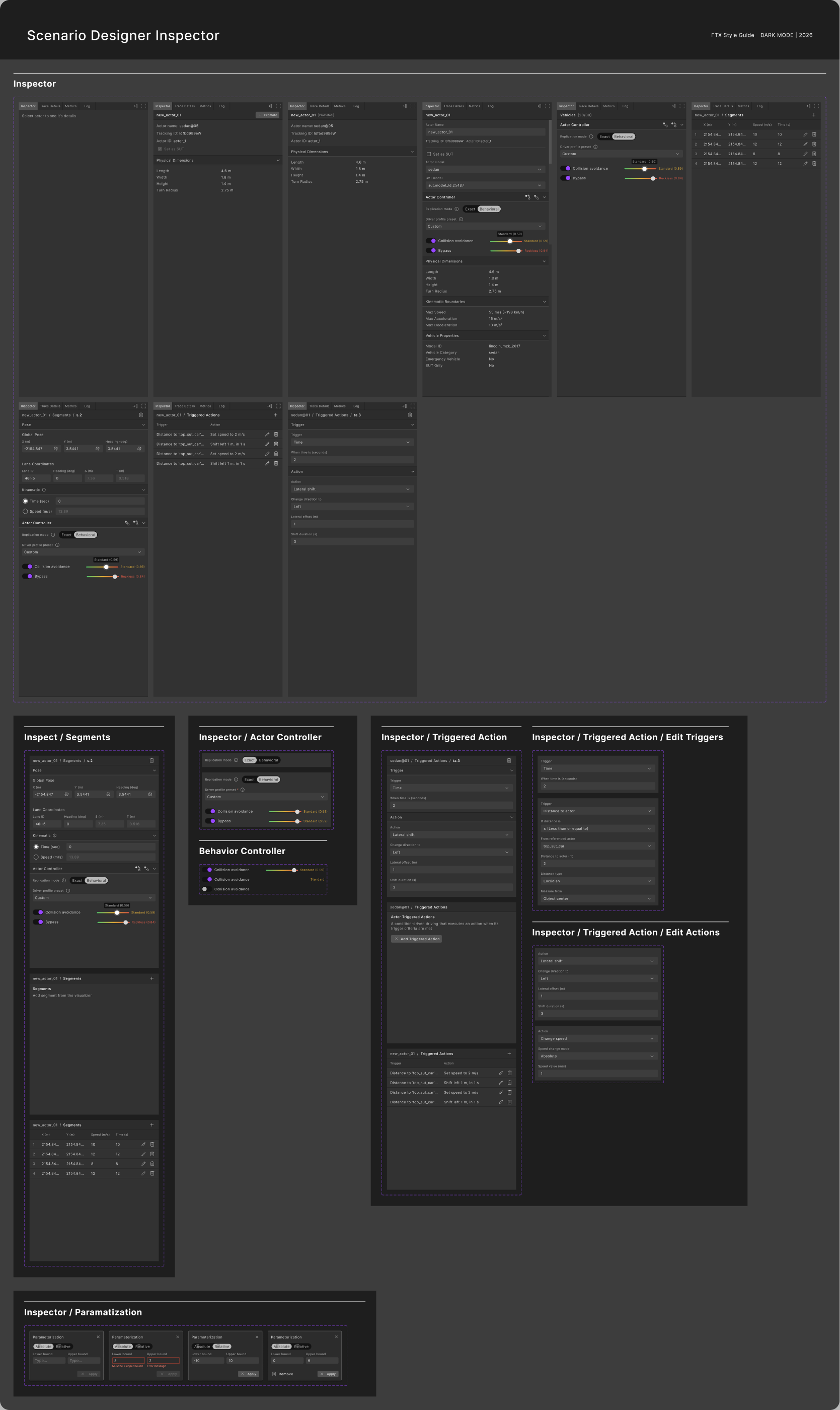
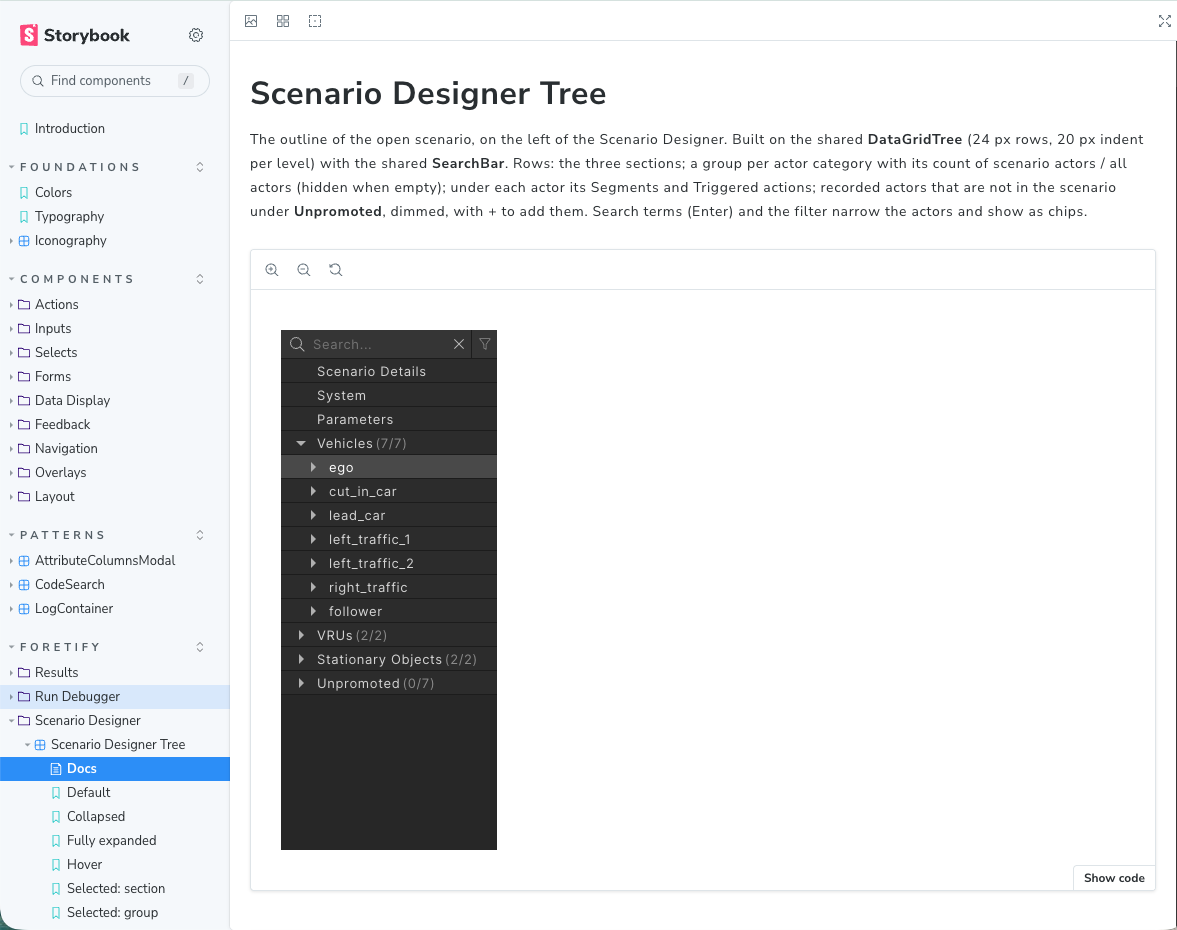
When an idea had to be tried rather than looked at, I built it in a prototype branch of the product, on the same shared components engineering uses, as with the tree.
Keeping Figma and the shared components in step was ongoing work. In the last year I could close the gap myself: with Claude Code I changed the shared components and merged them into the main repository, where Storybook documents them.
Outcome
What an author can do now
By September 2026 the editor had shipped with:
- Authoring from a run or an empty map. Actors, paths by waypoint, triggered actions, preview, save and launch.
- The issues model as specified, with the log beside it.
- The scenario tree, on by default in one of the two apps that host the editor.
- Two names from my prototypes, shipped word for word: "Save as new test" and the before-you-leave dialog.
In one internal usability session, a stand-in user built a cut-in scenario in about 15 minutes.
Adoption at the main customer stayed low, and with no product analytics and no direct access to users, nobody could establish why. My read is that they needed variations at scale more than scenarios authored one at a time.
What I would do differently
Push the automation direction earlier. I had built a working mock of prompt-based authoring inside the editor and didn't fight for it. Two customers kept asking for exactly that. Next time the mock goes in front of customers early, and the cost of having no direct user access gets written down on day one.
What next
Editing in plain language
Editing by prompt, with an AI agent that makes the change, was one of the first things customers asked for, and that mock is where I wanted the editor to go next. The author describes a change, and the assistant answers with a proposal: drawn on the map beside the plan, named in the editor's own terms, and waiting for Accept or Discard.
- A proposal, not an edit. Nothing changes until the author accepts, and every accepted change can be undone in one step.
- In the editor's terms. The reply names the actor, the waypoint or the triggered action it will change, so the author can check it in the tree and the inspector.
- Two ways in. From the chat, for changes to the scene, or from an actor on the map, for changes to that actor.
סקירה
מישהו צריך לבנות את הכמעט-תאונה
צוות של רכב אוטונומי לא יכול לחכות שהכביש ייצר רגע מסוכן, אז מישהו בונה אותו: לוקחים נסיעה מוקלטת, מוסיפים רכב שנדחק לנתיב, ומריצים בסימולציה. מי שבונה מתכנן מה אמור לקרות. הסימולציה מחליטה מה קורה בפועל, כי הרכב הנבדק נוהג בעצמו.
Scenario Designer הוא המקום שבו עושים את זה, מאפס או מתוך הקלטה: שני השלבים הראשונים ב-flow של Foretellix. עיצבתי אותו כך שהיוצר יראה את הפער בין התכנית להרצה: מה לא תקין לפני ה-Preview, מה קרה בו, ומה השתנה לעומת ההקלטה.
שאלה אחת עברה מתחת לכל מסך, וממנה יצאו ארבע החלטות עיצוב: האם ההרצה תתאים לתכנית?
הבעיה
תכנית שאי אפשר לבדוק עד שהיא רצה
בהתחלה משתמשים יכלו רק לסקור ולדבג תוצאות סימולציה, לא לערוך או ליצור אותן. זה לקח ארבעה שלבים:
- 1פאנל ייצוא. ההתחלה הרזה ביותר: Smart Replay, בתוך ה-run debugger. משאירים את ה-actors המוקלטים, משנים מהירות או מיקום, ומייצאים בדיקה חדשה.
- 2actors חדשים. הם דרשו עורך שלם. התחלתי לעצב אותו תוך כדי הרחבת Smart Replay.
- 3עורך נפרד. שלב זמני: Smart Replay יצא מה-debugger. הוא ידע לגוון הקלטה, לא להתחיל מאפס.
- 4עורך אחד. Scenario Designer: תרחישים חדשים מאפס, ועריכה של תוצאות קיימות.
ה-actors החדשים הביאו גם את הבעיה הקשה יותר, זו שהעמוד הזה עוסק בה. ב-cut-in, היוצר מוסיף רכב שעובר נתיב ממש לפני הרכב הנבדק. הרכב הזה נוהג בעצמו: קצת מהר יותר או לאט יותר ממה שהונח, וה-cut-in מגיע מוקדם מדי, מאוחר מדי, או בכלל לא.
איך עבדתי
ממלאי מקום ושאלות בכתב
בחודשים הראשונים לא היה לעורך מנהל מוצר. אז לצד העיצוב הגדרתי את הפיצ'רים, כתבתי את ה-user stories ואת קריטריוני הקבלה, וקבעתי את סדרי העדיפויות.
לא היה לי קשר ישיר עם מי שישתמשו בו, אבל לא עבדתי בעיניים עצומות. איש קשר אצל הלקוח העיקרי עבד איתנו מקרוב על הדרישות, ולקוח שני שלח רשימת צרכים כתובה וברורה. השאר הגיע ממקורות אחרים:
- ממלאי מקום למשתמשים. מבחני שמישות פנימיים עם עמיתים בתפקיד היוצר, dogfooding, ממצאי bug-bash ופרסונה. המבחן שתוכנן עם משתמש של לקוח לא התקיים.
- שאלות פתוחות, בגלוי. כתבתי את מה שאף אחד עוד לא החליט, מחומרת שגיאות ועד שמירה אוטומטית, והתשובות הפכו לאפיון.
- אבות טיפוס להצבעה. כשבחירה נשארה פתוחה, בניתי את האפשרויות כדי שהצוות ינסה אותן.
- שני מעצבים. הם קידמו את הצד של Smart Replay לפי הנחיות כתובות שלי, בזמן שאני עיצבתי את העורך.
השאלות הפכו לאפיון. בלי מנהל מוצר שיהפוך צרכים לאפיון, לשאול טוב, בכתב, היה התוצר.
מחקר שוק
מה עושים אחד-עשר עורכים אחרים
השוויתי אחד-עשר כלים ליצירת תרחישים בתשעה היבטים. הם נחלקו בדרך שבה מתארים מסלול, ורובם החזיקו תצוגה מובנית של הסצנה לצד המפה: השאלות שמאחורי החלטות 1 ו-2.
החלטת עיצוב 1
מסלול עשוי מ-waypoints
ל-actor חדש צריך מסלול. ההשוואה הראתה שתי דרכים לתאר אותו. חלק מהכלים משתמשים ב-waypoints: נקודות על המפה שהרכב עובר בהן לפי הסדר. אחרים משתמשים ב-segments: קטע נסיעה אחרי קטע, ולכל אחד התנהגות משלו.
לבנות את המסלול מ-waypoints. היוצר לוחץ על נקודה A, אחר כך B, אחר כך C על המפה, העורך מחבר ביניהן לאורך הכביש, ולכל waypoint יש זמן או מהירות.
- דפוס מוכר. כלי אנימציה ו-3D מזיזים אובייקט באותה דרך: לאורך מסלול, דרך נקודות.
- זה תואם את הדרך שבה מתארים תמרון. מכאן, לכאן, לכאן.
- מרחק וזמן נקראים יחד. שתי נקודות רחוקות עם מעט זמן ביניהן: הרכב נוסע מהר, עוד לפני שקוראים מספר.
מה ירד
אחד ממהנדסי האפליקציה שראיינתי לפני ההחלטה ביקש לראות את ה-waypoints גם על ציר הזמן, ולא רק על המפה. עיצבתי את זה: שורה לכל actor, נקודה לכל waypoint. זה ירד לפני הפיתוח ולא נבנה, כי ללקוחות לא נראה שזה נחוץ.
מה חזר
ה-segments חזרו מאוחר יותר. ייתכן ש-actor יצטרך לעקוב בדיוק אחרי קטע אחד במסלול שלו, ולהסתגל לתנועה בקטע הבא, וההגדרה הזו שייכת לקטע שבין שני waypoints. אז היוצר עדיין מציב waypoints, וה-segment שביניהם נושא את ההתנהגות.
להתחיל מהמושג שאנשים כבר יכולים לדמיין. המודל שמתחת יכול לגדול אחר כך, כמו שה-segment גדל.
החלטת עיצוב 2
עץ אחד לכל הסצנה
בתחילת 2026 סצנה כבר הכילה את הרכב הנבדק, actors מוקלטים, actors שנוספו, segments, triggered actions ו-parameters. ברשימה שטוחה, אנשים איבדו את מקומם.
להפוך את מבנה הסצנה למשטח קבוע: עץ לצד המפה שמציג את כל מה שיש בתרחיש, וקובע מה מוצג במפה וב-inspector.
שישה מתוך אחד-עשר הכלים שנבדקו הציבו רשימת סצנה מובנית לצד המפה. מנהל המוצר וראש הצוות הטכני לא השתכנעו שזה הכרחי, אז בניתי אב טיפוס עובד בקוד של המוצר עצמו. מנהל המוצר השתכנע ככל שפרטי הפיצ'ר העמיקו, ואני מאמין שאב הטיפוס עזר.
העץ נושא גם רעיון של מנהל המוצר: מגדירים התנהגות על קבוצה, וכל actor בה הולך אחריה. החלק שלי היה הכלל לחריגים: actor ששיניתם ידנית שומר על הערך שלו עד שמאפסים אותו.
כשטיעון לא מחזיק בקובץ סטטי, בונים אותו בחומר האמיתי. זה משנה מי מסוגל לשפוט אותו.
החלטת עיצוב 3
שני סוגי בעיות, במקום שבו הן קורות
על חלק מהבעיות אפשר לדעת מהתכנית עצמה. אחרות רק הרצה יכולה לחשוף. יוצר שלא מבחין ביניהן לא יודע אם לתקן את התכנית או להריץ שוב.
למיין בעיות לפי מתי אפשר לדעת עליהן.
- Design issues נובעות מהתכנית. הן מופיעות תוך כדי עריכה, שגיאות חוסמות את ה-Preview, וכל אחת נעלמת מעצמה כשמתקנים אותה.
- Runtime issues נובעות מהרצה, ונשארות עד ההרצה הבאה.
- לוג שומר את ההיסטוריה של כל Preview.
בעיה מופיעה גם במקום שבו היוצר מסתכל: על ה-waypoint שגורם לה, עם הסיבה. בטבלה, כל שורה מציינת את כל ה-actors המעורבים.
בעיה מתוקנת במקום שבו היא קורית, לא ברשימת בעיות. הטבלה נותנת תמונה כוללת; ה-waypoint הוא המקום שבו עובדים.
החלטת עיצוב 4
Preview: ההרצה לצד התכנית
ההשוואה התחילה ב-run debugger: תוצאה נבדקת מול הלוג הרועש המקורי, ומול גרסאות ווריאציות אחרות של אותה בדיקה.
ב-Smart Replay, השוואה הייתה לולאה ארוכה: לשנות, לחלץ, להריץ, ואז לפתוח את התוצאה במקום אחר.
Preview מריץ את התרחיש בתוך העורך ומציג את התוצאה כשכבה משלה לצד התכנית.
הבדיקה הדרגתית, מהזולה ביותר:
- Play. המסלול המתוכנן בדיוק. בלי התנהגות, בלי התראות.
- Preview. הרצה אמיתית על סימולטור ברירת המחדל של Foretify, לא על זה של הלקוח. מייצגת, ומהירה בהרבה.
- Launch. התצורה המלאה של הלקוח, כולל וריאציות. איטית בהרבה.
מנהל המוצר ואני רצינו שתי רמות, עם Preview על התצורה המלאה של הלקוח. זה היה איטי מדי ועלה ללקוח יותר. הרמה האמצעית הייתה הפתרון של ראש הצוות הטכני.
בהתחלה העברתי את ההשוואה מה-debugger לעורך כמו שהיא. אבל בעורך, צד אחד נמצא בעריכה: המודל הראשון שלי הפך actor מוקלט לכזה שאפשר לערוך, והרס את ההקלטה שהיה צריך להשוות אליה. הצוות שלי תפס את זה לפני שזה נבנה.
התיקון: קידום (promote) של actor משכפל אותו. המקור נשאר כשכבת ייחוס, והעריכה יושבת מעליו.
להרצה יש משמעות רק לצד מה שממנו היא באה, ולכן עריכה לעולם לא צריכה להחליף אותה.
שינוי תהליך
רכיב אחד, ב-Figma ובקוד
כל פאנל בעורך התחיל כ-master component ב-Figma: ה-inspector, העץ, ה-actor controller. מסכי המסירה של כל טיקט נבנו מהם, וכל מצב בהם ממוספר ומוער.
כשאת הרעיון היה צריך לנסות, לא רק לראות, בניתי אותו ב-prototype branch של המוצר, על אותם רכיבים משותפים שההנדסה משתמשת בהם, כמו עם העץ.
הסנכרון בין Figma לרכיבים המשותפים היה עבודה מתמשכת. בשנה האחרונה יכולתי לסגור את הפער בעצמי: עם Claude Code שיניתי את הרכיבים המשותפים ומיזגתי אותם ל-repository הראשי, שם Storybook מתעד אותם.
התוצאה
מה יוצר יכול לעשות עכשיו
עד ספטמבר 2026 העורך יצא עם:
- יצירה מהרצה או ממפה ריקה. actors, מסלולים לפי waypoints, triggered actions, Preview, שמירה והרצה.
- מודל הבעיות כפי שאופיין, עם הלוג לצידו.
- עץ התרחיש, פעיל כברירת מחדל באחת משתי האפליקציות שמארחות את העורך.
- שני שמות מאבות הטיפוס שלי, שיצאו מילה במילה: "Save as new test" והדיאלוג שמופיע לפני היציאה.
במבחן שמישות פנימי אחד, משתמש ממלא מקום בנה תרחיש cut-in בתוך כ-15 דקות.
האימוץ אצל הלקוח העיקרי נשאר נמוך, ובלי אנליטיקת מוצר ובלי גישה ישירה למשתמשים, אף אחד לא הצליח לברר למה. ההערכה שלי היא שהם היו צריכים וריאציות בהיקף גדול יותר מתרחישים שנכתבים אחד-אחד.
מה הייתי עושה אחרת
לדחוף את כיוון האוטומציה מוקדם יותר. בניתי mock עובד של יצירה מבוססת prompt בתוך העורך ולא נלחמתי עליו. שני לקוחות ביקשו בדיוק את זה שוב ושוב. בפעם הבאה ה-mock יגיע ללקוחות מוקדם, והמחיר של היעדר גישה ישירה למשתמשים ייכתב כבר ביום הראשון.
מה הלאה
עריכה בשפה טבעית
עריכה באמצעות prompt, עם סוכן AI שמבצע את השינוי בעצמו, הייתה מהבקשות הראשונות של הלקוחות, וה-mock הזה הוא הכיוון שרציתי שהעורך ילך אליו. היוצר מתאר שינוי, וה-assistant עונה בהצעה: מצוירת על המפה לצד התכנית, מנוסחת במונחים של העורך עצמו, ומחכה ל-Accept או ל-Discard.
- הצעה, לא עריכה. שום דבר לא משתנה עד שהיוצר מאשר, וכל שינוי שאושר אפשר לבטל בצעד אחד.
- במונחים של העורך. התשובה מציינת את ה-actor, ה-waypoint או ה-triggered action שהיא תשנה, כך שאפשר לבדוק אותם בעץ וב-inspector.
- שתי דרכי כניסה. מהצ'אט, לשינויים בסצנה, או מ-actor על המפה, לשינויים בו עצמו.