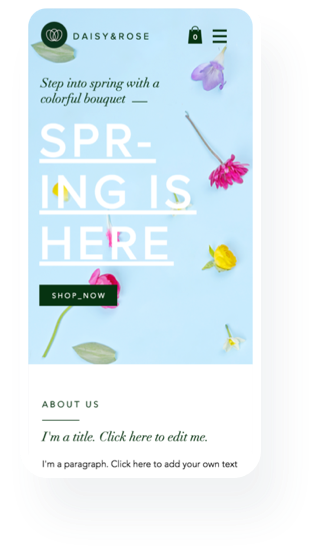
Wait, my site has a mobile version?רגע, לאתר שלי יש גרסת מובייל?
A first-visit intro that brought small business owners into the Wix Mobile Editor, and showed them what to change first.היכרות לביקור הראשון שהכניסה בעלי עסקים קטנים ל-Mobile Editor של Wix, והראתה להם מה לשנות קודם.
Overview
A site owner, not a web designer
Most people who build a site on Wix are not web designers. They are small business owners and individuals who spend weeks on the desktop version and expect the phone version to look after itself. Wix did build a mobile version of every site automatically. To change it there was the Mobile Editor, and fewer than one in five users ever opened it.
I was the only designer on the Mobile Editor group. This case study follows one part of that work: the intro that brings an owner into the Mobile Editor for the first time, and shows them what to change first.
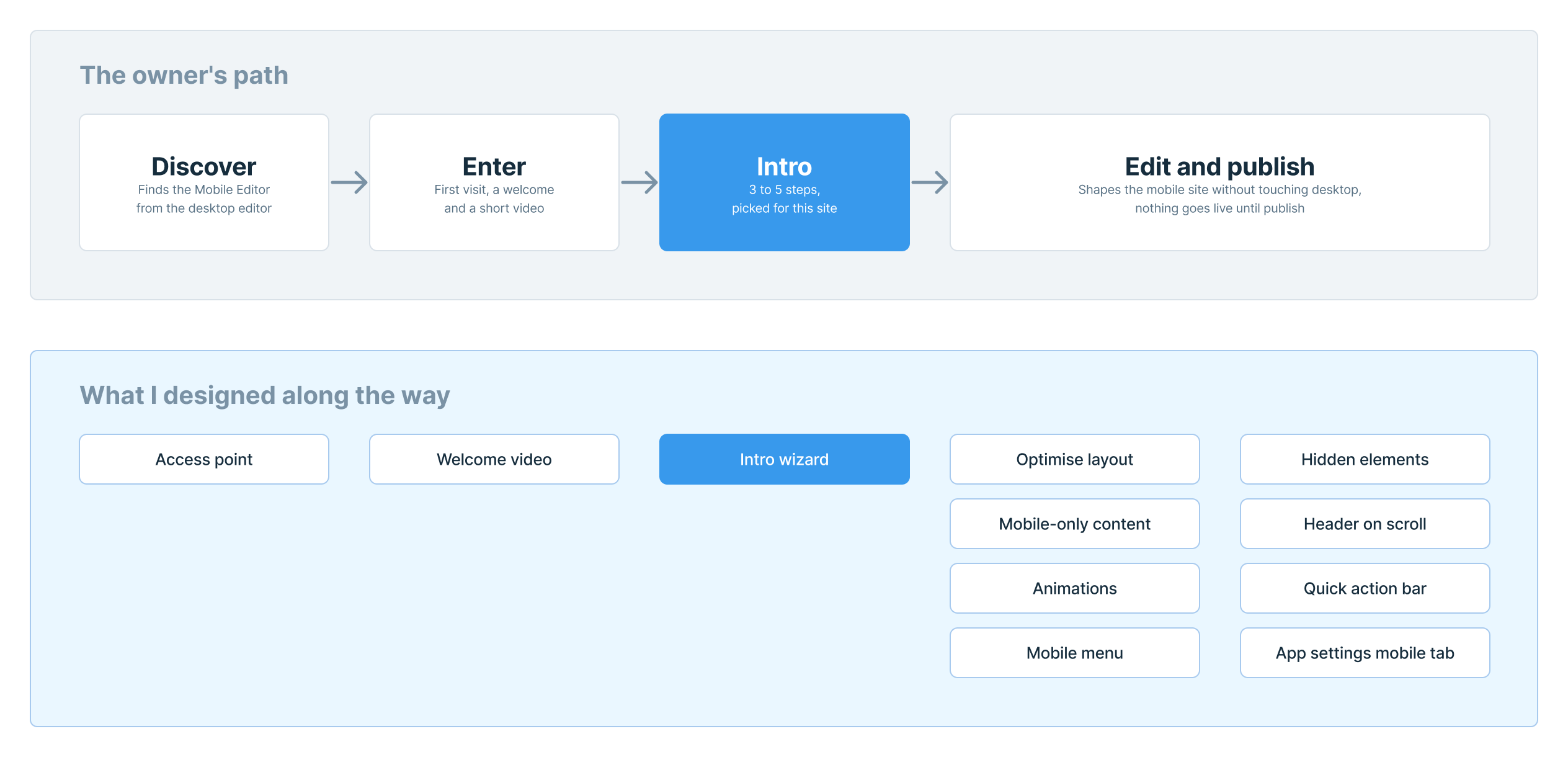
My role. I owned the owner's whole path, from finding the Mobile Editor, through every edit inside it, to leaving it. I worked with a product manager, a tech lead, four to five developers and a UX content writer, and reported to the editor's UX manager. The intro is the part I have research, prototypes and numbers for.
The problem
A fragile first visit
An owner's site was usually live before they thought about phones. Then their own visitors used it on mobile, and they found things to fix. By then the desktop site felt finished, and touching mobile felt like a risk to it.
BI and product analysis showed under 20% of users ever visiting the Mobile Editor. The product manager brought three problems:
- Purpose. People didn't know what the Mobile Editor was for.
- Fear. They were afraid of breaking the desktop version.
- Value. They didn't see why their mobile site mattered.
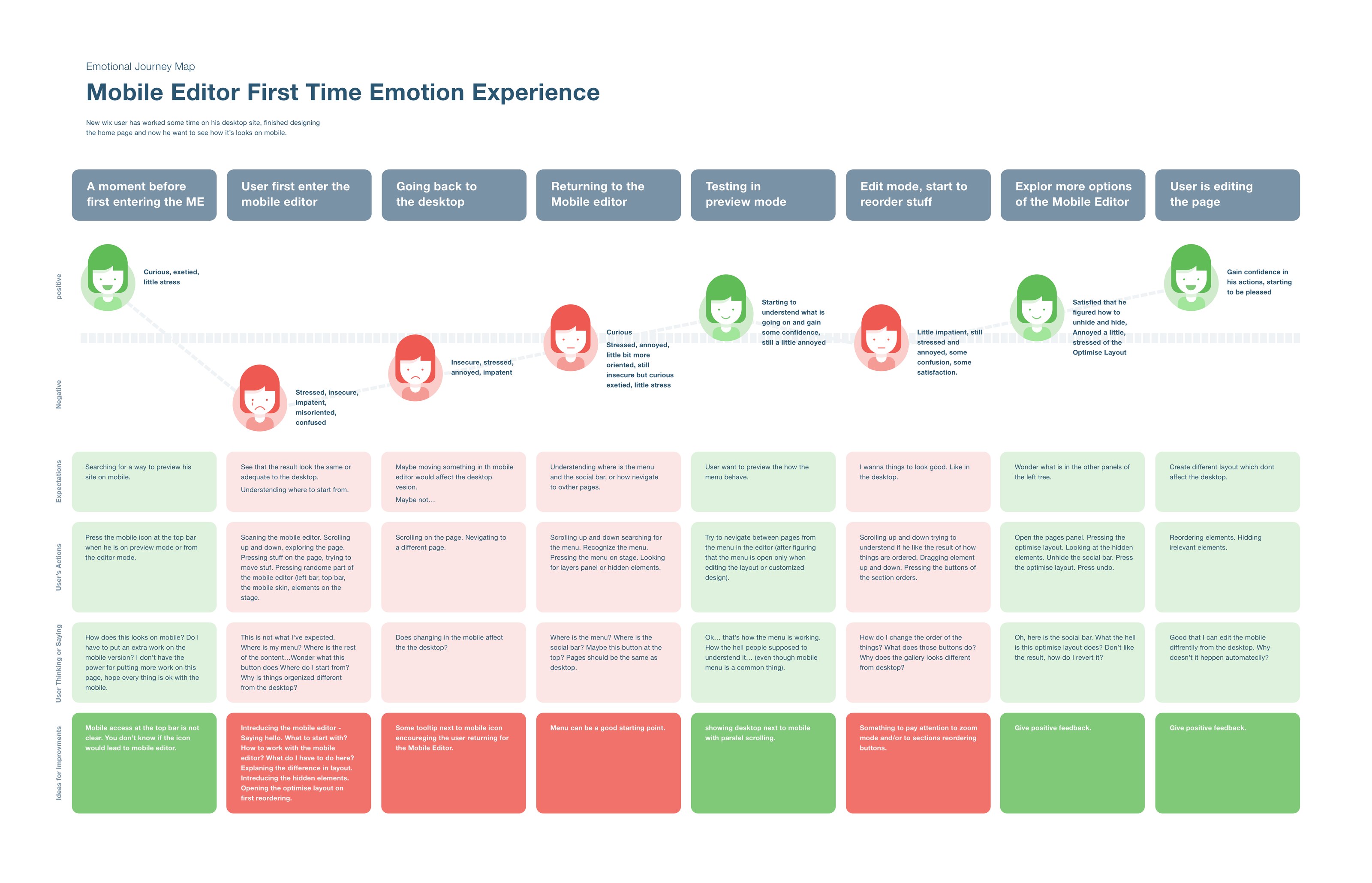
I built an emotional journey map from support tickets and interviews. It follows a new owner who has just finished the home page and wants to see it on a phone. The lowest point is the moment they enter: "This is not what I expected. Where is my menu?"
How I worked
The concept from UX, the goals from product
The goals came from product. The concept was mine: a short intro on the first visit, before the full editor. Before choosing its shape:
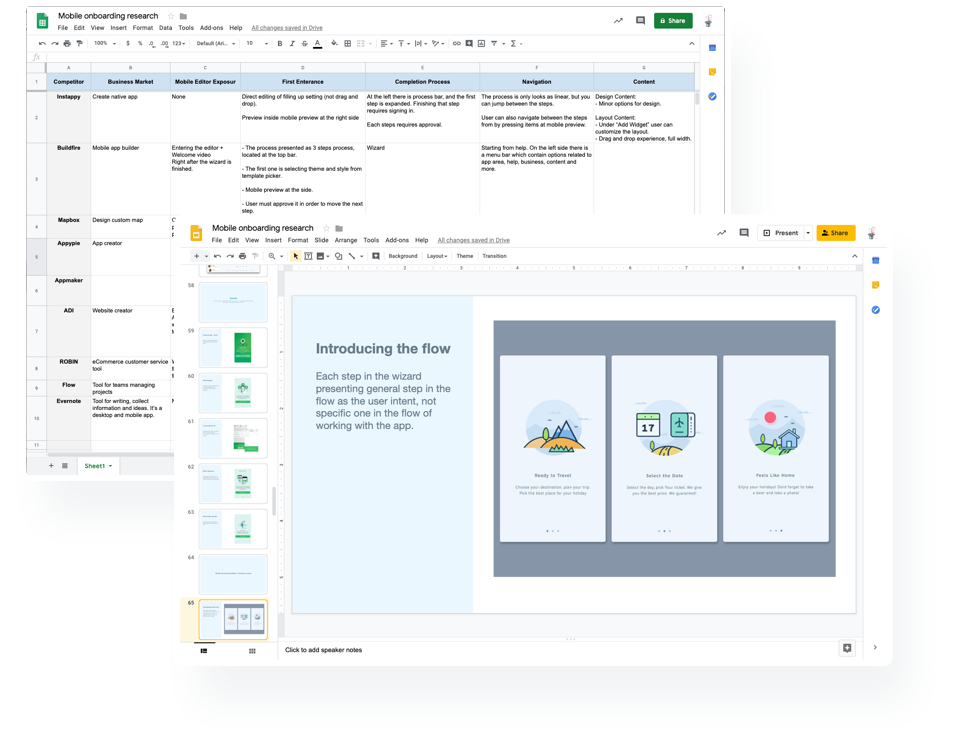
- A benchmark of nine products, mostly mobile app builders, on how they bring people into the editor and through a setup.
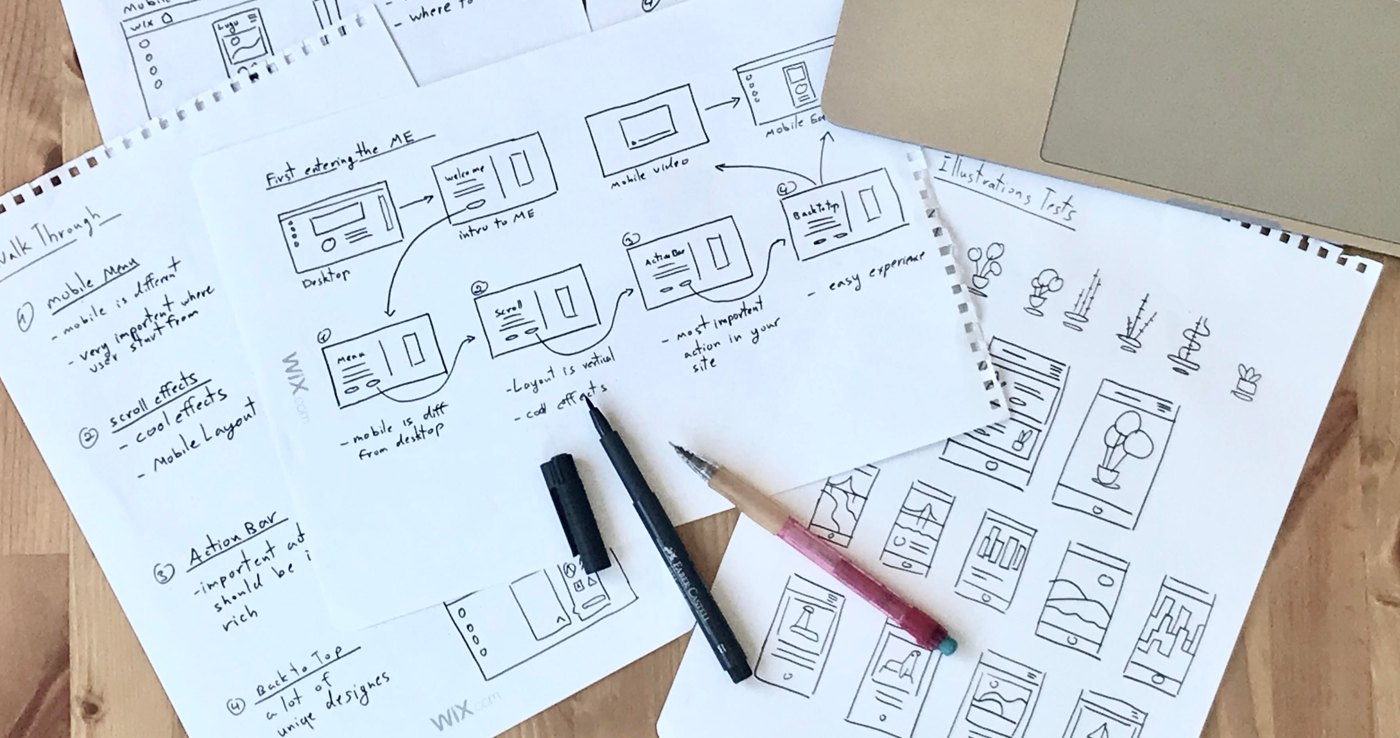
- Paper sketches of a walk-through, one feature at a time.
- Four Axure prototypes, tested in usability sessions with real Wix users, four or five people in a round.
Design decision 1
Only what matters for this site
The full Mobile Editor showed everything at once, and the journey map showed owners scrolling up and down, looking for somewhere to start.
Show each owner 3 to 5 steps: the changes with the most impact on their mobile site. For a site nobody had touched yet, the steps came from the template category. Once the owner had made changes, they came from their own edits.
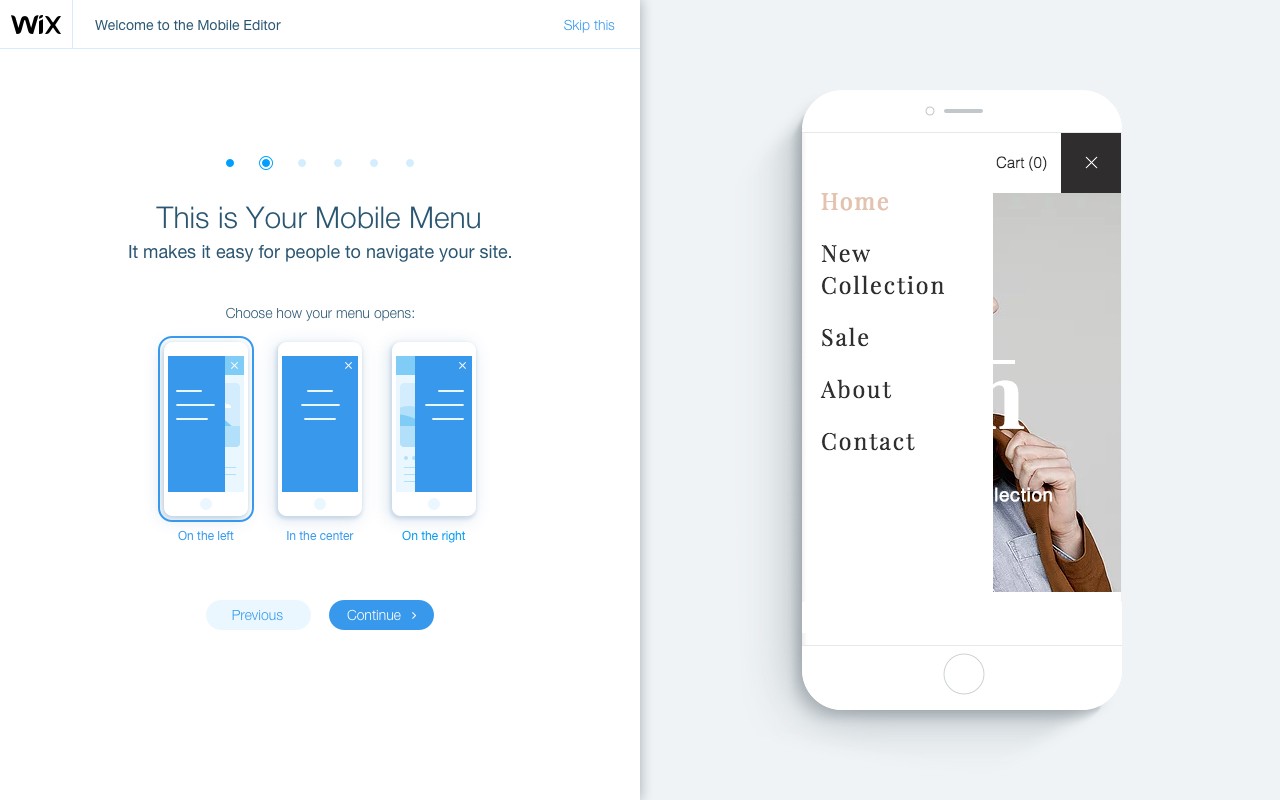
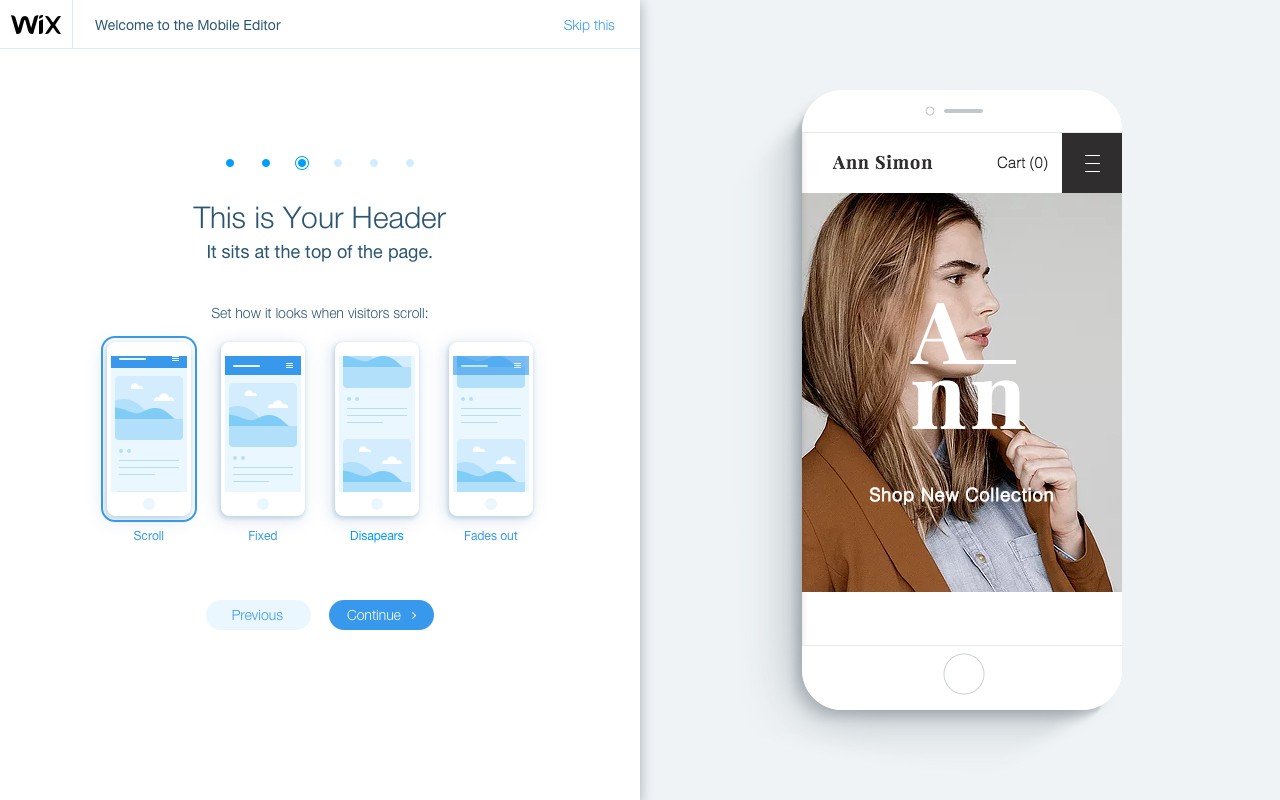
- One choice per step. How the menu opens, how the header scrolls, where the quick action bar sits.
- Built to grow. Later, the same steps could introduce new features or what mattered most for one site.
Design decision 2
Safe to touch
The fear in the tickets was specific: "Does changing the mobile affect the desktop?" An intro that asked owners to change things had to answer that before anything else.
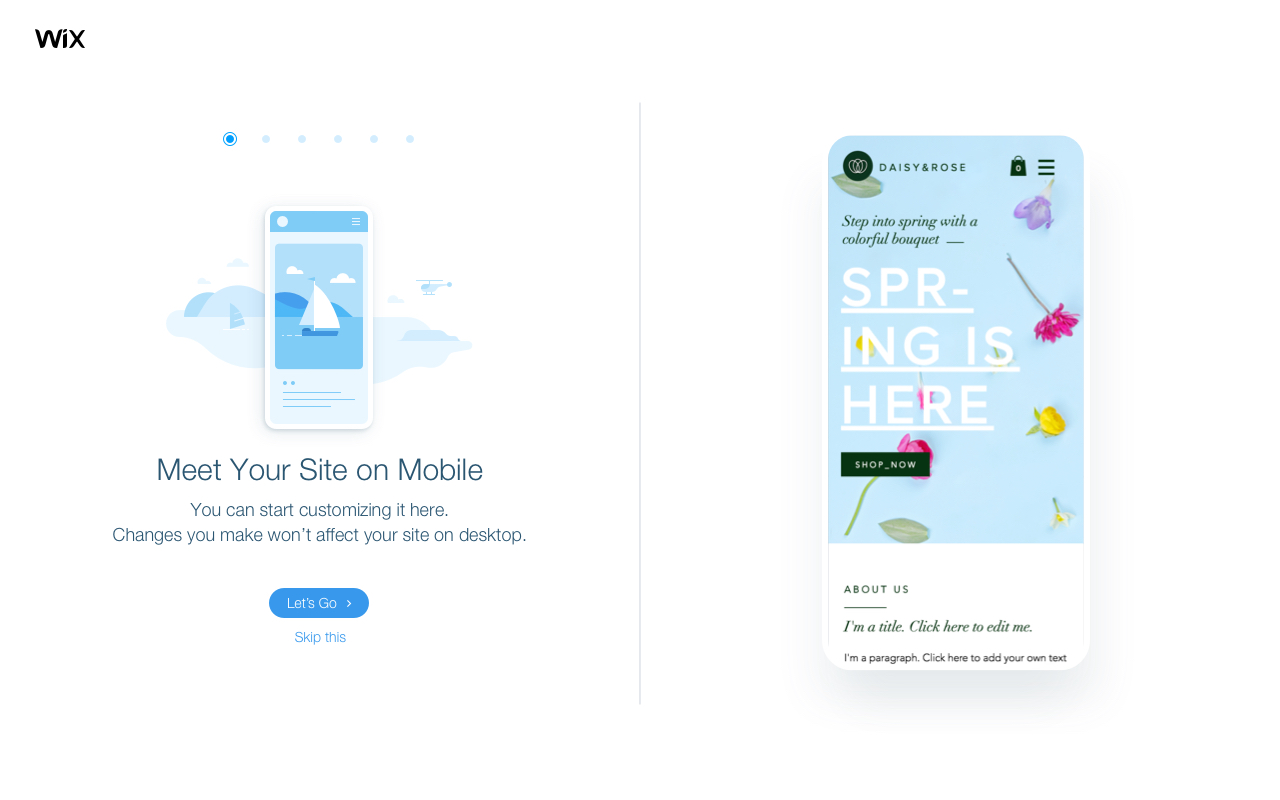
Make every step say it, and make it true. The intro opens with "Changes you make won't affect your site on desktop", and the owner's own site sits on a phone beside every choice.
- Nothing goes live on its own. Choices reach visitors only when the owner publishes.
- Skip, and come back. The intro can be skipped and reopened later.
- New sites first. It launched for new sites, then rolled out slowly to sites already published.
Design decision 3
A full page, not a pop-up
The same steps could live in very different shells. I prototyped four in Axure and tested them with real users: a dialog over the editor, a full page, a suggestion card inside the editor, and a list of steps down the side.
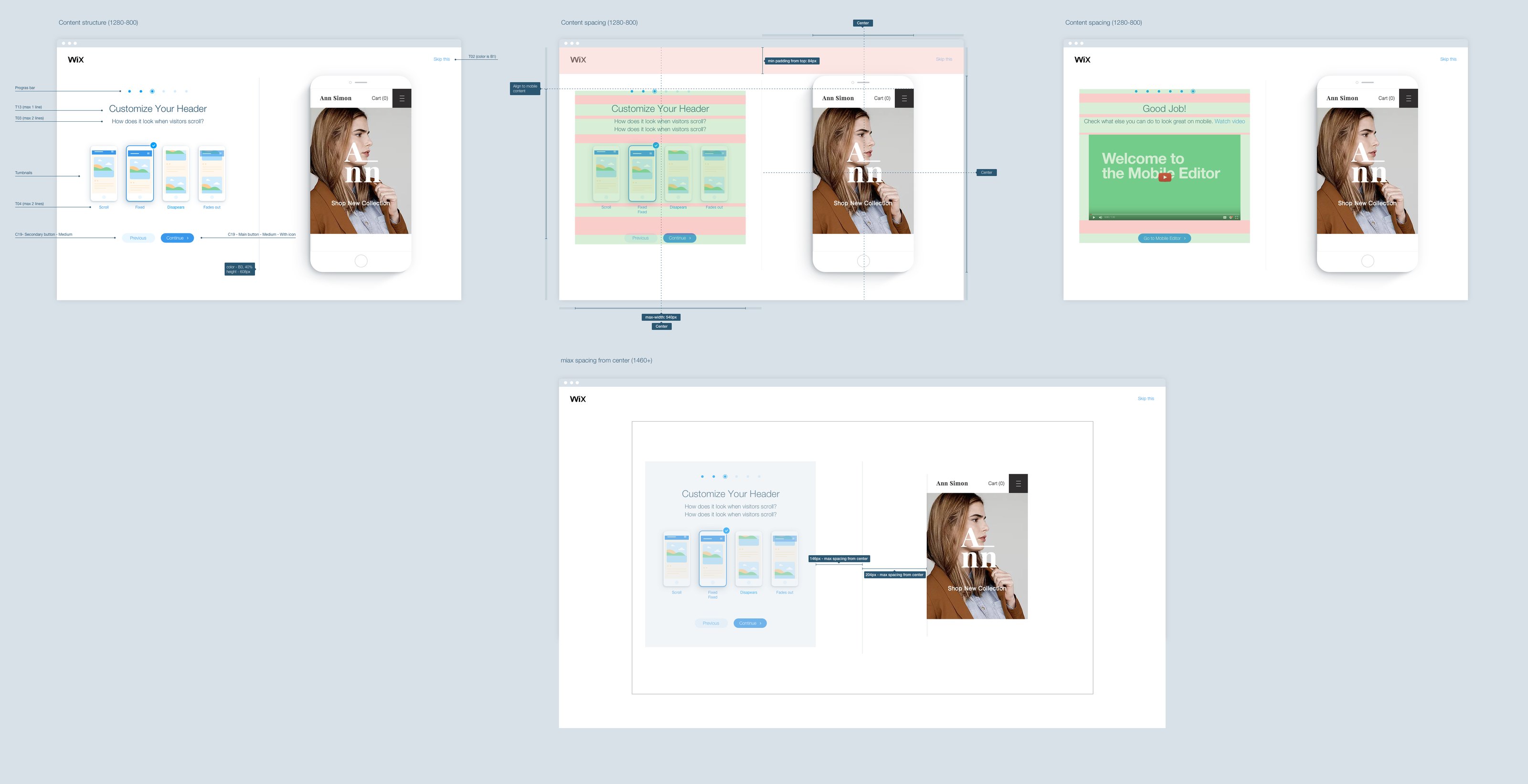
The full-page intro won. Each step gets the whole screen: the choice on one side, and the owner's site on a phone, at the size visitors will see it, on the other.
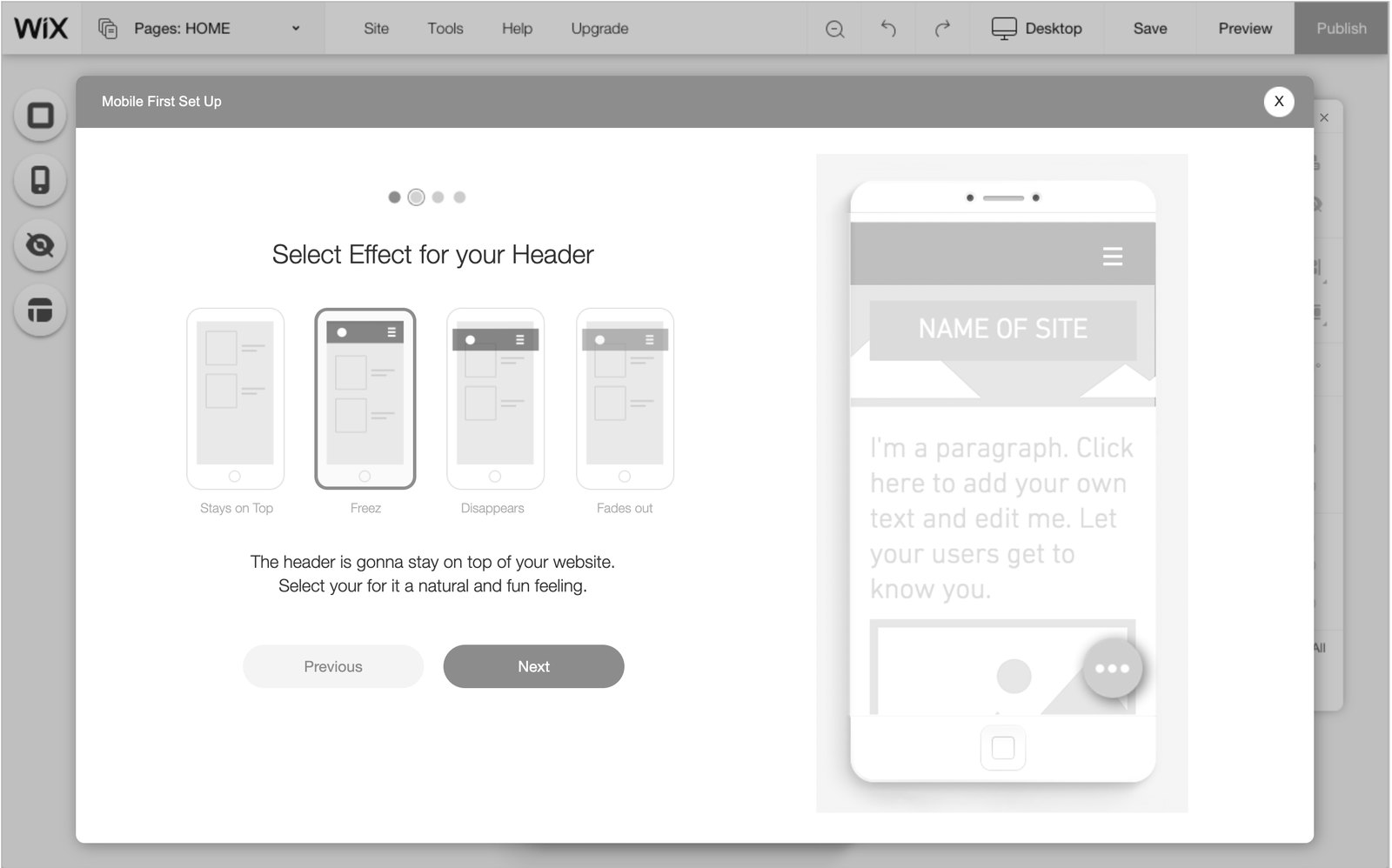
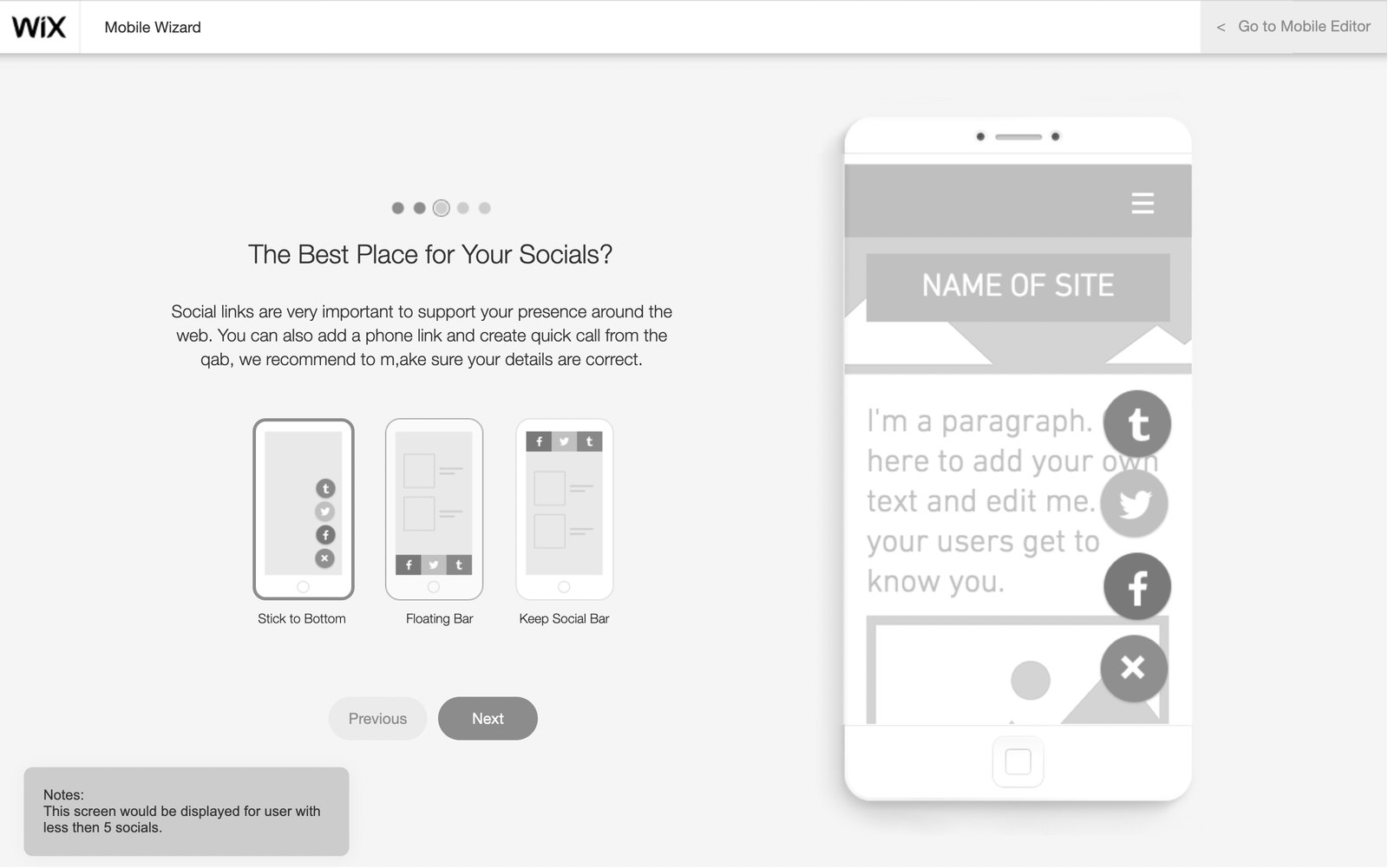
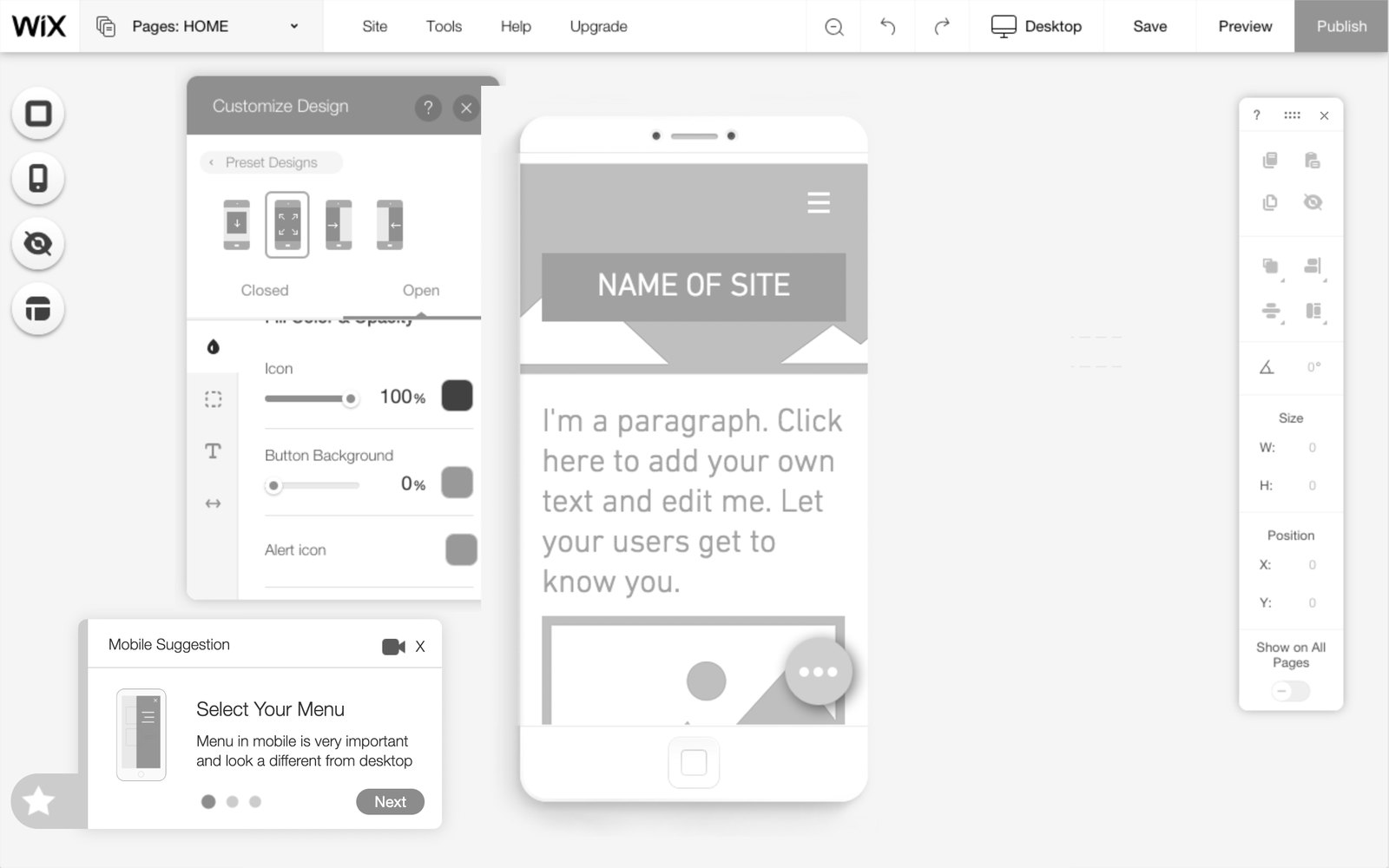
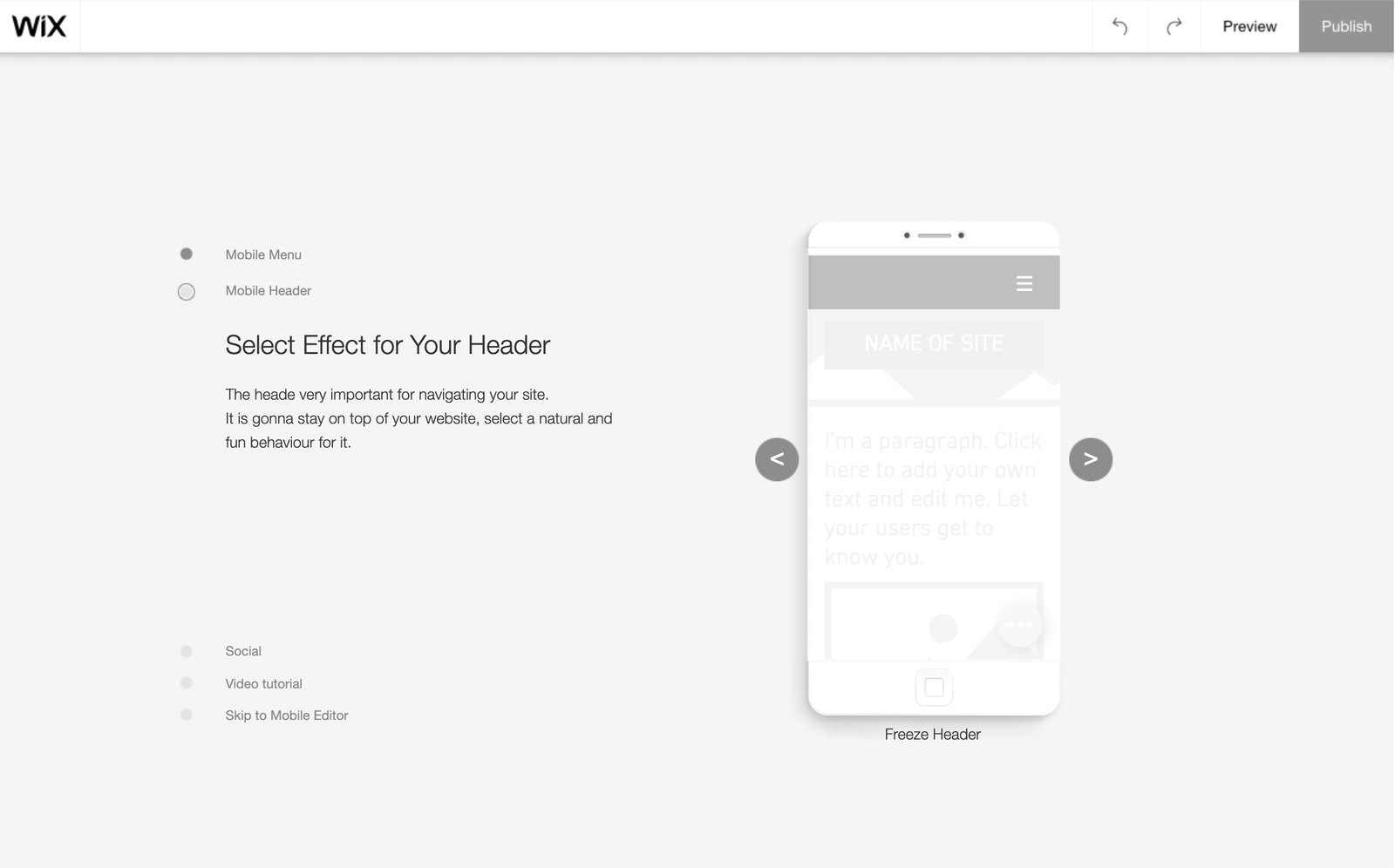
The four directions tested: a dialog, a full page, a suggestion card and a side list. The full page won.
Design decision 4
The intro worked, the handover didn't
In testing, people liked the intro. They called it clean and simple. Then they finished it, landed in the full Mobile Editor, and felt overwhelmed.
I had designed the intro as an ending. For the owner it was a beginning: the real work was in the editor behind it.
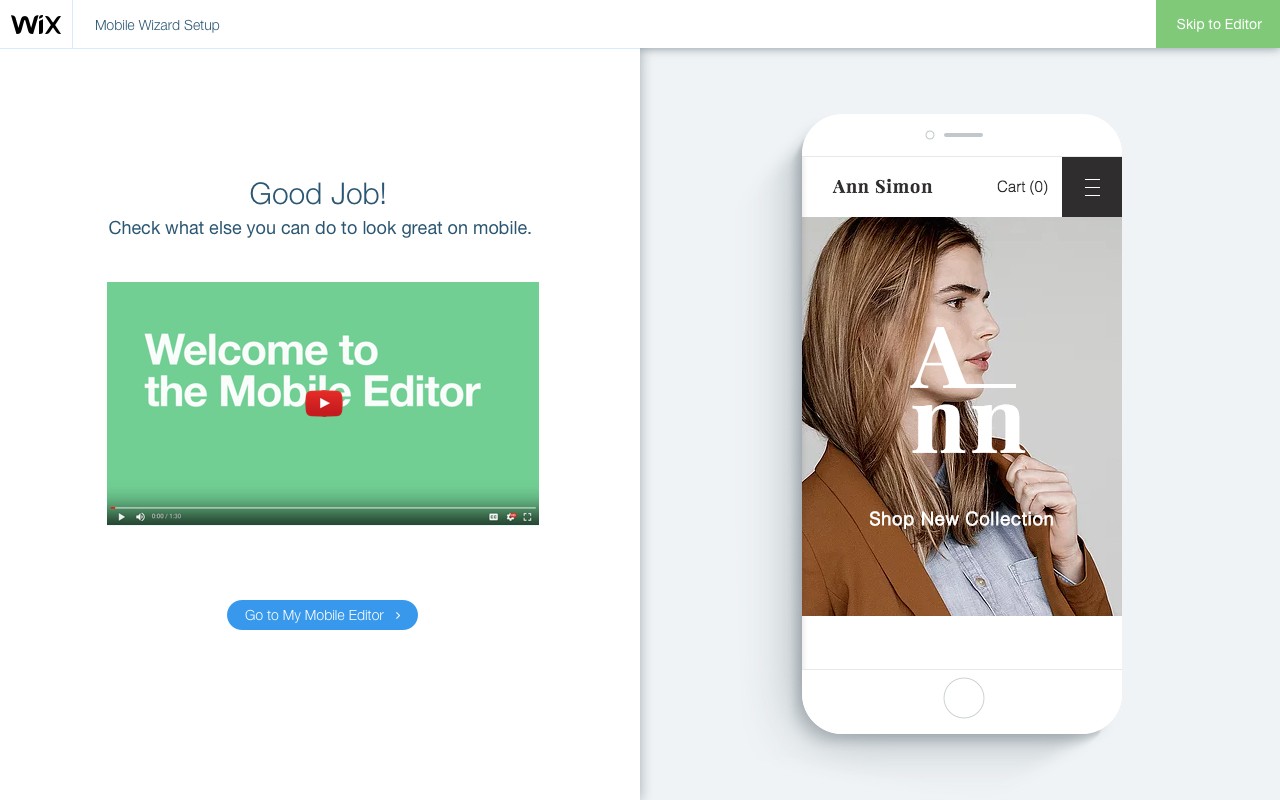
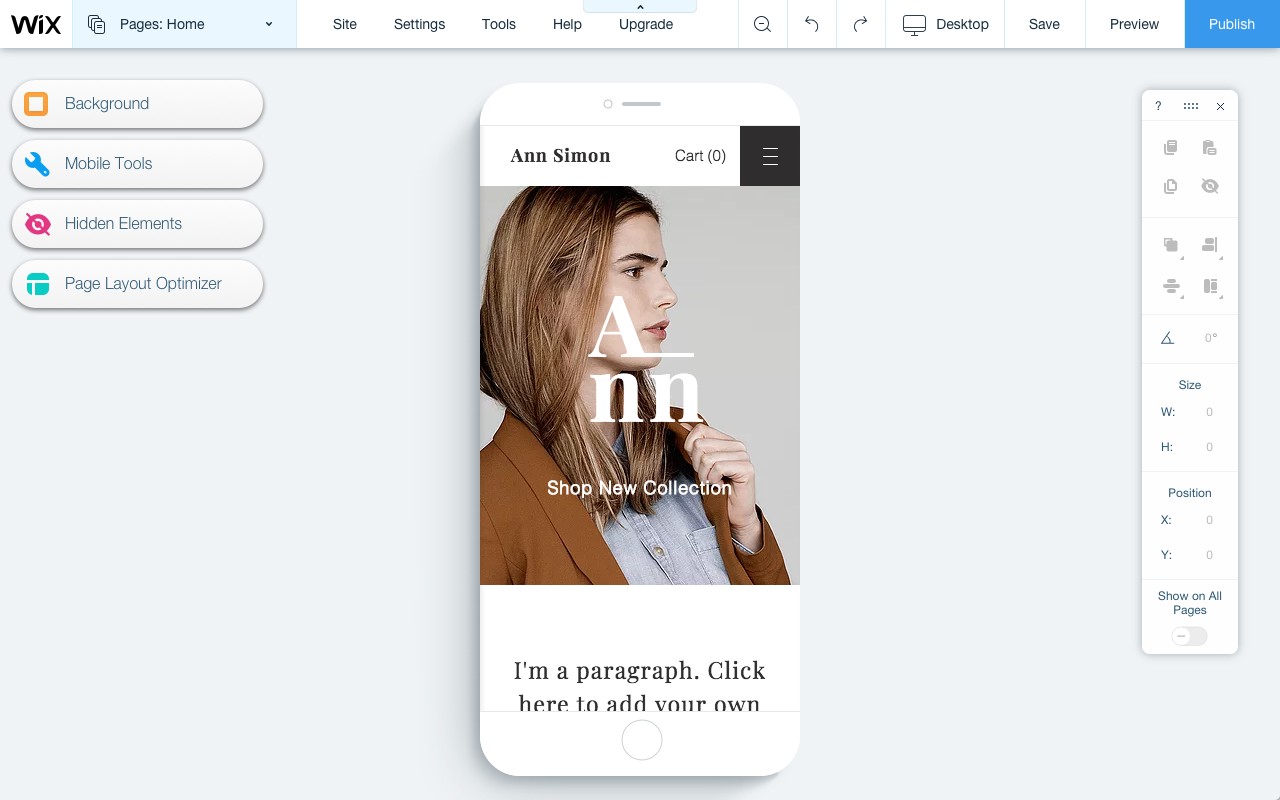
The fix was a clear last step: what else the owner can do on mobile, and one button that continues into their Mobile Editor.
How it was built
From Sketch to Zeplin to the build
This was 2016 and 2017. I designed in Sketch and Photoshop, prototyped in Axure, and worked out the intro's motion in Principle. Final screens and specs went to Zeplin, which was the reference for the developers.
I worked in one-on-one sessions with the front-end developer, and reviewed each piece once it was built. I wrote the first copy in my own words, and the UX content writer finalised it.
The work also reached past the Mobile Editor. The intro's progress bar went into the editor's design system, and app settings panels gained a mobile tab that sent owners to the Mobile Editor.
Outcome
Yes, and here's what to change first
Measured with an A/B test against no intro, a before and after comparison and BI dashboards, after three months:
- 47% of owners completed the intro.
- 60% kept the options they chose when they published.
- The quick action bar was the biggest winner: adding it went up 500%.
The first visit, before and after
- Before: The full editor at once, no idea where to start, and a fear of breaking the desktop site.
- After: A few choices that matter for this site, each shown on the owner's own phone screen, with the desktop safe.
After I moved to another group at Wix, the intro stayed. As far as I know, it kept showing different steps by template and by the owner's own edits.
What I would do differently
Test the handover as hard as the intro. Next time I would run an A/B/C test of the wizard against a walkthrough or a recommendation checklist inside the full Mobile Editor, aimed at the moment owners felt overwhelmed.
סקירה
בעלי אתר, לא מעצבי אתרים
רוב האנשים שבונים אתר ב-Wix הם לא מעצבי אתרים. הם בעלי עסקים קטנים ואנשים פרטיים שמשקיעים שבועות בגרסת הדסקטופ, ומצפים שגרסת הטלפון תסתדר לבד. Wix אכן בנתה גרסת מובייל לכל אתר באופן אוטומטי. כדי לשנות אותה היה Mobile Editor, ופחות מאחד מכל חמישה משתמשים נכנס אליו אי פעם.
הייתי המעצב היחיד בקבוצת ה-Mobile Editor. הפרויקט הזה עוקב אחרי חלק אחד מהעבודה: ההיכרות שמכניסה בעל אתר ל-Mobile Editor בפעם הראשונה, ומראה לו מה כדאי לשנות קודם.
התפקיד שלי. הייתי אחראי על כל המסלול של בעל האתר, מהרגע שהוא מגלה את ה-Mobile Editor, דרך כל עריכה בתוכו, ועד שהוא יוצא ממנו. עבדתי עם מנהל מוצר, ראש צוות פיתוח, ארבעה עד חמישה מפתחים וכותבת תוכן UX, ודיווחתי למנהל חוויית המשתמש של העורך. ההיכרות היא החלק שיש לי עליו מחקר, אבות טיפוס ומספרים.
הבעיה
ביקור ראשון שביר
האתר היה בדרך כלל באוויר לפני שבעליו חשב בכלל על טלפונים. אחר כך הגולשים שלו נכנסו מהמובייל, והוא גילה דברים לתקן. בשלב הזה אתר הדסקטופ כבר הרגיש גמור, ונגיעה במובייל הרגישה כמו סיכון עבורו.
נתוני BI וניתוח מוצר הראו שפחות מ-20% מהמשתמשים נכנסו אי פעם ל-Mobile Editor. מנהל המוצר הביא שלוש בעיות:
- מטרה. אנשים לא ידעו בשביל מה ה-Mobile Editor קיים.
- פחד. הם פחדו לשבור את גרסת הדסקטופ.
- ערך. הם לא ראו למה אתר המובייל שלהם חשוב.
בניתי מפת מסע רגשית מפניות תמיכה ומראיונות. היא עוקבת אחרי בעל אתר חדש שסיים את דף הבית ורוצה לראות אותו בטלפון. הנקודה הנמוכה ביותר היא רגע הכניסה: "זה לא מה שציפיתי. איפה התפריט שלי?"
איך עבדתי
הקונספט מחוויית המשתמש, היעדים מהמוצר
היעדים הגיעו מהמוצר. הקונספט היה שלי: היכרות קצרה בביקור הראשון, לפני העורך המלא. לפני שבחרתי לה צורה:
- השוואה של תשעה מוצרים, רובם כלים לבניית אפליקציות מובייל, באופן שבו הם מכניסים אנשים לעורך ומעבירים אותם דרך הגדרה ראשונית.
- סקיצות על נייר של סיור מודרך, פיצ'ר אחר פיצ'ר.
- ארבעה אבות טיפוס ב-Axure, שנבדקו בבדיקות שמישות עם משתמשים אמיתיים של Wix, ארבעה או חמישה אנשים בכל סבב.
החלטת עיצוב 1
רק מה שחשוב לאתר הזה
ה-Mobile Editor המלא הציג הכול בבת אחת, ומפת המסע הראתה בעלי אתרים גוללים למעלה ולמטה ומחפשים מאיפה להתחיל.
להראות לכל בעל אתר 3 עד 5 צעדים: השינויים עם ההשפעה הגדולה ביותר על אתר המובייל שלו. באתר שאף אחד עוד לא נגע בו, הצעדים נקבעו לפי קטגוריית התבנית. אחרי שבעל האתר כבר שינה דברים, הם נקבעו לפי העריכות שלו.
- בחירה אחת בכל צעד. איך התפריט נפתח, איך הכותרת מתנהגת בגלילה, איפה יושב סרגל הפעולות המהירות.
- בנוי לגדול. בהמשך אותם צעדים יכלו להציג פיצ'רים חדשים, או את מה שהכי חשוב לאתר מסוים.
החלטת עיצוב 2
בטוח לגעת
הפחד בפניות היה מדויק: "האם שינוי במובייל משפיע על הדסקטופ?" היכרות שמבקשת מבעלי אתרים לשנות דברים הייתה צריכה לענות על זה לפני כל דבר אחר.
שכל צעד יגיד את זה, ושזה יהיה נכון. ההיכרות נפתחת במשפט "השינויים שתעשו לא ישפיעו על האתר שלכם בדסקטופ", והאתר של בעל האתר מוצג בטלפון ליד כל בחירה.
- שום דבר לא עולה לאוויר לבד. הבחירות מגיעות לגולשים רק כשבעל האתר מפרסם.
- לדלג ולחזור. אפשר לדלג על ההיכרות ולפתוח אותה שוב אחר כך.
- קודם אתרים חדשים. היא הושקה לאתרים חדשים, ואז הורחבה בהדרגה לאתרים שכבר פורסמו.
החלטת עיצוב 3
עמוד מלא, לא חלון קופץ
אותם צעדים יכלו לשבת במעטפות שונות מאוד. בניתי ארבע ב-Axure ובדקתי אותן עם משתמשים אמיתיים: חלון מעל העורך, עמוד מלא, כרטיס הצעה בתוך העורך, ורשימת צעדים בצד.
ההיכרות בעמוד מלא ניצחה. כל צעד מקבל את כל המסך: הבחירה בצד אחד, ובצד השני האתר בטלפון, בגודל שבו הגולשים יראו אותו.
ארבעת הכיוונים שנבדקו: חלון, עמוד מלא, כרטיס הצעה ורשימה בצד. העמוד המלא ניצח.
החלטת עיצוב 4
ההיכרות עבדה, המעבר לא
בבדיקות, אנשים אהבו את ההיכרות. הם אמרו שהיא נקייה ופשוטה. ואז הם סיימו אותה, הגיעו ל-Mobile Editor המלא, והרגישו מוצפים.
עיצבתי את ההיכרות כסוף. בשביל בעל האתר היא הייתה התחלה: העבודה האמיתית חיכתה בעורך שמאחוריה.
הפתרון היה צעד אחרון ברור: מה עוד אפשר לעשות במובייל, וכפתור אחד שממשיך ל-Mobile Editor של בעל האתר.
איך זה נבנה
מ-Sketch, דרך Zeplin, ועד הפיתוח
זה היה 2016 ו-2017. עיצבתי ב-Sketch וב-Photoshop, בניתי אבות טיפוס ב-Axure, ועבדתי על התנועה של ההיכרות ב-Principle. המסכים והאפיונים הסופיים עברו ל-Zeplin, שהיה המקור של המפתחים.
עבדתי בפגישות אחד על אחד עם מפתח הפרונט, ובדקתי כל חלק אחרי שנבנה. את הטקסט הראשון כתבתי במילים שלי, וכותבת התוכן ליטשה אותו.
העבודה הגיעה גם מעבר ל-Mobile Editor. סרגל ההתקדמות של ההיכרות נכנס למערכת העיצוב של העורך, ופאנלי ההגדרות של אפליקציות קיבלו לשונית מובייל ששלחה את בעלי האתרים ל-Mobile Editor.
תוצאות
כן, והנה מה לשנות קודם
נמדד בבדיקת A/B מול היעדר היכרות, בהשוואה של לפני ואחרי ובדשבורדים של BI. אחרי שלושה חודשים:
- 47% מבעלי האתרים השלימו את ההיכרות.
- 60% שמרו את האפשרויות שבחרו כשפרסמו.
- סרגל הפעולות המהירות הצליח יותר מכולם: ההוספה שלו עלתה 500%.
הביקור הראשון, לפני ואחרי
- לפני: כל העורך בבת אחת, בלי מושג מאיפה להתחיל, ופחד לשבור את אתר הדסקטופ.
- אחרי: כמה בחירות שחשובות לאתר הזה, כל אחת על מסך הטלפון של בעל האתר, והדסקטופ בטוח.
אחרי שעברתי לקבוצה אחרת ב-Wix, ההיכרות נשארה. ככל שידוע לי, היא המשיכה להציג צעדים שונים לפי התבנית ולפי העריכות של בעל האתר.
מה הייתי עושה אחרת
לבדוק את המעבר באותה רצינות כמו את ההיכרות. בפעם הבאה הייתי מריץ בדיקת A/B/C של האשף מול סיור מודרך או רשימת המלצות בתוך ה-Mobile Editor המלא, שמכוונים לרגע שבו בעלי האתרים הרגישו מוצפים.